Ayush Chauhan is the Field CTO at TechAhead, with 10+ years of experience bridging enterprise technology and business strategy. A published author and recognized industry voice, he has advised Fortune 500 organizations on AI adoption, cloud architecture, and digital investment decisions. His consultative approach has been featured in leading tech publications and industry forums across the US.
Highlights
Published author on enterprise AI adoption, cloud strategy, and digital transformation frameworks
Award-winning pre-sales leader recognized for driving measurable ROI in Fortune 500 engagements
Featured speaker at HumanX, NVIDIA GTC, and AWS re:Invent on AI-driven growth and enterprise digital transformation.
On-field CTO advising C-suite executives on high-stakes technology investment and modernization decisions
Mobile App Development: The Complete Guide (2026).
Mobile app development is projected to grow from $116.87 billion in 2025 to $988.5 billion by 2035, reflecting a fundamental shift in enterprise value delivery.
Platform choice should follow actual user behavior and geography, not budget: Android dominates globally at 70%, while iOS leads the US at 60% and drives 3.5x higher in-app spending.
The framework decision between native, Flutter, React Native, hybrid, and PWA carries real cost and performance tradeoffs, with cross-platform development saving 25-35% over dual native builds.
Enterprise mobile costs scale from $30,000-$80,000 for a simple MVP up to $500,000+ for a multi-tenant enterprise platform with compliance controls and advanced analytics.
Agentic AI features embedded in mobile workflows, like autonomous fault diagnosis or predictive maintenance, reduce operational response times by 30-40% when architected correctly from discovery onward.
Every enterprise decision that used to happen at a desk, approving transactions, managing field operations, serving customers, processing claims, now happens on a device that fits in your pocket.
Mobile app development is the process of designing, building, testing, and deploying software applications specifically for mobile devices such as smartphones and tablets.
And the organizations that understand how to build for that reality are not just keeping pace with their industries. They are pulling away from competitors still treating mobile as a secondary priority. The numbers back this up.
According to Market Research Future, the mobile app development industry is projected to grow from $116.87 billion in 2025 to $988.5 billion by 2035; a compound annual growth rate of 23.8% over the next decade.
That’s not a technology trend. That is a fundamental shift in how enterprise value gets created and delivered.
However, here is what that number does not tell you. Most enterprises entering this market will overspend, underbuild, or launch the wrong product entirely, not because the technology is inaccessible, but because nobody gave them an honest picture of what building an AI powered mobile app actually requires in 2026.
This guide does exactly that.
Whether you are scoping your first enterprise mobile app, evaluating development partners, choosing between native and cross-platform, or trying to understand where your current project is going over budget, everything you need to make the right decision is in here.
Key Takeaways
Mobile app development is projected to grow from $116.87 billion in 2025 to $988.5 billion by 2035, reflecting a fundamental shift in enterprise value delivery.
Platform choice should follow actual user behavior and geography, not budget: Android dominates globally at 70%, while iOS leads the US at 60% and drives 3.5x higher in-app spending.
The framework decision between native, Flutter, React Native, hybrid, and PWA carries real cost and performance tradeoffs, with cross-platform development saving 25-35% over dual native builds.
Enterprise mobile costs scale from $30,000-$80,000 for a simple MVP up to $500,000+ for a multi-tenant enterprise platform with compliance controls and advanced analytics.
Agentic AI features embedded in mobile workflows, like autonomous fault diagnosis or predictive maintenance, reduce operational response times by 30-40% when architected correctly from discovery onward.
What is Mobile App Development?
Mobile app development is the process of building software applications that run on smartphones and tablets. However, this definition undersells what it actually involves. Behind every app on your phone is a series of interconnected engineering decisions; about architecture, platform, performance, security, and user experience.
All these compound into a product your users either trust or abandon within the first three sessions.
At its core, mobile app development covers:
Frontend development: Everything the user sees and interacts with, built for iOS, Android, or both.
Backend development: The server-side infrastructure, databases, and APIs that power the app’s functionality
UI/UX design: The visual and interaction design that determines whether users actually enjoy using the product
Quality assurance: Systematic testing across devices, OS versions, and real-world usage conditions
Deployment & distribution: Releasing through the App Store, Google Play, or enterprise distribution channels
Post-launch maintenance: Ongoing updates, security patches, OS compatibility, and performance monitoring
What separates a good mobile app from an expensive mistake is not the idea; it is the execution.
At TechAhead, we have delivered 2,500+ mobile products across 16+ years for clients ranging from early-stage startups to Fortune 500 enterprises like American Express, Disney, and AXA. As an AI-native app and enterprise software development company, that experience taught us one consistent truth: the decisions made in the first four weeks of a mobile project shape everything that follows.
Native vs. Cross-Platform vs. Hybrid vs. PWA: Which One is Right for You?
This is the decision most enterprises get wrong; not because the options are confusing, but because vendors often recommend the approach they are most comfortable building rather than the one that best fits the business requirements. Each development approach has a genuine use case, and partnering with a specialized mobile app development company that understands these tradeoffs is often the difference between a scalable product and a costly rebuild.
Each has real cost and performance implications. And choosing the wrong one does not just affect your build budget; it affects every maintenance cycle, every feature release, and every OS update for the life of the product.
At TechAhead, this conversation happens in discovery before a single line of code is written. Here is how we break it down for enterprise clients.
Native apps are built exclusively for iOS using Swift or SwiftUI, or for Android using Kotlin and Jetpack Compose. They have full access to device hardware, deliver the best possible performance. They also integrate most deeply with platform-specific features like Face ID, Apple Watch, CarPlay, or Android-specific notifications. The tradeoff is cost and time; you are essentially building two separate products, maintained by two separate engineering streams.
We have built native iOS for American Express, where PCI-DSS compliance, biometric authentication, and cold start performance were not negotiable. We built native iOS for Heatmiser, where HomeKit’s compliance framework dictated the entire device communication architecture before a single UI screen was designed. And for ESPN F1, native performance was not a preference. It was the only architecture that could handle real-time race data delivery to millions of concurrent users without dropping a frame.
Cross-Platform Development
Cross-platform frameworks, primarily Flutter and React Native allow a single shared codebase to run on both iOS and Android. Flutter uses Dart and delivers near-native performance with pixel-perfect UI consistency across platforms.
React Native uses JavaScript and TypeScript, offering a large talent pool and rapid iteration cycles. Both frameworks have matured and now power production applications for major enterprises. The cost saving over native dual development is 25–35%.
We’ve shipped Flutter and React Native applications for enterprise clients across healthcare, retail, and media where cross-platform consistency was the primary requirement and time-to-market mattered as much as performance, and our in-depth Flutter vs React Native guide helps enterprises choose the right framework for their specific needs.
For the ERIN employee referral platform, React Native’s JavaScript foundation let us move fast across both platforms simultaneously without sacrificing the real-time notification architecture the product depended on. That is the cross-platform advantage done right.
Hybrid Development
Hybrid apps are built using web technologies (HTML, CSS, JavaScript) wrapped inside a native container using frameworks like Ionic or Apache Cordova, allowing teams to leverage web development skills and technologies to build mobile applications. The development environment for hybrid apps enables rapid testing and deployment across platforms, making them faster and cheaper to build than native or cross-platform.
However, they come with real performance limitations that show up under heavy use. For internal enterprise tools, content-heavy applications, low-interaction workflows, hybrid can be the right fit.
PWAs are web applications that use modern browser APIs to deliver app-like experiences such as offline functionality, push notifications, and home screen installation. PWAs are built using web development technologies and are initially tested in a web-based development environment, often using emulators, before deployment. It is the most cost-effective option and can be built and deployed faster than any native or cross-platform alternative.
The limitation is platform depth. PWAs cannot access certain device hardware, face restrictions on iOS in particular, and do not appear in the App Store, which matters for consumer-facing products where discoverability drives downloads.
The App Store discoverability point is not theoretical. When we built ERIN’s employee referral platform, distribution channel was a core product decision. ERIN’s entire growth mechanic depended on employees downloading, sharing, and engaging with the app through a seamless native experience.
Approach
Technology
Performance
Code Reuse
Relative Cost
Best For
Native iOS
Swift / SwiftUI
Full native
None
Moderate (1x)
Premium consumer apps, Apple-first markets, deep OS integration
Native Android
Kotlin / Jetpack Compose
Full native
None
Moderate (1x)
Android-first markets, enterprise device fleets
Native Dual
Swift + Kotlin
Full native
None
Highest (1.7–2x)
Mission-critical apps requiring deep platform integration
Flutter
Dart
Near-native
80–90% shared
Lower (0.75–0.85x)
Pixel-perfect cross-platform UI, single codebase preference
React Native
JavaScript / TypeScript
Near-native
70–80% shared
Lower (0.70–0.85x)
Rapid iteration, large JS talent pool, cross-platform startups
Content delivery, low hardware dependency, no App Store needed
The table above gives you a framework. However, the right answer for your specific project depends on three questions we ask every enterprise client at TechAhead: What does your user expect from this experience? What device features does your app actually need? And what does this product need to do in three years that it cannot do today?
Choosing iOS vs. Android First: The Decision That Shapes Everything
Most enterprises frame this iOS vs Android as a technology question. It is not. It is a business question, and the answer lives in your target user’s device, income, geography, and behavior. Understanding your target audience and clearly defining your project goals is essential for choosing the right platform, as these factors guide the selection of frameworks, technologies, and tools that align with your desired outcomes. Build for the wrong platform first and you spend six months acquiring the wrong early adopters, learning the wrong lessons, and burning budget proving a hypothesis that did not need proving.
Here is how to think about it correctly:
The Numbers You Need to Know First
The global picture and the US picture tell completely different stories and confusing the two is where most platform decisions go wrong:
Global Market Share (2026)
Android holds 70.36% of the global mobile market while iOS holds 29.25%, according to StatCounter
Android commands over 3.9 billion active users globally, iOS serves approximately 1.56 billion
Android dominates emerging markets: India at 95%, Brazil at 81%
US Market Share (2026)
iOS holds 59.8% of the US mobile market compared to Android’s 40%
iPhone users in the US are more likely to earn over $75,000 per year and spend $101 per month on technology, nearly twice the amount Android users spend
62% of Gen Z users in the US prefer iPhones compared to 35% using Android devices
Revenue Picture
The App Store generates $85.1 billion in revenue, capturing 67% of global app spending: Google Play earns $47.9 billion
iOS users spend $10.4 per month on apps compared to Android’s $1.4, making iOS the significantly stronger platform for subscription and premium app revenue
iOS users generate 3.5x higher in-app spending than Android users
When iOS Should Come First
Your target users are in the US, UK, Japan, or Australia markets where iOS commands premium demographic dominance
Your monetization model depends on subscriptions, premium purchases, or in-app revenue
Your app requires deep Apple ecosystem integration: Face ID, Apple Watch, CarPlay, or AirDrop
Your enterprise client base runs Apple Business Manager or Jamf Pro for device management
You are building for a high-income consumer segment where iPhone penetration is highest
At TechAhead, consumer-facing fintech and healthcare apps almost always launch iOS first. The revenue per user, the compliance infrastructure, and the demographic profile make it the right call, every time, and our role as a trusted iOS app development company is to translate those strategic advantages into concrete product decisions.
When Android Should Come First
Your target markets are in Asia, Africa, Latin America, or emerging economies where Android holds 80–95% share
Your app is free, ad-supported, or depends on volume rather than premium revenue
Your enterprise deploys Android device fleets across field operations or logistics teams
You need maximum geographic reach from day one: Android’s 3.9 billion users deliver that
Your product is a utility or internal tool where platform experience matters less than accessibility
The Enterprise Device Reality
Enterprise device decisions often override consumer market logic entirely. If your workforce runs Android MDM through a corporate device program, building iOS first is irrelevant. Know your user’s actual device before you pick your platform.
At TechAhead, we have built iOS-first products for American Express, Disney, and AXA, all targeting premium, US-centric consumer bases where iOS dominance made the platform choice obvious.
The programming language your mobile app is built in is not just a technical preference; it is an architectural commitment that affects performance, hiring costs, and long-term maintainability. Most enterprise buyers never ask about language choice during vendor evaluation. They should. Because the language decision made in week one of a project shapes every engineering decision that follows.
Each mobile platform provides a software development kit (SDK) and powerful tools within the development environment, enabling developers to build, test, and deploy mobile apps efficiently. The development environment, often equipped with emulators and debugging features, is crucial for early-stage testing before moving to real device or field testing.
Swift is the primary language for iOS and iPadOS development, introduced by Apple in 2014 and now the standard for all serious iOS engineering. iOS app development typically takes place within the Xcode development environment, utilizing the official iOS software development kit (SDK) for building and testing applications. Swift replaced Objective-C as Apple’s primary mobile language and the difference in developer experience, performance, and safety is significant.
Modern, expressive syntax that reduces code verbosity significantly compared to Objective-C
Strong type safety catches entire categories of runtime bugs at compile time
Swift concurrency model — async/await — handles complex asynchronous operations cleanly
Deep integration with SwiftUI for declarative UI development
Full access to every Apple platform API, including HealthKit, ARKit, CoreML, and CarPlay
Active Apple development backing means Swift evolves in lockstep with iOS platform updates
Kotlin became Google’s officially preferred Android development language in 2017. It solved different problems that made Java-based Android development painful, without sacrificing performance or platform access. Android Studio, the official development environment for Android, provides a comprehensive overview and foundational tools for beginners, integrating seamlessly with the Android software development kit (SDK) to build and test Android apps.
Null safety built into the type system, eliminating the most common class of Android runtime crashes
Coroutines handle asynchronous programming cleanly without callback hell
Jetpack Compose Kotlin’s declarative UI framework has fundamentally changed Android UI development
100% interoperable with Java; legacy Android codebases can be migrated incrementally
Full access to Android platform APIs, Google services, and device hardware
For enterprise Android deployments, field service tools, logistics platforms, corporate device fleet apps, Kotlin is the only serious choice for native development.
Language Comparison at a Glance
Language
Platform
Performance
Learning Curve
Talent Availability
Best For
Swift
iOS / iPadOS / macOS
Full native
Moderate
Strong in US/Europe
Premium iOS apps, deep Apple ecosystem integration
Kotlin
Android
Full native
Moderate
Strong globally
Enterprise Android apps, Google ecosystem integration
Content delivery, no App Store distribution needed
Dart: Flutter’s Purpose-Built Language
Dart is the language behind Flutter, Google’s cross-platform framework that has rapidly become the most credible alternative to native development for enterprise mobile projects. The Flutter software development kit (SDK), combined with its integrated development environment, enables developers to build, test, and deploy cross-platform apps efficiently. Dart was good for client-side development, which means it is optimized for UI rendering, animation performance, and fast compilation cycles in ways that general-purpose languages simply are not.
Compiled to native ARM code on iOS and Android
Strong typing with null safety built in from Dart 2.12 onwards
Hot reload capability dramatically accelerates development iteration cycles
Flutter’s widget system means Dart code produces visually identical results across iOS and Android
Growing enterprise adoption, used in production by Google, BMW, and eBay
The honest tradeoff with Dart is talent availability. Swift and Kotlin engineers are easier to hire in most markets than dedicated Flutter/Dart developers. That gap is closing, but it is still a real consideration for enterprise teams planning long-term internal ownership of their mobile codebase.
JavaScript and TypeScript: React Native’s Foundation
JavaScript is the most widely used programming language in the world; it powers some of the most significant enterprise mobile applications in production today. TypeScript, Microsoft’s typed superset of JavaScript, has become the standard for serious React Native development. Leveraging the React Native software development kit (SDK) within flexible development environments such as Expo or VS Code enables efficient cross-platform app creation, testing, and deployment.
Largest global developer talent pool of any language on this list
TypeScript’s type system catches integration errors before runtime
Code sharing between React Native mobile apps and React web apps reduces total engineering cost
JavaScript’s event-driven model handles real-time data elegantly
React Native’s ecosystem of third-party libraries accelerates feature development
JavaScript-based React Native apps do not match native Swift or Kotlin for computation-heavy, animation-intensive, or hardware-dependent features.
Our language selection is not a preference conversation, it is a requirements conversation. We shipped Swift for American Express where PCI-DSS compliance and Face ID integration made native non-negotiable, and we designed enterprise AI application architectures the same way, starting from compliance, performance, and long-term maintainability requirements.
React Native powered ERIN’s cross-platform referral engine without sacrificing real-time notification architecture. Flutter delivered identical AI-personalized experiences across iOS and Android for our news platform.
Kotlin handles enterprise Android device fleet deployments where native performance is the baseline requirement. The right language serves your users, your team, and your three-year roadmap.
The 8-Stage Development Lifecycle of Mobile App Development
Every mobile app goes through the same fundamental journey, from an idea on a whiteboard to a product in someone’s hands. Across the industry, mobile app developers play a crucial role in executing the mobile application development process—a structured, multi-phase approach that transforms concepts into market-ready solutions. What separates a successful enterprise app from an expensive lesson is how rigorously each stage is executed. At TechAhead, we have delivered 2,500+ products across 16+ years. The lifecycle we follow is not theoretical. It is the result of building for Disney, American Express, JLL, AXA, and ESPN F1, clients who could not afford to get any stage wrong.
Here’s what that lifecycle actually looks like:
Stage 1: Discovery & Requirements Gathering
Why Most Projects Get Into Trouble Before They Start
Discovery is where every successful mobile project begins and where most troubled ones skip straight past. This stage is a precise understanding of what the app needs to do, who it needs to do it for, and what the technical constraints are before a single design decision is made.
When we built Intellicommand for JLL, managing IoT infrastructure across 5.4 billion square feet of global real estate. This discovery revealed integration complexities, data schema inconsistencies, and geofencing architecture requirements that nobody had anticipated in the brief. Finding those in week two cost significantly less than finding them in week twelve.
What good discovery produces:
Defined user personas and validated user journeys
Prioritized feature list with clear MVP scope boundaries
Technical architecture recommendations
Realistic timeline and budget estimate — not an optimistic one
Stage 2: UI/UX Design
UX design maps how users move through the app. UI design determines how it looks and feels when they get there. For mobile users, a well-designed user interface is crucial, as it directly impacts user engagement, app usability, and overall satisfaction. Both matter, but the order matters more. Wireframes come before visual design. User flows get validated before interfaces get polished. Top mobile app development best practices include prioritizing user experience (UX), adopting cross-platform frameworks for efficiency, and strengthening security.
At TechAhead, we prototype early and test with real users before any development begins. For example, The And a relationship card game app we built that went viral. The entire product experience depended on interaction design that felt intimate. The visual language had to communicate emotional safety. That is not something you get right by accident.
Architecture planning is the stage most clients do not ask about, and the one that has the most long-term impact on their budget. Complex projects require agencies with experience in advanced planning, scalability, and long-term support—not just code delivery. When hiring a development agency for mobile app development, it’s important to prioritize those that focsmart home platform, it meant real-timeus on product thinking, scalability, and long-term support. Database structure, API design, third-party service selection, authentication frameworks, cloud infrastructure, scalability planning—these decisions made in stage three determine how much it costs to add a feature in year two.
Development is the longest stage and we run development in two-week sprints with working software demonstrated at the end of each cycle. Using software development packages and tools, we develop, test, and deploy mobile applications efficiently across various platforms. You can see the real progress, not just status updates. Moreover, you can provide feedback before the build drifts from the original intent.
How we structure development:
Frontend and backend development running in parallel where possible
API-first development for clean separation between client and server layers
Code reviews on every pull request
Continuous integration pipelines catching integration issues before they compound
Feature flags allowing controlled rollout of new functionality without full releases
Stage 5: Quality Assurance & Testing
QA is not a phase at the end of development. Our testing begins in stage four, running alongside development rather than waiting for a “finished” build. Initial testing is conducted in the development environment using emulators, allowing us to identify and resolve issues early before progressing to real device and field testing. By the time a feature is complete, it already has test coverage.
What the dedicated QA stage adds is systematic, structured validation across every device, OS version, network condition, and edge case the app will encounter in production.
For the ERIN employee referral platform, our QA process covered real-time notification behavior across 12 device configurations, role-based access validation across three user types, and integration testing against multiple HR system APIs simultaneously, applying the same standards we bring to enterprise mobile app development in Dubai and other global hubs.
That level of coverage doesn’t happen in a two-week sprint at the end of the project. It happens when QA is built into the development process from the start.
What comprehensive mobile QA covers
Functional testing: does every feature work as specified
Performance testing: how does the app behave under real load conditions
Security testing: penetration testing, data handling validation, authentication flows
Device compatibility testing: across screen sizes, OS versions, and hardware configurations
Regression testing: Making sure new features don’t break existing functionality
User acceptance testing: Real users validating real workflows before launch
Stage 6: App Store Submission & Deployment
Apple and Google have submission requirements that are more rigorous than most enterprise teams anticipate. Generally, App Store review for a standard consumer app takes 24-48 hours. For a healthcare app with HIPAA implications, a fintech app with payment processing, or any app collecting sensitive user data, review periods extend.
For us, App Store preparation is a dedicated workstream. Privacy manifests, data use declarations, guideline compliance audits, screenshot specifications, and metadata optimization all happen before the first submission.
Stage 7: Launch & Post-Launch Stabilization
Launch day is not the finish line. It is a starting point for a 90-day stabilization period where real users interact with the app in ways that testing environments never fully replicate. Performance under real load. Edge cases that only emerge at scale. User behavior that differs from what research predicted.
Our every enterprise launch includes a dedicated post-launch stabilization team for monitoring crash rates, API response times, user drop-off points, and App Store reviews in real time. For clients like AXA and Disney, where brand reputation is directly tied to digital experience quality, post-launch monitoring is not optional, it is contractual.
Stage 8: Ongoing Maintenance & Evolution
Apple and Google release major OS updates annually. Every update has the potential to break functionality, introduce new compliance requirements, or deprecate APIs your app depends on.
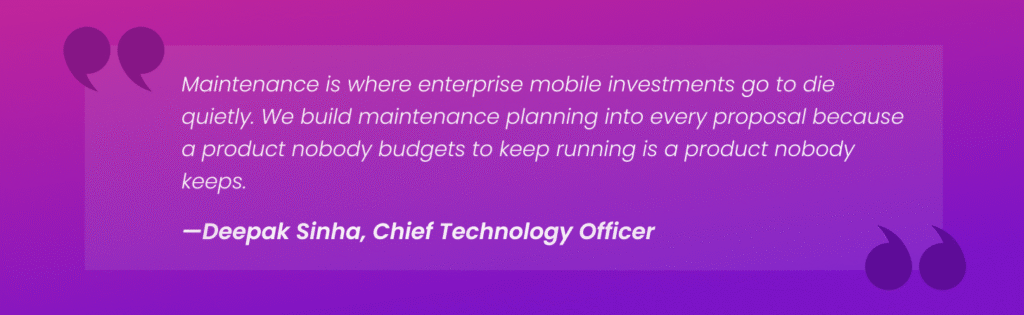
At TechAhead, we build maintenance planning into every engagement from stage one. Not as an upsell as a delivery standard. Because we have seen too many good mobile products go dark within 18 months of launch simply because nobody budgeted to keep them running.
What ongoing maintenance covers:
iOS and Android OS compatibility updates
Security patches and dependency updates
Performance monitoring and optimization
Bug fixes from production user reports
Feature development based on user data & business evolution
Mobile UI/UX Patterns and Best Practices
Design is the part of mobile development most enterprises underinvest in, and most users make their decision within the first three seconds of opening an app. Mobile app development must account for different form factors and user interface constraints, ensuring that the UI adapts to various screen sizes and hardware limitations. A technically flawless app with poor UX will get uninstalled.
A visually polished app with broken flows will get one-star reviews. Design experts advocate for clutter-free screens to keep interactions quick and simple, allowing users to focus on one specific task at a time.
Additionally, approximately 85% of mobile users use their phone with one hand, so app design should ensure that frequently used controls and common action items are within the reach of the user’s thumb. The goal is not beautiful design or functional design; it is both, working together, invisibly.
Navigation Patterns
Navigation is the skeleton of your mobile app. Get it wrong and your users cannot find what they came for. Get it right and they never think about it at all, which is exactly the goal.
Tab bars work best for apps with four to five core sections that users switch between frequently. The App Store, Spotify, and most enterprise dashboard apps use tab bars because they keep primary destinations permanently visible.
Hamburger menus hide navigation behind an interaction, which reduces discoverability and consistently lowers engagement with secondary features.
Gesture-based navigation, swiping between screens, pull-to-refresh, swipe-to-dismiss reduces interface clutter and feels natural on modern smartphones. However, gestures need to be discoverable without being accidental.
For The And relationship card game app we built, gesture-driven card interactions were central to the entire product experience. Every swipe had to feel intentional, not accidental, which required extensive interaction design testing before development began.
Content Hierarchy
Enterprise mobile apps carry a lot of information. The temptation is to surface everything; it means every data point, every action, every status on a single screen. The result is cognitive overload that sends users back to the desktop version.
Progressive disclosure solves this. Show the most critical information first. Surface secondary details on demand. Let users drill down rather than overwhelm them upfront.
For the ERIN employee referral platform, our design team restructured a dashboard that originally displayed 14 data points simultaneously into a clean three-metric summary with expandable detail views. Task completion rates improved significantly before a single line of code changed.
Platform-Specific Design Standards
iOS and Android users have different expectations, and violating those expectations creates friction that users feel without being able to articulate why.
iOS Human Interface Guidelines
Bottom-aligned navigation and controls
System fonts, SF Pro for consistency with Apple’s visual language
Swipe-from-left-edge to go back
Haptic feedback tied to meaningful interactions
Modal sheets and action sheets
Android Material Design
Top-aligned navigation bars and floating action buttons
Roboto and Google Sans typefaces for visual consistency
Back button behavior: hardware and gesture
Material You dynamic color theming
Bottom sheets for contextual actions
Building the same UI for both platforms is one of the most common mistakes in cross-platform development. Our platform-specific design adaptation is a fixed workstream, not an optional refinement.
Performance-Driven Design
Not all design decisions are equal from an engineering perspective. Some are beautiful and cheap to build. Others are beautiful and expensive to maintain. Our designers and engineers work in the same room because a designer who understands engineering constraints makes better decisions, and an engineer who understands design intent builds better products.
Design patterns that consistently add unexpected engineering cost:
Custom animations that require frame-by-frame implementation outside standard libraries
Complex gesture recognizers that conflict with platform-native navigation gestures
Real-time data visualizations that require continuous API polling and state management
Infinite scroll feeds with heterogeneous content types and variable cell heights
Video backgrounds and parallax effects on entry screens: visually impressive, performance-expensive
Accessibility
Accessibility is not a compliance checkbox; it is a design standard that makes apps better for every user, not just users with disabilities. Dynamic Type support, VoiceOver and TalkBack compatibility, sufficient color contrast ratios, touch target sizing, and alternative text for images; these are not optional enhancements.
State Management & Navigation Patterns
State management is the part of mobile architecture that nobody talks about in a sales pitch, and the part that causes the most production incidents after launch. Every mobile app has state: user authentication status, data fetched from APIs, UI interaction responses, cached content, network connectivity changes.
How your app manages that state, how it stores it, updates it, and shares it across screens determines whether your app feels fast and reliable or slow and unpredictable under real-world conditions.
Our state management architecture is decided in stage three of our development lifecycle before a single screen is built. Because retrofitting a state management solution into a half-built enterprise app is one of the most expensive and disruptive engineering decisions we have ever helped clients recover from.
iOS State Management
Model-View-Controller pattern (MVC) worked for simpler apps but created “Massive View Controller” problems as enterprise apps grew in complexity. Modern iOS development has moved to cleaner separation patterns.
SwiftUI’s built-in property wrappers @State, @StateObject, @ObservedObject, and @EnvironmentObject handle local and shared state elegantly for most enterprise use cases. For complex, data-heavy applications, TCA (The Composable Architecture) has become the standard for teams that need predictable, testable state management at scale.
We have used TCA on enterprise fintech builds where every state transition needed to be auditable and reproducible because in a payment application, an unexpected state change is not a UX problem. It is a compliance incident.
Android State Management
Android’s recommended state management approach has stabilized around Jetpack’s ViewModel and Kotlin Flow combination. ViewModels survive configuration changes, screen rotations, split-screen switches, which historically caused data loss and UI inconsistency in enterprise Android apps. Kotlin Flow handles asynchronous data streams cleanly, replacing the callback-heavy patterns that made early Android development difficult to maintain.
Cross-Platform State Management
Flutter and React Native each have mature state management ecosystems, but choosing the right one for an enterprise project requires understanding the tradeoffs, not just following community trends.
For pixel-perfect cross-platform apps where UI consistency across iOS and Android is non-negotiable, BLoC’s structured approach scales well. React Native enterprise projects use Redux or Zustand for global state management. Redux provides predictable, traceable state changes, valuable for complex enterprise apps with multiple data sources and user roles.
Navigation architecture and state management are more interconnected than most teams anticipate. Deep linking, the ability to open a specific screen inside an app from an external URL or push notification, requires navigation and state to work in perfect coordination. An enterprise app that receives a push notification about a specific work order needs to open directly to that work order, with the correct user context already loaded, regardless of where the user was in the app previously.
Our deep linking architecture is scoped in discovery, not added in the final sprint when someone remembers push notifications need to work. For the ERIN employee referral platform, deep linking drove the entire referral workflow, a candidate clicking a link needed to land in exactly the right app state with exactly the right context pre-loaded.
Performance Optimization
Performance is the feature users notice most and talk about least. Nobody leaves a five-star review saying “the app loaded in 200 milliseconds.” However, they absolutely leave one-star reviews when it takes four seconds to open, drains their battery by noon, or crashes during checkout. Leveraging powerful tools for performance profiling and optimization is essential in mobile app development to ensure efficiency and reliability. For enterprise mobile apps, it is an architectural discipline that starts in stage three and runs through every sprint until launch, and understanding the performance tradeoffs between Flutter, native, and React Native is part of making the right architectural choice.
Cold start time, how long your app takes to launch from a completely closed state is the most visceral performance metric users experience. Apple and Google both consider anything above two seconds a poor experience. Enterprise apps with complex initialization sequences, heavy SDK loading, and authenticated session restoration routinely exceed that threshold without deliberate optimization.
We optimize cold start time through lazy initialization, deferring non-critical processes until after the first screen renders and asynchronous session restoration that runs in parallel with UI initialization rather than blocking it.
For the American Express engagement, cold start optimization was a non-negotiable requirement. A Fortune 500 financial app that takes three seconds to open does not just frustrate users; it signals unreliability to a demographic that has zero tolerance for it.
Memory Management
Memory leaks are the performance problems that do not announce themselves until it is too late. An app that works perfectly in a 10-minute testing session can crash consistently after 45 minutes of real-world use if memory is not being released correctly.
Retain cycles in Swift, improper lifecycle management in Android ViewModels, and image caching without size limits are the most common culprits, and the hardest to catch without deliberate instrumentation.
At TechAhead, memory profiling runs throughout development, not just during QA. Instruments on iOS and Android Studio’s Memory Profiler on Android are standard tools in our engineering workflow.
Network Performance
Enterprise mobile apps do not always run on fast WiFi. Field service engineers work in basements. Healthcare workers move between floors. Logistics teams operate in warehouses with patchy coverage. An app that only performs well under ideal network conditions isn’t ready for enterprise deployment.
Network performance optimization covers several distinct problems, none of which solve each other automatically.
API response optimization reduces payload size through proper data pagination, response field filtering, and compression. Caching strategies (both in-memory and persistent) make sure users can access critical data when connectivity drops. Retry logic with exponential backoff handles intermittent connection failures gracefully without hammering servers or confusing users.
For the JLL Intellicommand platform, deployed across thousands of properties with variable connectivity, offline-capable architecture was not a feature request. It was a fundamental requirement that shaped the entire data layer design from discovery onward.
Rendering Performance
Dropped frames are invisible to developers working on powerful machines with clean datasets. They are immediately obvious to users scrolling through a list of 500 records on a three-year-old device over a 4G connection. Sixty frames per second is the baseline expectation on modern smartphones — anything below that registers as lag even when users cannot articulate why the app feels slow.
Rendering performance optimization means keeping the main thread clear of heavy computation, using background threads for data processing and network requests, implementing efficient list virtualization for large datasets, and avoiding unnecessary view hierarchy depth that forces the GPU to composite too many layers simultaneously.
TechAhead runs rendering performance benchmarks on older target devices, not just the latest iPhone and flagship Android because enterprise user fleets include devices from multiple generations.
An app that drains battery faster than expected gets deleted. Not because users consciously decide to remove it, but because it ends up on the list of apps they check when their phone dies at 2pm.
Location services running continuously in the background, push notification listeners polling too frequently, and background fetch cycles that wake the app unnecessarily are the most common battery drains in enterprise mobile apps.
Background task optimization is scoped explicitly during architecture planning. Location updates use significant-change monitoring rather than continuous GPS polling where precision allows it. Background fetch intervals are calibrated to actual data freshness requirements — not defaulted to the most aggressive setting available.
For Heatmiser’s smart home iOS platform, where the app needed to monitor device states continuously without destroying battery life, background execution architecture was one of the most technically complex problems we solved, and one that only surfaced as a requirement because we asked the right questions in discovery.
Mobile App Development Company Cost by Complexity
Mobile app development costs vary by complexity: Simple, Medium, Complex, factoring features, platforms or design. Here is a table:
10–15 screens, REST API integrations, payment processing, user roles
10–15
4–7 months
$80,000–$200,000
Complex
20+ screens, AI/ML features, real-time data, custom backend, multiple integrations; suited for complex projects requiring advanced planning and long-term support
20+
7–12 months
$200,000–$500,000
Enterprise Platform
Multi-tenant architecture, compliance controls, advanced analytics, SSO, admin portal; designed for complex projects that demand advanced planning, scalability, and ongoing support
30+
12–18+ months
$500,000+
Mobile App Development Agency USA Cost by Platform
The choice of development platform and target mobile platforms significantly affects both budget and timeline, as each platform comes with its own infrastructure, performance characteristics, and development tools. Platform choice affects both budget and timeline. Here is how the major options compare on a medium-complexity project baseline.
Cross-platform startups, rapid iteration, large JS talent pool
Flutter
Dart
80–90% shared
Near-native
Lower (0.75–0.85x)
Pixel-perfect cross-platform UI, teams preferring a single codebase
Native Dual (iOS + Android)
Swift + Kotlin
None
Full native
Highest (1.7–2x)
Mission-critical apps with deep OS integration, large teams
Mobile App Development Cost by Team Location
This is where buyers often make the most significant leverage decisions, and the most significant mistakes. Rate is not the same as value. Low hourly rates with high revision cycles and poor communication can cost more than a higher-rate team that ships clean. Clear communication—including transparency, regular updates, and direct access to developers—is crucial for managing project costs and avoiding misunderstandings throughout the mobile app development process. Be cautious of low quotes that do not include a discovery phase, as this can be a red flag indicating potential issues with the agency’s process.
Team Location
Typical Hourly Rate
Time Zone Overlap (US)
Communication Overhead
Blended Project Cost (Medium Complexity)
US-Based
$150–$250/hr
Full
Low
$160,000–$280,000
Nearshore LATAM (Colombia, Mexico, Argentina)
$60–$100/hr
1–4 hours
Low–Moderate
$70,000–$140,000
Eastern Europe (Poland, Ukraine, Romania)
$50–$90/hr
6–9 hours
Moderate
$60,000–$120,000
India / Southeast Asia
$30–$60/hr
9–13 hours
Moderate–High
$35,000–$80,000
Hybrid (US lead + offshore execution)
$80–$120/hr blended
Managed overlap
Low
$90,000–$160,000
Hiring: In-House vs. Agency vs. Offshore: Which is Best?
This decision shapes your budget, your timeline, and your product quality for the entire life of the application. Clear communication and alignment on project goals are essential when choosing a hiring model, as they ensure transparency, regular updates, and that development efforts match your desired outcomes. Additionally, always request to see actual code and speak directly with past clients to verify an agency’s capabilities and avoid potential issues during the development process. There is no universally correct answer, but there is a right answer for your specific situation. Here is the honest breakdown.
In-House Development
Building an internal mobile development team gives you full control, deep product knowledge, and engineers who are invested in the long-term outcome. It is also the most expensive option by a significant margin, and the slowest to get started.
Pros:
Full control over team culture, processes, and product direction
Deep institutional knowledge that compounds over time
Faster internal communication; no handoff friction or timezone gaps
Hire engineers who care about the product because it is their only focus
Easier compliance and security control over sensitive internal data
Cons:
Hiring a single senior mobile engineer costs $120,000–$180,000+ annually in the US
A complete mobile team: frontend, backend, QA, DevOps, costs $600,000–$1,000,000+ per year
Recruitment takes 3-6 months before a single line of code is written
Skill gaps are expensive to fill, mobile technology evolves faster than most internal teams can keep up
Overhead costs: benefits, equipment, office space, training, add 30-40% on top of salaries
When the project is done, you are still paying the team
A good agency brings a complete team, proven processes, and delivery experience across multiple industries and technology stacks. You are paying for expertise you cannot easily hire, and flexibility you cannot afford to maintain internally.
Pros:
Access to a full cross-functional team from day one — no recruitment delay
Diverse industry experience means they’ve solved your problem before
Scales up and down based on project phase — no fixed overhead between projects
Established QA processes, security frameworks, and delivery standards
Certifications like SOC 2 Type II and ISO 42001 that most in-house teams can’t achieve
Accountability to delivery milestones — not just activity
Clear communication and transparency, with regular updates and direct access to developers, ensuring alignment throughout the project
Agencies experienced in complex projects are equipped for advanced planning, scalability, and long-term support
Cons:
Higher hourly rates than offshore alternatives — US agencies typically run $100–$250/hour
Less institutional knowledge about your business than a dedicated internal team
Senior talent featured in the pitch doesn’t always execute the build — ask specifically
Vendor dependency if the relationship is not structured with knowledge transfer in mind
Offshore Development
Offshore teams offer the lowest hourly rates, $30–$60/hour in India and Southeast Asia, but the real cost includes coordination overhead, communication gaps, and rework cycles that erode the savings.
Pros:
Significantly lower hourly rates; 60-80% cheaper than US-based teams on paper
Large talent pool, access to developers across a wide range of technologies
Round-the-clock development possible across time zones
Good option for well-defined, stable scope projects with minimal ambiguity
Cons:
9-13 hour time zone gaps with US teams create coordination overhead that compounds daily
Communication barriers introduce misunderstandings that show up as rework
Maintaining clear communication can be challenging due to time zone differences and language barriers, making transparency and regular updates harder to achieve
Quality control is harder to enforce without on-site oversight
Intellectual property and data security risks increase with distributed offshore teams
Senior engineers are harder to retain attrition disrupts continuity on long engagements
After 16+ years and 2,500+ products delivered, here is what we have consistently seen: enterprises that build entirely in-house overspend on talent and underspend on expertise. Enterprises that go purely offshore save on rates and overspend on rework, timeline extensions, and eventually, a rescue engagement with an agency.
The model that works best for most enterprise mobile projects is a hybrid, a US-based agency with strong delivery leadership, clear accountability structures, and an engineering team that includes senior specialists your internal team could not hire or retain independently.
You get the control of a managed engagement, the expertise of a specialist team, and the flexibility to scale without the fixed overhead of a permanent headcount.
At TechAhead, that is exactly what we offer. SOC 2 Type II certified delivery. Named senior engineers on every engagement. A track record that includes American Express, Disney, JLL, and AXA. And a process built around one principle, the estimate we give at the start should be the number you sign off on at the end, whether you engage us as a full project partner or hire vetted AI and software engineers to augment your existing team.
The most significant shift in mobile AI over the past 18 months is not a new model; it is where the model runs. On-device AI, powered by Apple’s Core ML, Google’s ML Kit, and dedicated neural processing units in modern smartphones processes data locally without sending it to a server.
For enterprise apps, this matters for three reasons: latency drops dramatically, privacy compliance becomes significantly simpler, and the app works without an internet connection.
We recommend on-device AI is now a standard architecture conversation for any mobile product handling sensitive data (healthcare diagnostics, financial document processing, biometric verification). Running inference locally means no data leaves the device. For regulated industries, that is not a performance optimization. It is a compliance strategy.
Every enterprise mobile app in 2026 seems to have a chatbot. Most of them should not. The valuable LLM integrations are not the ones that add a chat interface; they are the ones that embed language model reasoning into workflows users are already performing. Intelligent document summarization that processes a 40-page insurance claim in seconds.
Natural language search that lets field engineers query equipment manuals without knowing the right search terms. Automated report generation that turns raw operational data into structured summaries without manual input.
We have built exactly these integrations. For AXA, LLM-powered document processing reduced insurance claim review time dramatically, not by adding a chatbot, but by embedding summarization directly into the claims workflow adjusters were already using. For JLL’s field engineers, natural language equipment queries replaced manual searches across thousands of property documents. Real workflows. Real time saved. No chatbot required.
As both Claude & OpenAI partner, TechAhead builds generative AI app development that connect to enterprise knowledge bases through RAG grounded in your actual company data rather than general training knowledge. That distinction matters enormously for enterprise accuracy and compliance.
Agentic AI autonomous agents that plan, decide, and execute multi-step tasks are moving from enterprise backends into mobile interfaces. Field service apps where an agent diagnoses equipment faults, orders replacement parts, and schedules a technician without human input at each step.
Insurance claim apps where an agent validates documentation, cross-references policy terms, and generates a settlement recommendation before a human reviewer sees it.
We built agentic device management into Heatmiser’s smart home platform, where autonomous agents monitor heating system states across connected properties, detect anomalies in real-time device data, and trigger corrective actions without requiring manual user intervention at each decision point.
The agent does not wait for a homeowner to notice the temperature is wrong. It diagnoses the fault, adjusts the system, and logs the action; all before the user opens the app.
Recommendation engines, adaptive UI, predictive content loading, and behavioral personalization; these are the AI features that move retention metrics. Netflix and Spotify proved the model. Enterprise mobile apps are now applying the same principles to internal tooling, customer portals, and field operations platforms.
The difference between a personalization feature that works and one that wastes engineering budget is data quality. At TechAhead, personalization architecture starts with a data readiness assessment because an AI recommendation engine trained on incomplete or inconsistent enterprise data does not personalize the experience. It just surfaces the wrong content faster.
The most valuable AI feature in enterprise mobile apps is not one users actively interact with; it is the one that catches a problem before it becomes an incident. Predictive maintenance alerts for field technicians.
Fraud anomaly detection in mobile payment flows. Inventory depletion warnings in logistics apps. These features operate invisibly, surfacing actionable intelligence at exactly the moment a user needs it, without requiring them to go looking.
For JLL’s Intellicommand platform, predictive AI monitoring across thousands of properties reduced unplanned equipment failures by 60% and generated $10M in annual operational savings. That is not a feature. That is a business outcome, and it is the standard we hold AI-powered mobile features to at TechAhead.
Conclusion
Mobile app development in 2026 is not just a technology decision. It is a business commitment; one that shapes how your customers interact with your brand, how your field teams operate, and how your enterprise scales for the next five years.
The difference between a mobile app that delivers and one that drains budget is not the idea. It is the partner you choose to build it.
TechAhead has been building enterprise mobile applications since 2009. 250+ engineers. 2,500+ products delivered. Clients include Disney, American Express, AXA, JLL, ESPN F1, and ICC, organizations that do not hand projects to teams they are not certain about — whether they are building focused products or scalable super app ecosystems.
We hold SOC 2 Type II, ISO 42001, and ISO 27001 certifications. We are an AWS Advanced Tier and Claude & OpenAI services partner. And we have been recognized by Clutch as a Top App Developer and Top Generative AI Company for 2026.
We do not just build mobile apps, we build mobile products that hold up under real enterprise pressure and keep performing long after launch day.
What is the difference between a mobile app and a web app for enterprise use?
A mobile app runs natively on iOS or Android, accessing device hardware, working offline, and delivering platform-specific experiences like Face ID, push notifications, and background processing. A web app runs in a browser with broader accessibility but limited device integration. For enterprise use, the choice depends on whether your users need device-level capabilities or just accessible information. At TechAhead, we have built both, and the decision always starts with what your users actually need to do, not what is cheaper to build.
How do we define the right MVP scope for an enterprise mobile app?
Start with one user problem, one workflow, and one measurable outcome. Everything else is a phase two conversation. A focused MVP for ERIN’s employee referral platform proved the core referral mechanic worked before a single secondary feature was built. That discipline saved months of development time and six figures in rework cost.
What is a mobile-first strategy and does every enterprise need one in 2026?
Mobile-first means designing and building for mobile experience before desktop because that is where most users actually are. In 2026, global mobile internet usage exceeds 60% of all web traffic. For consumer-facing enterprise products, mobile-first is not a strategy choice; for internal tools serving desk-based workers, desktop-first still makes sense. We assess actual user device behavior in discovery before recommending a platform strategy, not after the architecture is already locked.
How do we align mobile app development with our broader digital transformation roadmap?
Your mobile app should not be a standalone project; it should be a component of a larger technology ecosystem that shares data, infrastructure, and business logic with your other digital investments. We map every mobile engagement to a client’s broader architecture during discovery, identifying where the app connects to existing ERP, CRM, and cloud infrastructure. Apps built in isolation become integration problems. Apps built within a transformation roadmap become multipliers.
How many user testing rounds should an enterprise mobile app go through before launch?
Minimum three; and each should test something different. Round one validates information architecture and user flows with wireframes before visual design begins. Round two tests the interactive prototype for usability gaps before development starts. Round three validates the built product against real user tasks before submission.
How do we balance brand consistency with platform-specific iOS and Android design standards?
Brand consistency lives in color, typography, tone, and visual identity; not in navigation patterns and interaction models. iOS users expect bottom tab bars and swipe-to-go-back. Android users expect top navigation and material design conventions. Usually, we maintain brand identity across platforms while adapting interaction patterns to each platform’s native conventions because your brand should feel familiar on every device.
How do we handle offline data synchronization in enterprise mobile apps?
Offline sync requires three things built correctly from day one; a local data store, a conflict resolution strategy, and a sync queue that handles intermittent connectivity gracefully. The conflict resolution piece is where most implementations fail. When a field engineer updates a record offline while a colleague updates the same record online, which version wins and how does the app handle it without losing either change? We scoped offline architecture during discovery because retrofitting it into a built app is one of the most disruptive and expensive engineering changes we have seen clients face.
What is containerization and how does it affect mobile app backend architecture?
Containerization, packaging backend services with their dependencies using Docker and orchestrating them with Kubernetes, makes mobile app backends portable, scalable, and consistently deployable across environments. For enterprise mobile apps with complex backend requirements, containerization means your development, staging, and production environments behave identically, which eliminates the “works on my machine” class of deployment failures.
What is event-driven architecture and when does it apply to mobile app development?
Event-driven architecture means components communicate by publishing and reacting to events. For mobile apps, it applies whenever real-time data matters, live sports scores, push notification triggers, IoT device state changes, payment confirmations. For JLL’s Intellicommand platform, this architecture was the only model that could handle thousands of simultaneous equipment state changes across global properties without polling overhead. We recommend event-driven patterns whenever your mobile app needs to react to the world in real time, not just when users request data.
What is zero-trust security and how does it apply to enterprise mobile development?
Zero-trust means no user, device, or network connection is trusted by default; every request is verified regardless of origin. For enterprise mobile apps, it means continuous authentication, device posture checking, least-privilege access controls, and encrypted communication at every layer. Our SOC 2 Type II certification and ISO 27001 framework mean TechAhead implements zero-trust principles as audited architectural standards, not optional security enhancements added after launch when a vulnerability surfaces.
How do we conduct a mobile app security audit before enterprise deployment?
Thorough pre-launch security audit covers five areas: authentication and session management, data storage and encryption, API security and input validation, third-party library vulnerability scanning, and penetration testing. For regulated industries, add compliance-specific testing; HIPAA data handling validation, PCI-DSS transaction security, GDPR data residency verification. We run security testing throughout development, not as a single pre-launch gate. Our SOC 2 Type II certified delivery framework treats security as a continuous engineering standard, not a final checklist.
We use cookies to enhance your experience, analyze site usage, and support our marketing efforts. You can accept all cookies or manage your preferences.
Manage Your Cookie Preferences
We use cookies to ensure our website functions properly, improve performance, and provide a personalized experience. You can choose which types of cookies to allow below.
Always Active
Required for core functionality such as security, network management, and accessibility. These cannot be disabled.
Help us understand site traffic and user interactions so we can improve performance and usability.
Enable enhanced functionality and personalization such as language or region preferences.
Used to deliver relevant ads, track campaign performance, and measure advertising effectiveness.


 Copy Link
 Share on X
 Share on Facebook
 Share on LinkedIn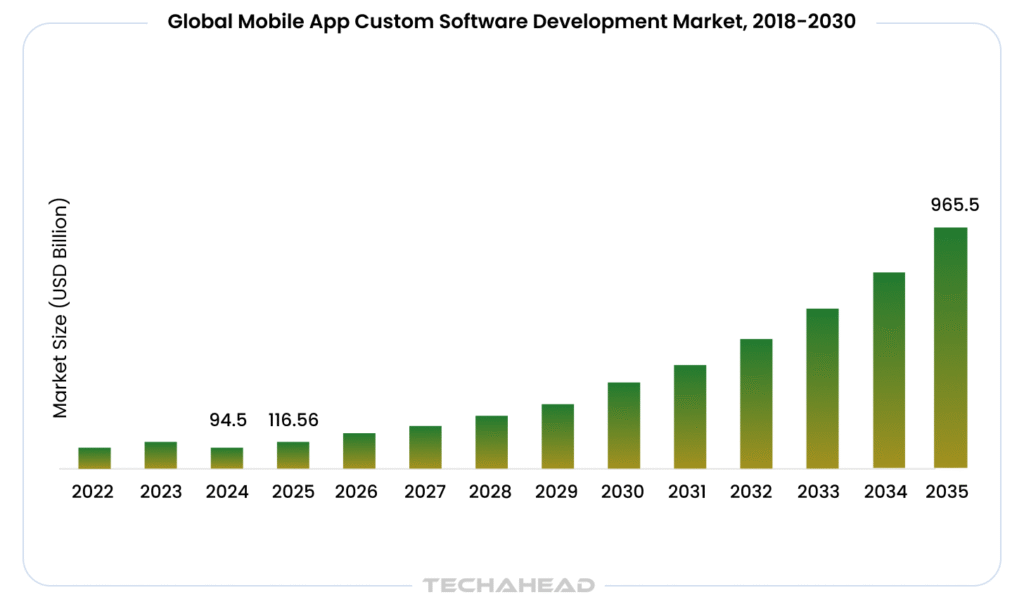









 Last Updated: Sep 18, 2026
  901
901  47 min. Read