


 Copy Link
 Share on X
 Share on Facebook
 Share on LinkedIn
Always Active
Required for core functionality such as security, network management, and accessibility. These cannot be disabled.

Uncover the transformative potential of digital and mobile solutions for your industry.



 Last Updated: Nov 6, 2026
Nov 6, 2026
 7
 38 min. Read


Key Takeaways
Ask Muse to handle a task, and it can work across connected services and its browser to move it forward. Meta’s agent brings remembered context and actions into the same experience. That gives you a useful starting point when you’re thinking about what your own app could do for customers.
Imagine that convenience inside your service app. A customer asks to arrange next week’s visit. Your personal AI agent checks availability and the service agreement, asks for approval, and returns a confirmed appointment. Every step needs to work together for the customer to trust the result.
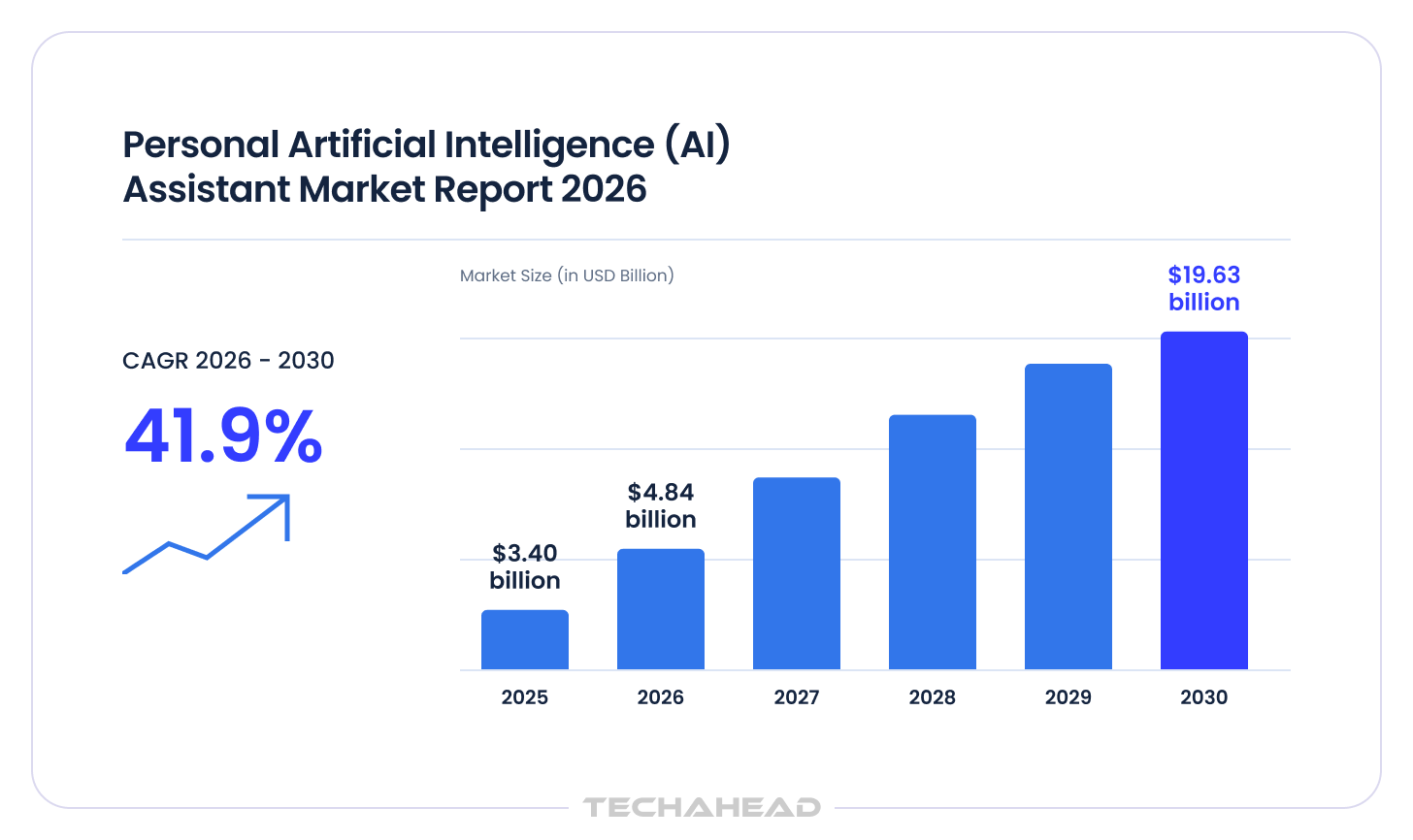
The Business Research Company forecasts that the global personal AI assistant market will reach $19.63 billion by 2030.
For you, the opportunity is to make a recurring customer task easier to complete, using the services, relationships, or business information your product already brings together.
If you’re exploring how to build a personal AI agent like Muse, start with the outcome you want to offer. Which task is worth delegating? What should require approval? And what will it cost to complete reliably? Those decisions shape the features, development scope, and budget covered in this guide.
Also Read: AI Voice Assistant App Development Like Alexa: Building One Interface Across Devices
The Muse AI agent is Meta’s personal agent product. You give it a task in everyday language and connect the accounts it needs. It combines conversation with a persistent cloud computer, a full browser, and tools for working across services. That gives it a place to research, keep files, and carry out steps toward your goal.
Its capabilities fit together in several useful ways:
Meta’s explanation of Muse’s design describes how these capabilities support continuing work while keeping the user involved. The experience depends on the pieces working together: remembering a preference helps with planning, access to a service enables the next step, and a clear approval lets the user decide whether to proceed.
The attention has a measurable basis. On Meta’s October 21, 2026 earnings call, the company said more than 10 million people in the US and Canada had set up Muse in about a month and a half.
The difference between an AI agent and a chatbot matters when setting customer expectations. A suggested appointment still leaves them to arrange it; a confirmed appointment requires the correct account access, availability check, approval, and final record. Your personal AI agent needs to know when to ask, when to act, and what evidence establishes that the job is finished.
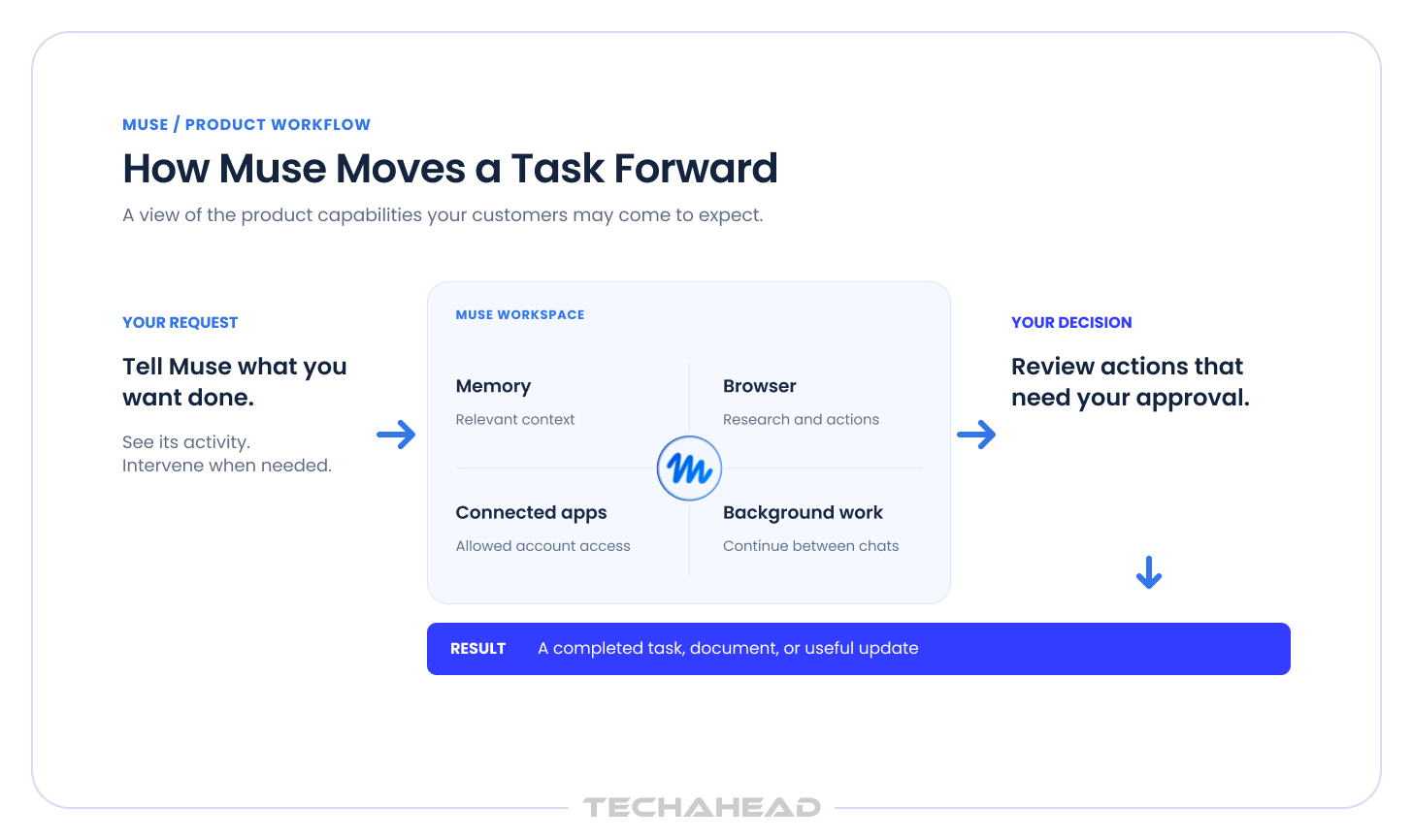
For your development plan, Muse provides a useful benchmark. Choose the recurring task where your product can offer something valuable through its own services or business rules. Then assess the whole journey: how the customer makes the request, what the agent can access, where a decision is needed, and how the customer knows the work is complete.
Also Read: AI Agents for KYC (Use Cases & Build Guide)
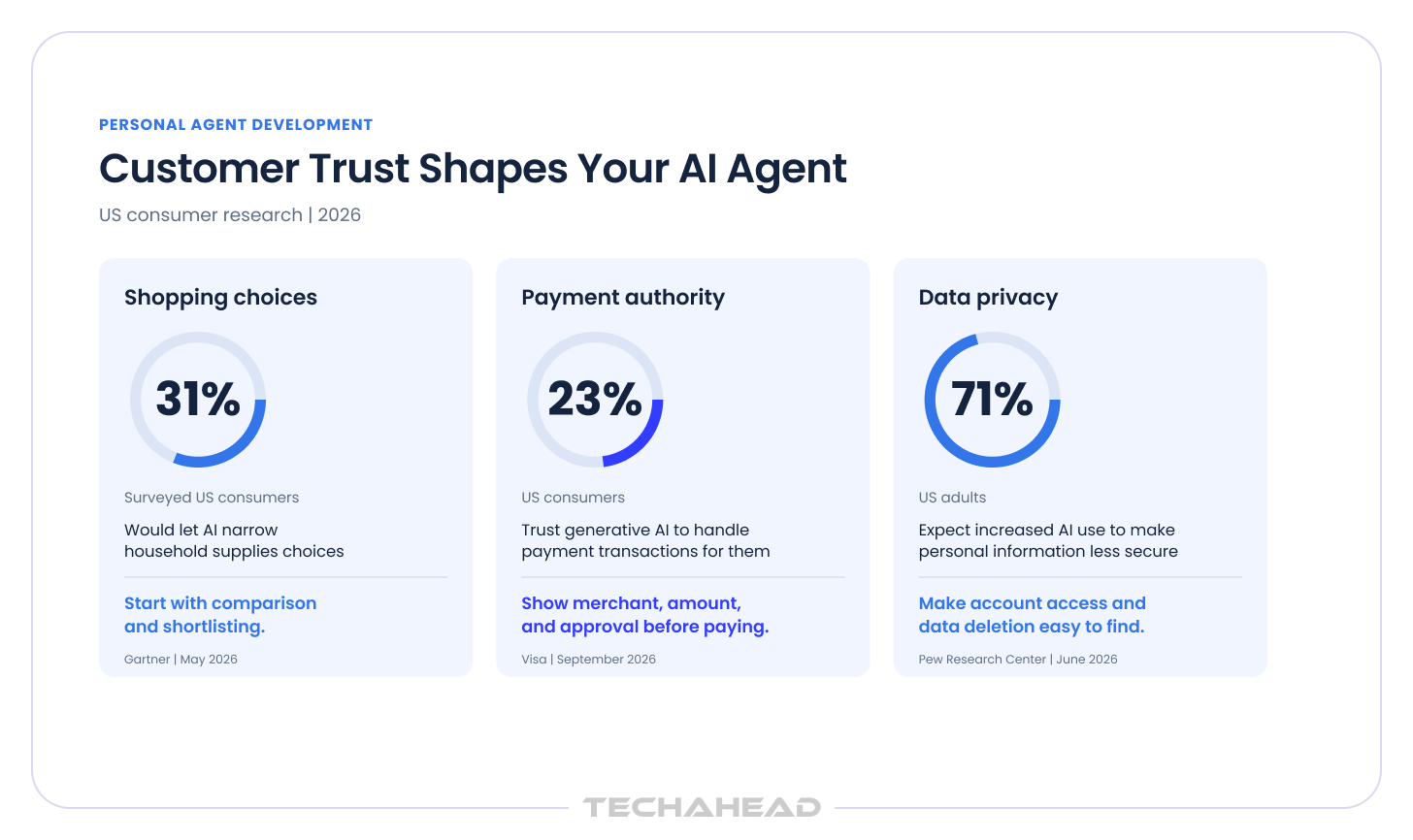
Customers increasingly recognize AI interfaces, but granting an agent authority is a separate decision. These findings help shape onboarding and the first release:
Muse already supports memory, connected accounts, background work, and created documents or interactive artifacts. Building the same feature labels offers little evidence of differentiation. Review the current product against the task your personal AI agent would complete.
Muse can pursue goals and scheduled work in its cloud environment. Its interface includes editable memory and visibility into activity.
This changes what customers may expect from your product. Someone arranging a recurring service should not have to explain their usual availability every time. They should also be able to leave while a task is in progress and return to a clear update.
For your first release, decide:
These decisions affect both convenience and the amount of support your team will provide.
Muse supports mobile, web, and WhatsApp interaction, alongside Mac access. Meta’s Connect announcement describes permissioned access to local files and applications, distinct from the persistent cloud computer.
For your product, the useful question is where the customer starts and finishes the task. A mobile request may depend on a document held elsewhere or on approval by another team member. Map that journey before adding channels. Supporting every device at launch increases testing and operating work; supporting the right handoff can make one workflow considerably easier to complete.
Related Read: How to Cap AI Agent Costs: A Budget-Control Framework
On November 5, 2026, Meta announced the US rollout of voice conversations and expressive avatars across Muse’s mobile, web, and Mac apps. Users can speak naturally, interrupt responses, and continue talking while Muse works on tasks in the background. Voice access through AI Glasses and Muse Charm is described as coming soon.
For your product, consider whether speaking makes the chosen task easier. A customer arranging a service visit may find it useful to explain requirements aloud. Include voice when it improves that journey, and test how customers review details and approve actions during the conversation.
Muse for Small Business lists connections including QuickBooks, Shopify, Slack, Asana, Canva, and Box. Its published scope includes business tasks such as content work, project management, and operational insights.
You therefore need to compare more than email and calendar assistance. Test the business task you intend to sell using the relevant supported accounts, with the comparison grounded in the customer’s existing stack rather than isolated point features. Record where the existing experience meets your needs and where customer-specific rules, permissions, or final records require more work. Those findings help you decide whether to adopt the product, expose your service through a connector, or invest in an experience you control.
Meta announced Muse Wonder and Wonder Full in October. Active Memory is intended to retrieve useful context across conversations, including old notes and past conversations; Active Focus supports sustained work and recovery from blockers.
These capabilities make a stronger model worth evaluating, and gains in advanced reasoning may matter, but your task tests should determine its value. Your application still needs to:
Budget for the controls and workflow around the model as well as access to the model itself.
Muse is the customer-facing agent, while Wonder and Wonder Full are models used to power AI experiences. Meta’s October 12 announcement introduced Wonder through the Meta Model API and Muse Code, with Wonder Full available through specified Muse Code subscription plans. The announcement described Wonder’s arrival in the Muse app as a staged rollout. When comparing products, check the capabilities available in the actual Muse account you test. For your own application, confirm model API access separately.
The Personal Agent Protocol, or Poppy, is also evolving. Its official documentation currently identifies the specification as draft 0.4. It covers how personal agents connect with companies, obtain account access, and exchange requests. Before including it in your development plan, confirm support from the services your product needs to use.
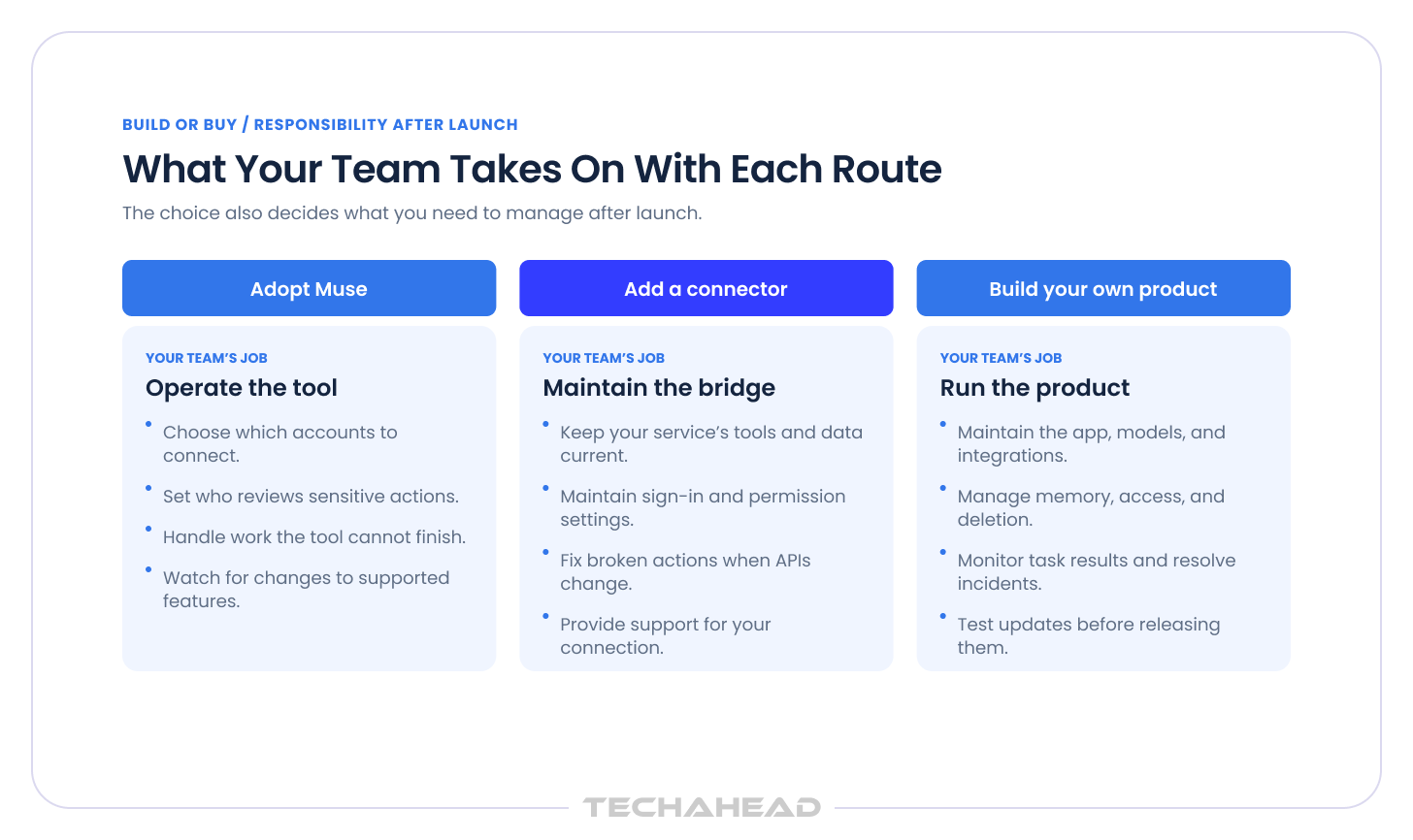
The build vs buy decision has three practical routes. Choose according to who owns the customer experience and which part of the workflow creates value.
| Route | Best fit | What to establish first |
| Adopt Muse | Your team needs personal productivity or supported business tasks | Does it complete the work with acceptable access, cost, and oversight? |
| Add a connector | Customers already use Muse and need access to your service | Can the approved connection expose useful actions under your permissions? |
| Build your own product | The experience depends on your workflow, proprietary systems, or customer commitments | Will customers pay for the outcome and return to use it? |
Buyers should distinguish a full personal assistant from a smarter search box that mainly answers queries.
For a service management platform, custom AI agent development might connect customer preferences with service entitlements, technician availability, and a confirmed job record. The commercial advantage would come from completing that specific process well.
You may be considering an agent because customers abandon a complicated booking journey, employees repeatedly reenter information, or your new product needs to complete a task across existing systems. Measure the time lost, failed transactions, and extra staff work before you invest in broader workflow automation or an ai personal assistant.
At TechAhead, we help you turn a promising use case into a defined first release. Our AI agent development covers workflow selection, decision boundaries, and measurable outcomes. We would use that process to agree what your agent should complete before you commit to broader development. |
A first release needs enough capability to complete its chosen task safely. Connect each feature to a customer’s needs and decide how you will test it. A feature list alone will not tell you whether the product is ready for real accounts.
The agent should recognize when a request is incomplete. It should handle day-to-day requests without forcing the customer to restate context. If a customer asks for an appointment next week, it may need the service type, location, and acceptable times before it can proceed.
The conversation should help customers:
Some customers will still prefer a chat window, but the better experience is resolving details as part of the workflow.
Editable AI agent memory should distinguish lasting preferences from information relevant only to the current job. A preferred contact method may remain useful for months; a temporary delivery address may apply once. That only works well when the system keeps persistent memory and a persistent identity across sessions.
Give customers control over:
Connections to other apps need limited access, clear user consent, and a way to disconnect. Explain why a connection is needed when the customer reaches the relevant task. Someone asking for a calendar check should understand whether they are granting read access or also permitting changes. Start with the access needed for the workflow, and explain any additional permission before requesting it. Users should also understand whether the agent can act on external services or only read data from them.
Keep a human in the loop where a mistake could cost money or affect another person, especially when approval leads to action execution rather than a suggestion. An approval screen should make the decision clear by showing:
This makes the approval useful to the customer and gives your team a record of the authority granted.
An agent should be able to wait for a provider response or customer decision without losing the task. Customers need a clear explanation of what has already happened when work stops.
Build in the ability to:
An activity history should show meaningful progress and the final outcome. For a booking, include a confirmation from the booking system. For a created report, provide the document and identify the information used. If the task is incomplete, explain the remaining step. Customers should not need to inspect a long conversation to work out whether anything actually happened.
How do personal AI agents remember user preferences?
Your product saves selected facts and retrieves those relevant to the next task. Record where a preference came from and let the customer correct it. Decide how long task details should remain available.
Good AI agent security also means separating client accounts, protecting credentials, and enforcing permissions outside the model. These requirements belong in the first release’s acceptance criteria.
| TechAhead’s security engineering covers restricted tool access, credential handling, and records of agent activity. We would apply those controls to the accounts and actions in your product. This is useful when your development partner must handle both the customer experience and the permissions behind it. |
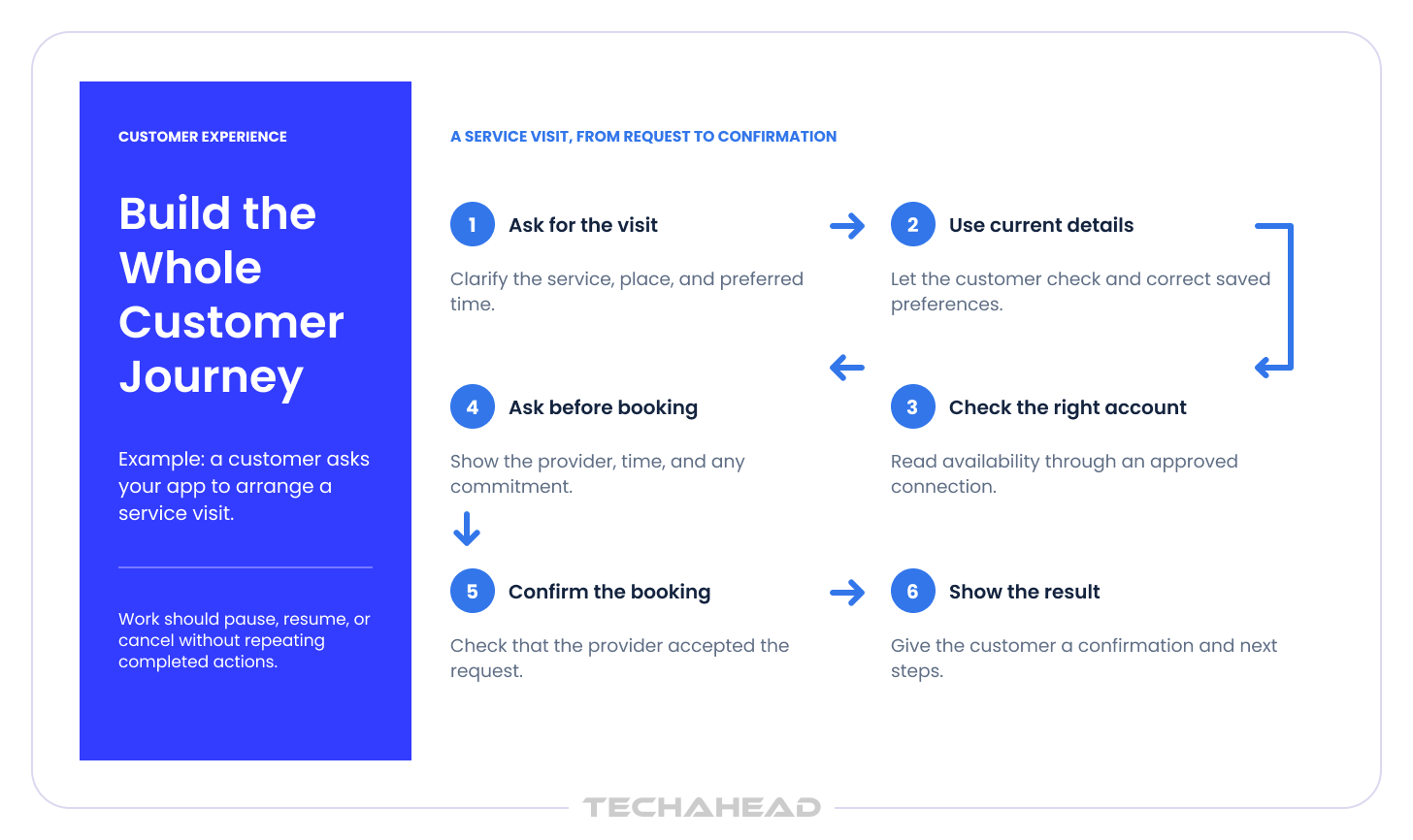
Your opportunity is to make a particular customer task work well with your business systems, service rules, and approval requirements. Muse already supports connected services and actions across multiple steps, so the features below need to demonstrate a practical improvement for your customers. Compare the same task in both products and check where your proposed experience reduces effort, handles an important exception, or produces a more reliable result.
Your advantage may be access to the records and actions needed to finish a specialized job. For a service platform, that could mean:
Include exceptions such as an expired agreement or a request outside the service area. The value comes from handling the process customers actually encounter, including the parts that usually require a phone call.
A customer may prepare a request while someone else must approve it. A business account may also need different limits for an employee and an administrator.
Define roles around who can:
Clear delegation can help you sell into teams whose responsibilities do not fit a single shared login.
Contracts, service entitlements, spending limits, and cancellation terms can change what the agent should offer. For example, a customer may qualify for a replacement visit under an existing agreement but need approval for additional work. Check the relevant rule before presenting an option. You can then explain why an action is available and avoid creating a commitment your business cannot honor.
A message saying a booking succeeded should agree with the actual appointment system. Your product could reconcile the appointment time, customer, price, and status before declaring completion. If records disagree, preserve the evidence and route the issue to the right person. This becomes especially valuable where customers otherwise have to compare confirmation emails with a separate account portal.
Some customers will ask where information is stored, how long it remains, and what happens when they leave. Define options around the customers you intend to serve, including:
Must Read: AI Development Guide 2026: Costs, ROI & Decision Framework
Open-source options now include a modular skills system, and AnythingLLM is often chosen by small teams for private document understanding and retrieval despite the technical setup.
Make those commitments testable. An option that helps a buyer pass its own review can be commercially important, even when it is less visible than a new conversational feature.
Select improvements through customer interviews and a side by side task test. A shorter time to a valid booking gives customers a measurable reason to choose your personal AI agent.
| With Unchecked Fitness, TechAhead combined conversational AI with trainer expertise to deliver personalized meal and workout plans, testing and refining the experience throughout development. We would apply that approach to your product by deciding which customer details and specialist knowledge should shape the result before adding more features. |
Plan custom AI agent development around evidence that reduces your next investment risk. Each stage should give you a concrete result to review before you commit to the next.
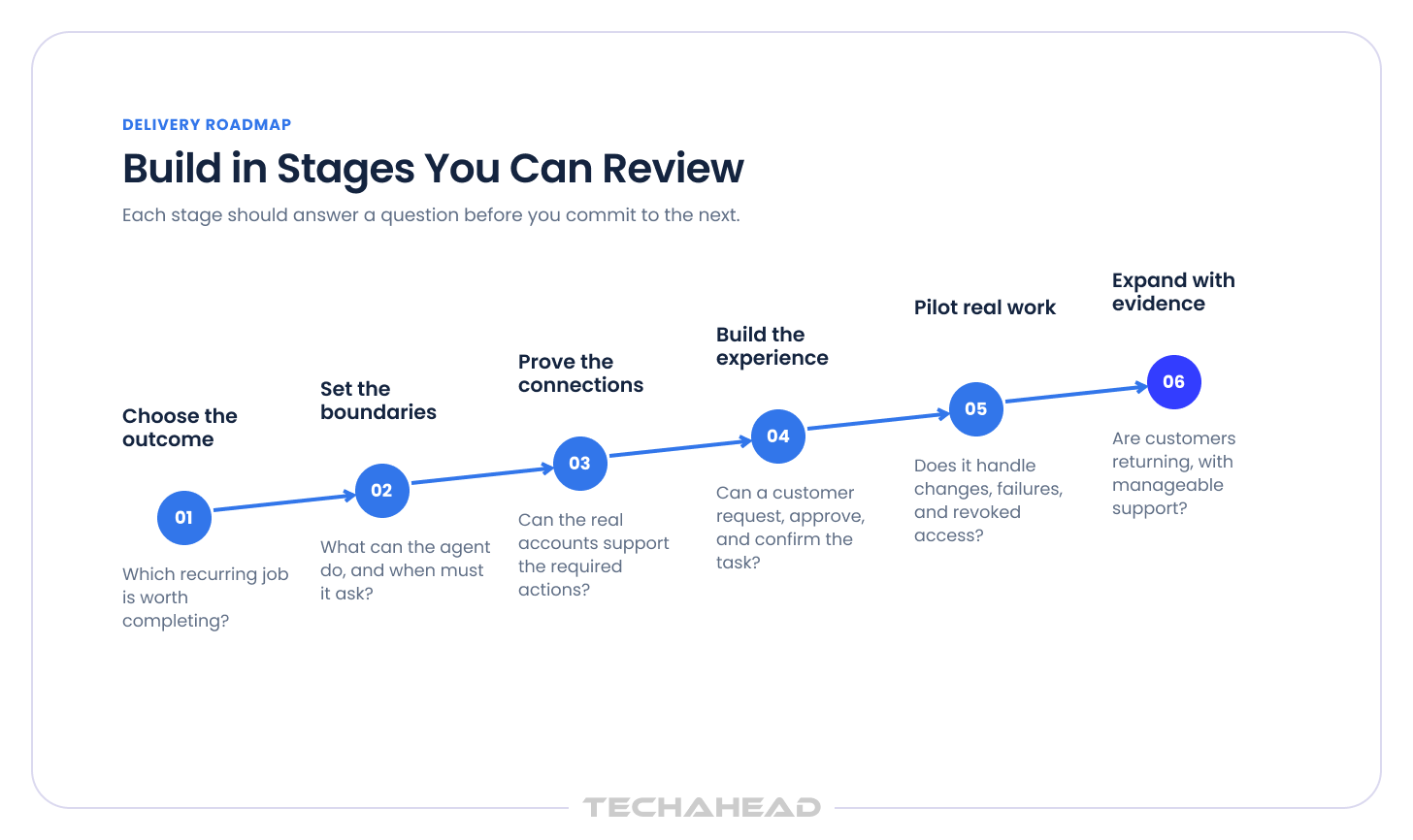
Interview the people who perform the task and the person who pays for it. Document the current steps, time spent, failure points, and cost of mistakes. Choose a workflow that recurs often enough to support retention and that a personal assistant can support in work or personal life when relevant. Agree what successful task automation would change.
Walk through recent examples, including the awkward ones. A service request that looked like a simple booking may have required a contract check, a supervisor’s decision, and a call to confirm access to the property. These details reveal the work your product must handle.
Use that evidence to define a pilot offer:
Test willingness to pay alongside usefulness. A task that people enjoy demonstrating may still be too occasional or too low in value to support a product, and it should deliver enough value to feel like a real assistant experience rather than a demo.
List what your personal AI agent may read, prepare, and execute, including file management and calendar management where relevant. Define AI agent guardrails as enforceable rules, such as a booking price ceiling or a requirement for approval before sending a message. Write down the cases that require staff intervention.
Related: Implementing Guardrails and Content Filters for Responsible GenAI Systems
Translate that scope into everyday examples:
Set stricter approval or scheduling rules for critical work than for low-risk tasks.
Agree these boundaries before building the interface. They determine the approval screens, integration permissions, and tests your team needs. They also help you explain the offer honestly: customers can see which part of the task they are handing over and which decisions remain with them.
How can a personal AI agent connect to email and calendar?
Through supported provider integrations and customer authorization, with permissions limited to the required actions, including email sync and calendar scheduling. Validate account eligibility, review requirements, and access restrictions before promising a launch feature.
An AI agent integration proof should demonstrate a real read, an authorized change, and recovery from an expired connection. Tools like Motion automatically schedule tasks around deadlines and priorities, while Reclaim can automatically reschedule tasks when calendar conflicts arise. Muse’s Connector Platform also applies review and action classifications; a self-created tool does not establish that an approved connector exists.
Also Read: Agent2Agent Architecture: A New Era of Agent Collaboration
Run the proof with an account that matches the intended customer’s plan and permissions. Confirm:
If an essential action is unavailable, revise the offer before committing to the full build. You may need a provider partnership, a narrower workflow, or a step completed by a person. Finding that limitation early protects both the launch promise and the budget.
| TechAhead’s construction ERP project involved building a bridge between AI agents and live business data. That experience is relevant when your agent depends on existing systems. We would assess access, permissions, and supported actions early, then prove the connections needed for your first workflow. |
Choose an available model, implement memory and permissions, and connect the user interface to reliable task execution. Decide which actions customers can delegate and which decisions they should review, since some models are better suited to advanced workflows than others. Keep permissions independent of the agent’s own interpretation to reduce cognitive load and maintain clear human control.
Claude is often chosen when teams need strong complex reasoning and dependable handling of multi step tasks.
Recommended Read: Best AI Models for Developers: H2 2026 Edition
Connect the conversation to a task record that shows what has been requested, approved, attempted, and confirmed. This lets your product recover when a session closes or a provider responds late. A new message should not accidentally restart work that is already complete.
Review the full journey with your team:
Your prototype should demonstrate the experience and the controls together.
| For Boxlty, TechAhead connected visit scheduling, visitor verification, and remotely controlled property locks in one mobile experience. Owners or managers could verify visitors before allowing entry. That experience is relevant when your agent needs to connect a convenient customer request with an action that still requires a person’s authority. |
How do you test a personal AI agent before launch?
Use representative tasks and difficult cases: changed preferences, conflicting appointments, revoked access, duplicate requests, and misleading or incomplete details in a document or meeting transcripts. AI agent evaluation should measure correct completion, intervention, and cost. Agree release thresholds before reviewing results.
The agent should still answer questions accurately during testing, but verified completion in the source system is the higher bar.
Test the outcome as well as the response:
A convincing answer on screen is insufficient evidence for those checks.
Ask pilot users to complete real tasks under the agreed limits and observe where they hesitate or need help. Track unsuccessful attempts and manual corrections along with successful work. Those findings tell you whether to improve the experience, tighten the scope, or delay a capability before making it available more widely.
Launch to a limited audience with support and AI agent monitoring that identifies stalled work, failed actions, repeated retries, and watches deadlines when the workflow includes queued tasks or scheduled work. Add workflows when the evidence supports them.
Also Read: The AgentOps Framework for Production-Ready AI Agents
Before expanding access:
Your launch review should consider repeat use, support effort, and cost per completed task together. An agent that completes more work but requires constant staff intervention may need a different price or a smaller scope. Expand once the service you are selling is dependable enough to support the next group of customers.
| TechAhead’s AgentOps services track model usage, infrastructure spending, failures, and task outcomes. We can help you use that visibility to identify expensive retries and inefficient workflows. Consider this support when you need a development partner who can maintain the agent and assess its operating costs after launch, including monitoring protected scheduling blocks such as focus time in scheduling-heavy workflows. |
How long does it take to build an AI agent? A delivery estimate depends on scope, integration access, review processes, and pilot findings. Ask for a delivery schedule that accounts for integration access, reviews, and pilot testing. A team should revise its estimate when an integration proof changes the scope.
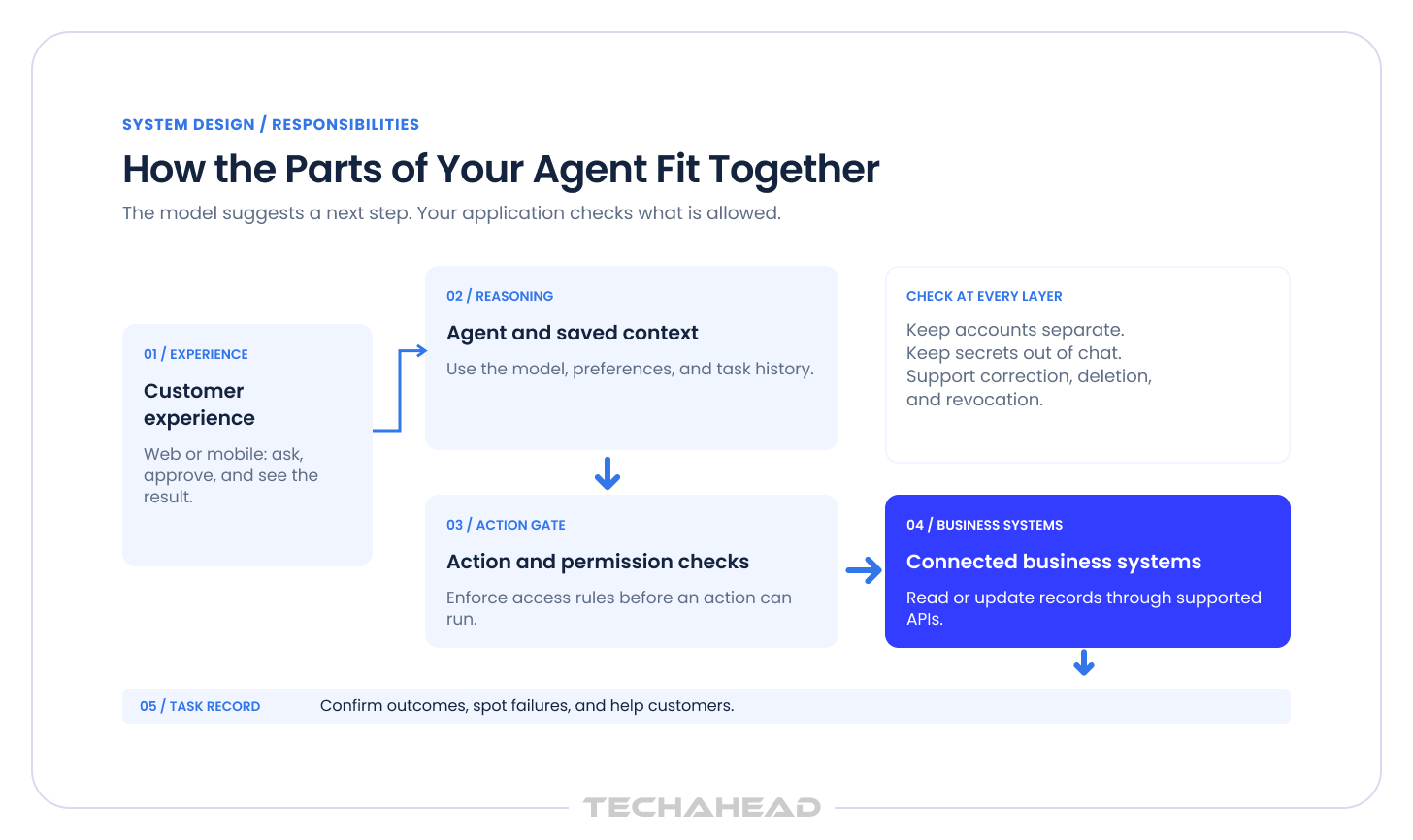
Meta’s published architecture describes an isolated cloud environment and independent permission controls. Your personal AI agent needs an architecture suited to its own tasks; duplicating Meta’s infrastructure is not a prerequisite.
| Layer | Illustrative Choices | What You Should Ask |
| Customer Experience | React or Next.js web app; native mobile when needed | Which channel fits the recurring task? |
| Reasoning Model | An available hosted model, including Wonder where appropriate | Does it pass our task tests at an acceptable cost? |
| Application Services | Python or TypeScript services and a durable job queue | Can interrupted work resume without repeating actions? |
| Customer Context | PostgreSQL; retrieval search where useful | Can customers correct, export, and delete their information? |
| Integrations | Provider APIs; supported MCP connectors where suitable, including services like google drive | Are permissions and commercial access confirmed? |
| Controls | Independent policy checks, secret storage, role controls | Can the model bypass a restriction, and do some tools work without api keys while others require them for cloud models? |
| Operations | Cloud hosting, task traces, alerts, evaluation records | Who notices and resolves an incomplete job? |
The table offers technology options for your custom product; it is not a verified list of Meta’s complete Muse stack. Choose tools around the task, account connections, and controls your first release needs. Dedicated computer environments and browser automation add development and operating work, so include them when the workflow requires them. Apply data privacy requirements wherever customer information is stored or shared.
What are the challenges of building a personal AI agent? Most appear when an apparently simple request meets changing preferences, limited permissions, or an unreliable external system. The approaches below describe how we would address them in a scoped TechAhead engagement.
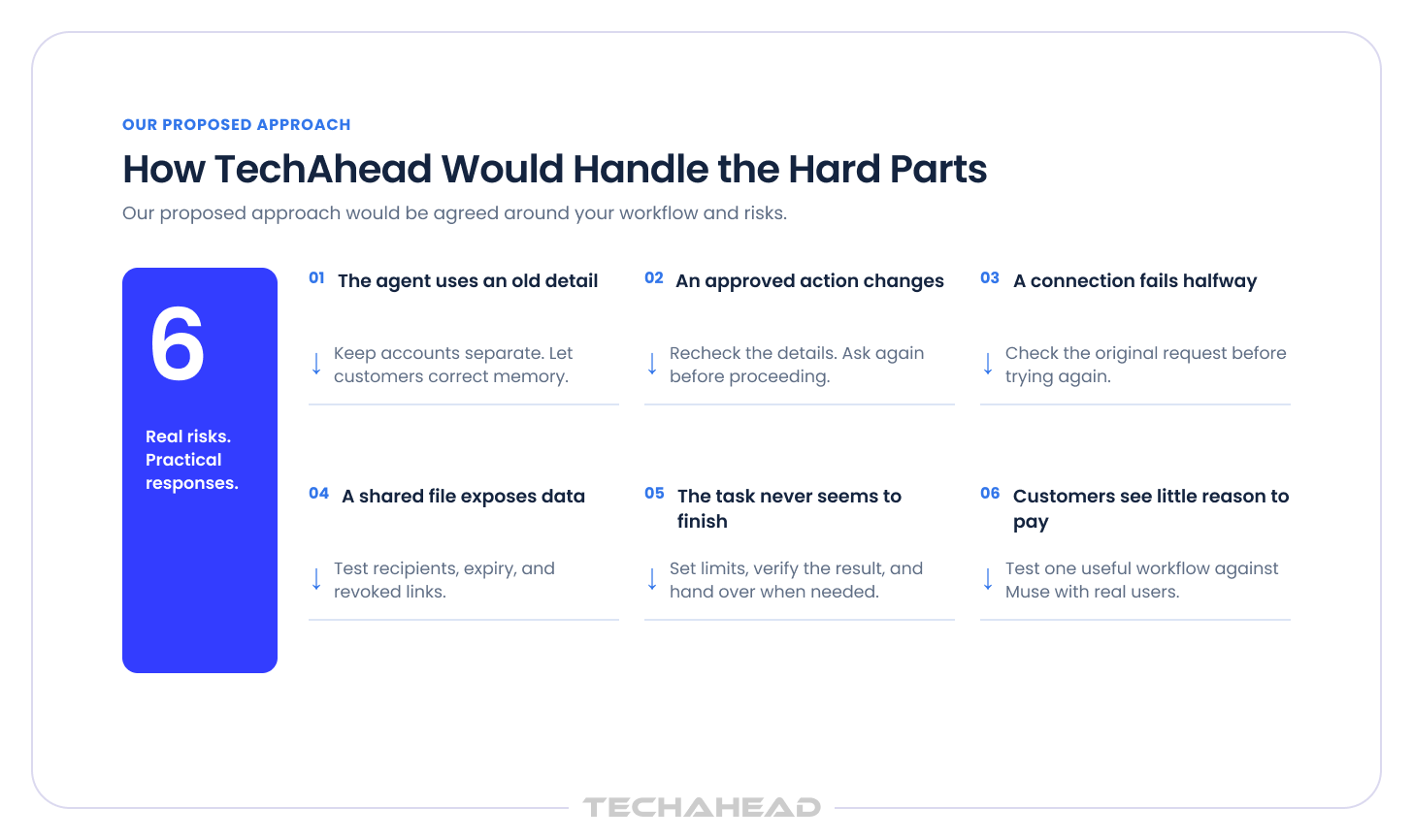
A customer changes an address, but the next booking uses the old one. Or information from one client turns up in another client’s task. These mistakes can start when a conversation, uploaded document, account record, or past conversations contain different versions of the same fact.
Saving more information does not resolve the conflict. Your product needs to know which source takes precedence and whether a detail applies beyond the current job. An incorrect address can cause a failed visit; information crossing client accounts can damage trust in the whole service. Customers also need corrections to affect future work, rather than only the current reply.
Our approach: We would separate lasting preferences from job details, attach sources and dates to saved facts, keep client contexts isolated, and ensure long-term memory does not become an opaque store the customer cannot inspect. The pilot would include corrections and conflicting records. AI agent memory should favor verified, relevant information and ask when the conflict remains unresolved.
We would also check that:
That gives the customer control at the point where a stale detail would matter.
How do you keep a personal AI agent from taking unauthorized actions? Enforce authority outside the model and bind approval to the actual recipient, amount, scope, and action. A changed booking price should trigger another check.
The difficult part is that a task can change after approval. A selected slot disappears, a provider adds a charge, or the customer disconnects an account while work is waiting. An approval given earlier may no longer cover what the agent is about to do. Broad instructions to be careful cannot reliably settle those changes, and repeated vague approval requests make the experience frustrating.
Our approach: We would implement policy checks and test changed details, cancellation, and revoked access while work is queued. For consequential steps, a human in the loop would see what will happen before approving it. Muse’s published connector rules similarly require fresh approval for sensitive writes and material changes.
To enforce those decisions, we would:
An account may lack the right access, a provider may reject a change, or a retry may create the same booking twice. A demonstration often uses a prepared account and an uncomplicated request. Real customers bring different subscriptions, expired sessions, and settings your team does not control.
The most difficult case is an uncertain result. A provider may accept a booking while the confirmation response is lost. Repeating the request could create a duplicate; reporting failure could prompt the customer to book again. Your product needs a way to establish the state of the original request before deciding what happens next.
Our approach: We would prove provider access early, protect credentials, and review generated tools before giving them privileges. Each AI agent integration would distinguish a proposed action from a confirmed result and check before retrying. Current Muse connector guidance does not approve new money movement or trading tools simply because financial data can be read.
We would handle uncertain results by:
Sharing a report or dashboard adds another access boundary. A secure conversation does not automatically make its shared output private. A customer might create a report from account information and then send it to someone who should see only part of that information.
Exposure can occur through the document contents, an overly broad link permission, a revealing file title, or access that continues after the customer tries to revoke it. These details are easy to miss when testing focuses on whether the agent produced a useful report. They matter because customers judge the service by where their information ends up.
Our approach: We would test recipients, link permissions, expiry, revocation, and exposed metadata separately. AI agent security testing would cover the artifact as well as the agent. Meta said it fixed a shared-artifact flaw and restored sharing on October 22; older artifacts required new links.
For your product, we would define who can open an output and whether it can be forwarded before enabling sharing. Tests would cover:
Shared outputs would receive their own access checks.
Gartner’s May 2026 release reported that 54% of US respondents who used AI for a recent purchase said they had to double-check all its information. That extra work undermines the promised convenience.
A long task creates more opportunities for uncertainty. Availability changes, a source contains conflicting information, or the agent repeatedly tries a route that cannot succeed. Customers may see activity without receiving a usable result. Meanwhile, every additional model call or browser attempt adds cost, and there can be a learning curve for teams reviewing and intervening in long-running workflows before they can help.
Our approach: We would verify completion against the source system, set time and spending limits, and escalate unresolved work. The agent should preserve progress and explain what remains. Evaluate the staff time spent checking its output alongside its apparent speed.
The pilot would measure completion without correction. To keep unfinished work manageable, we would define:
General memory, integrations, and background work already exist in Muse. Rebuilding them can consume a budget before the team has established demand.
A demonstration can attract interest because agents are new, while leaving the buying decision unanswered. Your customers may already have a general agent, or they may prefer the existing process for an occasional task. The best AI assistant depends on the workflow, integrations, and proof of completed work rather than headline features alone. Adding more features in response can increase costs without improving the reason to pay. You need to establish which recurring problem your product solves particularly well and how customers will discover that benefit.
Our approach: We would compare the chosen workflow against current Muse, test a connector option, and agree on the improvement customers value. We would then scope the smallest product that demonstrates that improvement. This keeps custom AI agent development tied to a buying reason and measurable operating costs.
The pilot would test a commercial offer as well as the experience. We would examine:
If the workflow works but customers do not value it enough, you can revise the offer before funding a broader product.
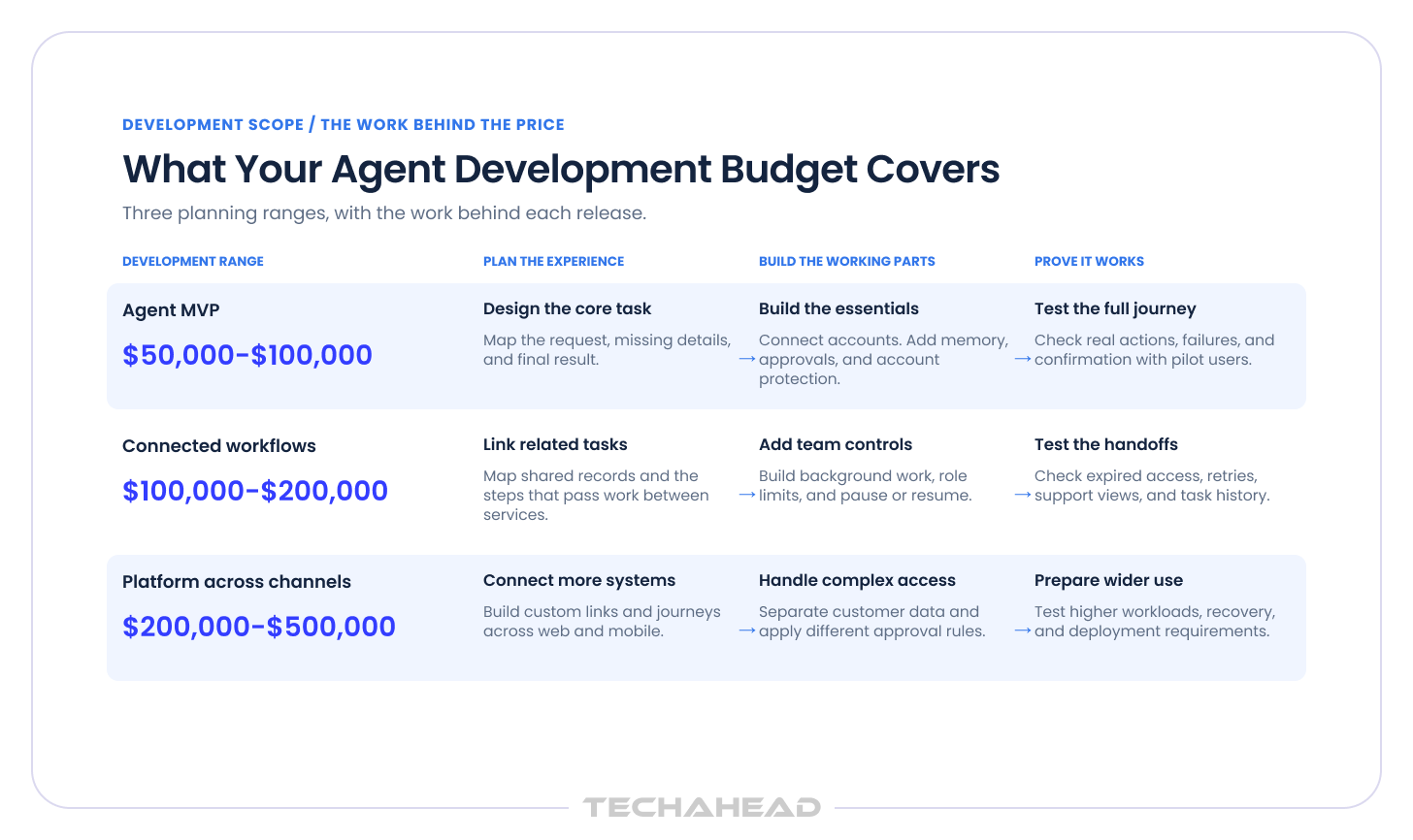
Plan $50,000 to $100,000 for an agent MVP focused on one core task, $100,000 to $200,000 for an agent that connects several workflows, and $200,000 to $500,000+ for an agent platform spanning multiple channels and business systems. Your integrations, approval requirements, and launch scope determine the budget.
| What you are building | Development range in USD | Illustrative scope |
| Agent MVP | 50,000–100,000 | One focused workflow and primary channel, limited integrations, editable context, approvals, basic administration, and a tested pilot |
| Agent for connected workflows | 100,000–200,000 | Several related workflows, broader integrations, background execution, team permissions, and more operational controls |
| Agent platform across channels | 200,000–500,000+ | Multiple channels and workflows, custom integrations, complex permissions, and greater deployment and operational requirements |
Each option includes baseline security and testing. These development ranges cover a scoped personal AI agent built with available models, with the budget shaped by your workflows, integrations, and approval requirements. They are planning ranges for your custom product, not Meta’s development expenditure or an estimate for reproducing the entire Muse platform.
These sample allocations show how three budgets within the bands could be distributed. They are planning examples, not project quotations or measured market averages.
| Workstream | MVP example | Connected workflows example | Platform example |
| Discovery and scope | $6,000 | $10,000 | $20,000 |
| User experience design | $8,000 | $15,000 | $30,000 |
| Application and administration | $16,000 | $30,000 | $70,000 |
| Agent behavior and memory | $12,000 | $25,000 | $60,000 |
| Integrations | $8,000 | $20,000 | $55,000 |
| Security and access controls | $8,000 | $15,000 | $40,000 |
| Testing and pilot | $10,000 | $20,000 | $45,000 |
| Deployment and handover | $7,000 | $15,000 | $30,000 |
| Total development | $75,000 | $150,000 | $350,000 |
Integration access, unclear business rules, browser driven tasks, and complex approval requirements can move the estimate. Before accepting a quote, ask:
The AI agent development cost is only the initial investment. Model usage, infrastructure, support, and third party services continue after launch. Measure them during the pilot and set a monthly operating budget before expanding access.
For an illustrative monthly workload, assume 1,000 users attempt 20 tasks each. Across all model calls per attempted task, assume 12,000 uncached input tokens and 2,000 output tokens. Tokens are the units used to meter model processing.
Meta’s published Wonder API rates are $4 per million input tokens and $20 per million output tokens, checked on November 3, 2026.
| Monthly item | Calculation or assumption | Example cost |
| Model input | 240 million tokens × $4 per million | $960 |
| Model output | 40 million tokens × $20 per million | $800 |
| Hosting and storage | Planning allowance | $1,500 |
| Monitoring services | Planning allowance | $500 |
| Support and maintenance | Planning allowance | $4,000 |
| Example monthly baseline | Sum of the rows above | $7,760 |
If 18,000 of those 20,000 attempts finish successfully, that baseline is approximately $0.43 per successful task. External search, browsers, paid connectors, transaction fees, taxes, and additional infrastructure would add to it. Replace the workload assumptions with pilot measurements before setting customer pricing.
Before you invest in a personal AI agent, you need to know which customer problem it will solve and whether your systems can support it; some clients also compare a free plan, free tier, and paid plans when evaluating the launch approach. Through our AI agent development services, we help you turn that idea into a defined first release with clear priorities and measurable outcomes.
TechAhead is an OpenAI Services Partner and a member of the Claude Partner Network. Our credentials also include AWS Advanced Tier status and ISO/IEC 27001 and ISO/IEC 42001 certifications, covering information security and AI management. These credentials give you a basis for assessing our engineering and governance practices.
Our approach would cover four practical areas:
A controlled pilot would then measure completed tasks, repeat usage, and manual intervention. Those results would help you decide what to improve and which workflows deserve further investment.
Before expanding delivery, we would agree on the next release scope, investment estimate, and data privacy requirements. Ownership, handover, and ongoing support responsibilities would also be clear.
Contact us to discuss your customer journey and what it would take to build a useful first release.
Begin with a job your customers regularly need help completing, such as arranging an appointment. Decide which systems the agent needs, what it should remember, and when it must ask for approval. TechAhead can help you turn those decisions into a custom AI agent development plan and test the complete journey with a limited customer group.
A Muse connector may be enough when customers already use Muse and need access to your service. Building your own personal AI agent makes sense when the experience depends on your business rules, customer relationships, or internal systems. Compare both options using the same customer task, including approvals, failed connections, and confirmation that the work was completed.
Your first version should complete one useful task from request to confirmed result. Give customers a clear conversation, editable preferences, relevant account connections, approval controls, and progress updates. Include a way to cancel work or get help when something goes wrong. Expand task automation after customers can complete that first task reliably and understand what the agent is doing.
It can, provided those services allow the access and actions your product needs. Reading a calendar and changing an appointment require different permissions, and some workflows also need the agent to manage a task list instead of only scheduling meetings. For AI agent integration, TechAhead would check these details early and test expired connections, failed requests, and duplicate actions. That helps establish what you can reliably offer customers before you promise a feature.
Keep each customer’s saved information separate and record where important details came from. AI agent memory should let people view, correct, and remove their preferences. If a new request conflicts with an old address or instruction, ask which one to use. Test that corrections affect future tasks and that one customer’s information never appears in another customer’s results.
Give the agent access only to the information and actions its task requires. Your application should check those permissions before anything happens. AI agent guardrails should also require another approval when an agreed recipient, amount, or booking detail changes. Keep a human in the loop for sensitive actions, and let customers disconnect accounts or cancel unfinished work.
The requirements depend on where your customers live, what information you handle, and your business role. Assess applicable state privacy laws, including CCPA where covered. HIPAA applies to covered entities and business associates. Your data privacy plan should explain what you collect, who receives it, how long you keep it, and how applicable customer rights will be handled.
Test the tasks customers will actually perform, including situations where things go wrong. AI agent evaluation should cover changed preferences, disconnected accounts, duplicate requests, and misleading instructions hidden in emails or documents; for research-heavy assistants, deep research may help, but it still needs to be tested against real completion criteria. Check the result in the connected system: did the appointment appear, and was it created only once? Agree what must pass before making the feature available.
Ask to see relevant work and how the team handles a task that fails halfway through. When comparing AI agent development services, agree who owns the code and customer data, which accounts you control, and what documentation you receive. If a vendor offers a free base plan, ask what security, hosting, and deployment options are included. The agreement should also explain how you approve completed work and who supports the product when a connected service changes.
Your agent needs regular attention as models, connected services, and account permissions change. AI agent monitoring should show which tasks finished, which failed, and where customers needed help. TechAhead’s AgentOps services can help investigate these issues and test updates before release. Assign someone to resolve unfinished tasks and explain the outcome to customers who are waiting.
We use cookies to ensure our website functions properly, improve performance, and provide a personalized experience. You can choose which types of cookies to allow below.
Required for core functionality such as security, network management, and accessibility. These cannot be disabled.
Help us understand site traffic and user interactions so we can improve performance and usability.
Enable enhanced functionality and personalization such as language or region preferences.
Used to deliver relevant ads, track campaign performance, and measure advertising effectiveness.