


 Copy Link
 Share on X
 Share on Facebook
 Share on LinkedIn
Always Active
Required for core functionality such as security, network management, and accessibility. These cannot be disabled.

Uncover the transformative potential of digital and mobile solutions for your industry.



 Last Updated: Nov 4, 2026
Nov 4, 2026
 11
 17 min. Read


Key Takeaways
Alexa introduced households to a voice assistant that lives in the room around them. More than a decade later, the same idea reaches phones, cars, TVs, glasses, and wearables, and Meta’s Muse, which runs in a phone app, on the Mac, inside smart glasses, and on a keychain device called Muse Charm, shows how far the model has traveled.
The assistant stays constant while the surface changes. That shift defines AI voice assistant app development like Alexa in 2026: the voice assistant app becomes the front door to a shared intelligence, and every device a customer owns becomes another door.
Fortune Business Insights values the global voice assistant application market at $11.92 billion in 2026 and projects it to reach $121.08 billion by 2034, a compound annual growth rate of 33.61%.
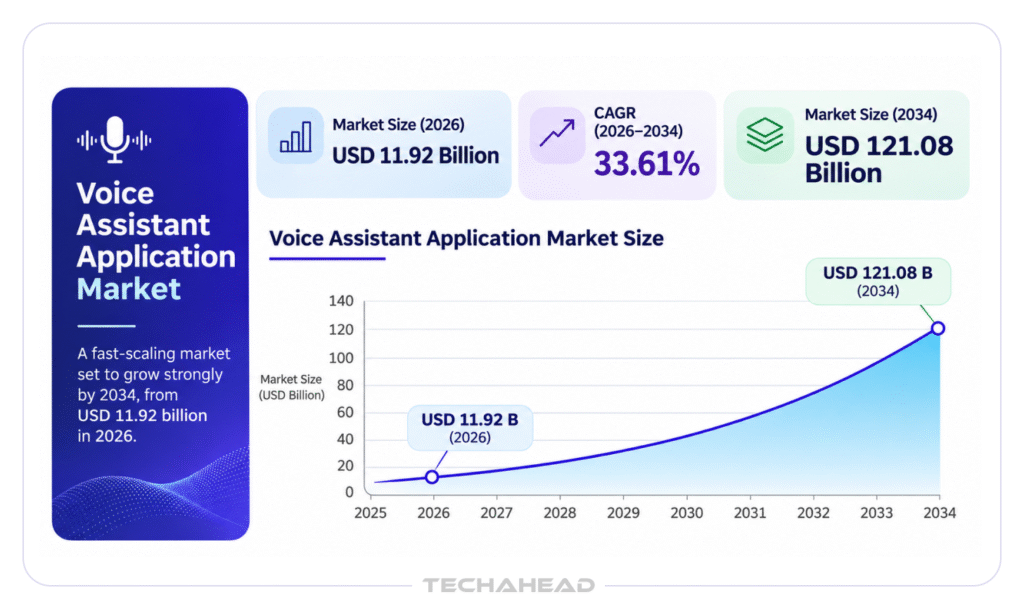
That trajectory shapes what customers expect from an AI voice assistant today. They expect it to follow them from the kitchen speaker to the car dashboard to the wrist, with the same memory, the same voice, and the same ability to complete tasks. Siri, Alexa, and other digital assistants have turned that expectation into a baseline.
This article is written for technology and business leaders who treat voice assistant development and wider virtual assistant development as a product decision. It examines how the five most visible assistants work today, what made Alexa the benchmark, which features deserve a place in a custom voice assistant, and how to plan voice assistant app development so a single build serves every touchpoint.
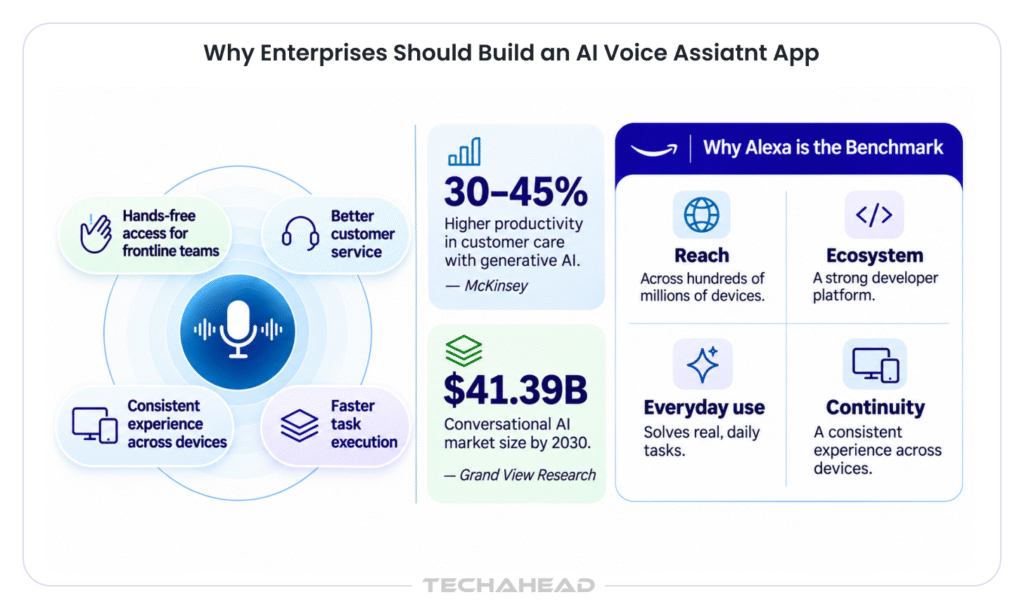
Voice technology earns its place on a roadmap when it reduces real work, and well-built voice apps turn a personal assistant on the phone into an enterprise tool. Hands-free control matters most for drivers, clinicians, field technicians, and warehouse teams, whose hands are busy with something else. Voice commands compress a multi-step tap flow into a single sentence, and hands-free calls keep attention on the task at hand.
The financial case is equally clear. McKinsey estimates that applying generative AI to customer care functions could increase productivity by 30 to 45% of current function costs. A voice agent that resolves user requests such as order status, bookings, and account updates, enabling users to complete tasks by voice and receive up-to-date information, captures a share of that value, while human specialists concentrate on complex tasks.
Market research points in the same direction: Grand View Research projects the conversational AI market to reach $41.39 billion by 2030, reflecting sustained investment in voice AI, speech recognition, and natural language processing.
Alexa became the benchmark for four reasons that every enterprise team can study.
Together, these four qualities form a practical design brief for any custom voice assistant development project.
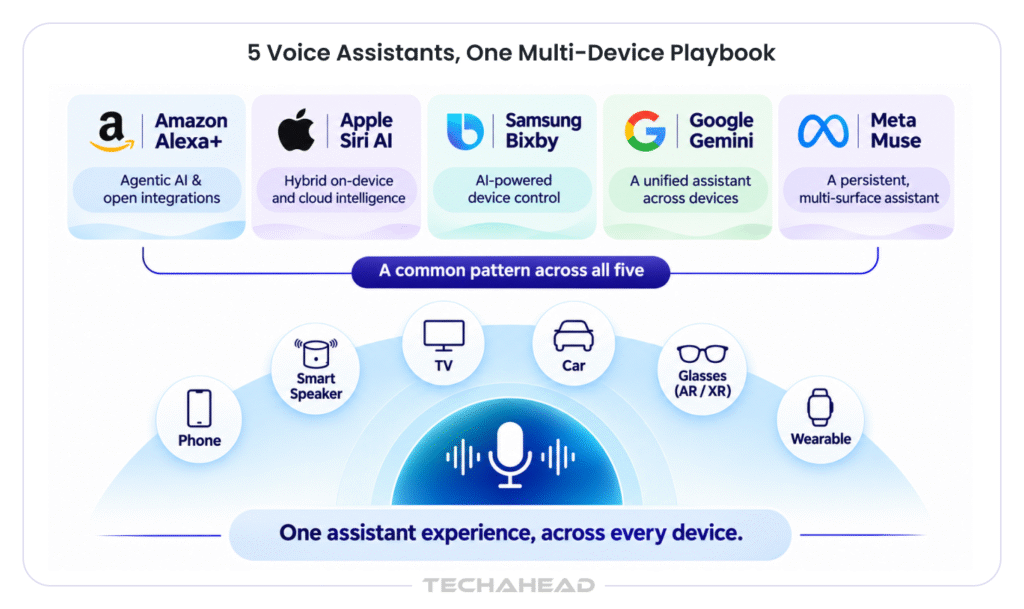
In this section, we will discuss the notable AI assistants that show where the market stands. Each one reveals a design choice worth borrowing for a virtual assistant app or an AI assistant of your own.
Also Read: Top 10 AI Agent Development Companies in 2026
Alexa runs across Echo devices and third-party hardware, and skills function as apps for Alexa. The Alexa+ generation adds large language models and agentic capabilities. Amazon introduced the Alexa AI Action SDK, Web Action SDK, and Multi-Agent SDK so partners such as OpenTable, Yelp, and Tripadvisor can make their services available through voice.
The Web Action SDK deserves attention because it lets Alexa+ complete tasks on websites that offer a browser experience, following steps the partner defines. Echo Show screens add visual confirmation, which keeps complex tasks accurate.
What this means for your app: expose every important function as a clean action. The assistant layer rewards services that are easy to call.
Apple announced Siri AI at WWDC in June 2026, rebuilt on a custom Gemini model and delivered through a standalone Siri app. Requests travel across three tiers: on-device models, Private Cloud Compute and a larger cloud model. That routing decision sits at the center of the design, since it balances speed, privacy and capability for each request. Apps join the system through App Intents, which describe what an app can do in terms the assistant understands.
What this means for your app: describe your app functionality as intents, and the assistant can discover and use it.
Samsung rebuilt Bixby for the Galaxy S26 with Perplexity behind it. The new Bixby manages device settings and troubleshooting through natural language and agentic tools, while Perplexity and Gemini sit alongside it as additional agents on the same phone. Bixby also continues as the voice assistant on Samsung TVs and appliances, which gives Samsung a presence across the home.
What this means for your app: users will hold several assistants on one device, so a mobile app benefits from answering each of them through the same underlying actions.
Google began phasing out Google Assistant on mobile devices, Wear OS watches, and compatible headphones in September 2026, with Gemini taking its place. General Motors delivered Gemini to roughly four million vehicles through an over-the-air update, and Google TV gained natural language controls.
Android XR glasses add a Hey Gemini activation phrase with camera context, so a user can ask about whatever is in view. The familiar Hey Google wake phrase is making room for a new one across hardware, and Android users encounter one assistant brand on phones, cars, TVs, and eyewear.
What this means for your app: every surface has its own behavior, so a voice assistant app benefits from a device layer that adapts the same intelligence to each one.
Meta introduced Muse as an AI personal assistant that runs on a persistent cloud computer with its own browser, file system, and terminal, so work continues after the app closes. At Connect 2026, Meta added real-time voice with designable voices, a real-time avatar, an email address for each agent, and Muse Charm, a keychain device due in December. Payments run through single-use virtual cards, so the agent completes purchases while the user’s card details stay private.
What this means for your app: memory, identity, and permissions belong in the backend, and each device acts as a surface for that shared agent.
Large language models handle open conversation, and structured actions handle the tasks that carry business consequences. A helpful assistant combines both. Alexa’s feature set works as a checklist for product teams.
Here are the features that map each of Alexa’s voice capabilities to what a custom build needs.
| Alexa feature | What it does | What to build in your app |
| Wake word detection | Starts a session from a spoken phrase | On-device wake word detection tuned for background noise and audio quality |
| Multi-device continuity | A conversation moves from speaker to phone to TV | A shared session and memory service tied to the user account |
| Routines | One phrase triggers a sequence of actions | A rule and schedule engine that chains actions across business systems |
| Smart home control | Controls smart home devices such as lights, thermostats, locks, and appliances, with Matter support | A device integration layer that lets users control smart devices through standard protocols |
| Skills and actions | Third-party services add new abilities | An action registry with clean APIs so partners and internal teams add capabilities |
| Visual responses | Echo Show screens confirm choices and display results | Voice plus screen responses inside the user interface |
| Personalization and voice profiles | Recognizes household members and preferences | Voice biometrics and a preference memory for each user |
| Commerce and reminders | Shopping lists, orders, calendar and alerts | Integrations with commerce, calendar and CRM systems |
| Enterprise and hospitality | Alexa Smart Properties for hospitality and senior living | Role-based deployments with admin controls and audit trails |
| Alexa+ agentic layer | Web actions, multi-agent handoff and open conversation | LLM orchestration with tool calling and handoff to specialist agents |
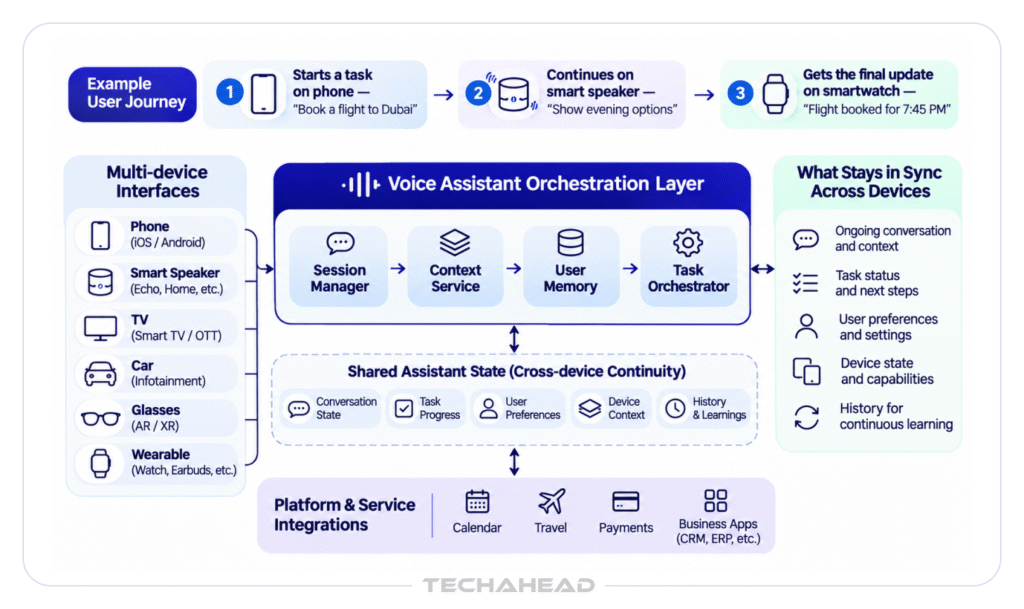
A voice assistant app behaves differently on every surface. Android users and iPhone users alike expect the voice assistant app to appear in the same places as their system assistant, so coverage of Android devices, iOS, and wearable platforms belongs in the first release plan.
Let’s look at what each touchpoint demands of AI voice assistant app development.
| Touchpoint | Context of use | Main engineering priority |
| Mobile app on iOS and Android | Mobile devices in hand, on the move | Push-to-talk plus wake phrase, offline fallback and strong audio quality |
| Web | Desktop browser at work | Microphone permissions, live transcript and fast text-to-speech playback |
| Smart speaker and display | Shared home or office space | Far-field audio and multi-user voice profiles |
| TV | Living room, several viewers | Voice search and control with large-screen results |
| Car | Driving, attention on the road | Short spoken replies and hands-free calls |
| Glasses and earbuds | Walking, audio first | Camera context where available and brief responses |
| Wearables including Apple Watch | Wrist, quick glances | Micro-interactions with haptic confirmation |
| Kiosk and hospitality room | Shared public setting | Privacy controls and automatic session reset |
| Field and clinical settings | Busy environments with specialist vocabulary | Background noise handling, domain vocabulary and compliance |
Whether you have a clear idea of your requirements for AI voice assistance development and the related cost, you still need a clear roadmap for building it successfully.
List most frequent user requests across customers or employees, then map each one to the device where it happens. A request to check a delivery arrives on a phone, while a request to adjust a thermostat arrives through a speaker. This map decides the first touchpoint for a pilot.
We have explained the core features in the above section. However, while developing that you need to divide the features into two tiers. Core capabilities include wake word detection, speech-to-text, text-to-speech, intent recognition, and a clear user interface. Differentiating capabilities include personalization, proactive suggestions, multilingual support, and actions that perform specific tasks inside business systems. Keeping the two tiers distinct protects both schedule and budget.
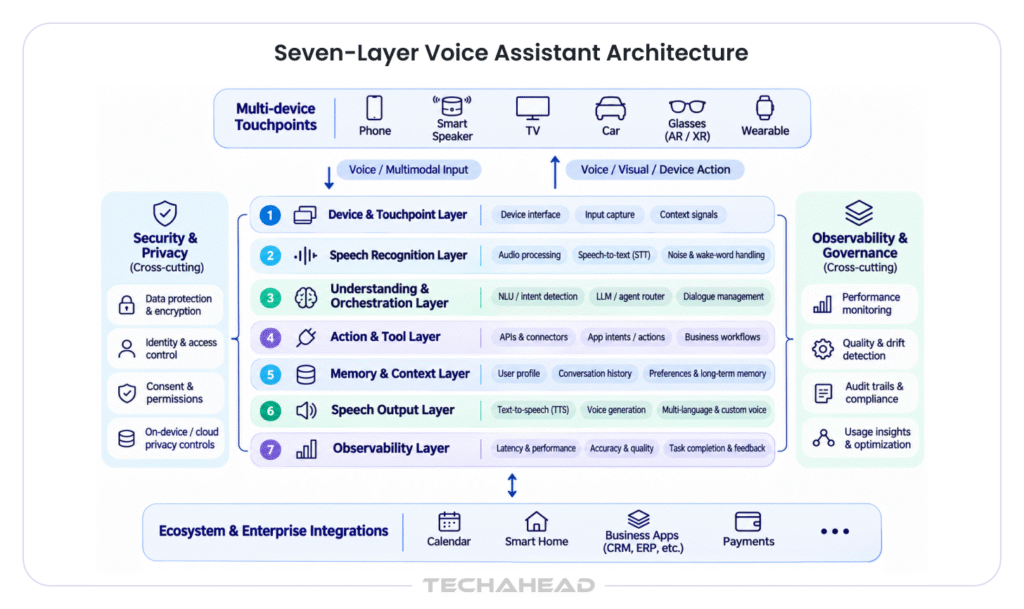
An on-device versus cloud routing decision runs across these layers, the same pattern Apple uses for Siri AI. Short and private requests run on the device, and complex tasks travel to larger models in the cloud.
| Layer | Role |
| Device and touchpoint layer | Captures user speech, plays responses and adapts to each device’s microphone, speaker and screen |
| Speech recognition layer | Converts user speech into text, tuned for accents, background noise and domain vocabulary |
| Understanding and orchestration layer | Combines natural language understanding, intent recognition and large language models to decide the next step |
| Action and tool layer | Calls business systems and third-party services through secure APIs |
| Memory and context layer | Holds preferences, history, and session state so conversations continue across devices |
| Speech output layer | Produces natural voice through text-to-speech with a consistent brand voice |
| Observability layer | Tracks response accuracy, latency and task completion for continuous improvement |
Speech recognition and text-to-speech providers differ in language coverage, latency, and voice quality, so benchmarking them with recordings from your own users pays off. Machine learning models for intent recognition give structure to high-stakes actions, and large language models bring flexible dialogue. Choosing among AI models comes down to language coverage, latency, and cost per interaction.
Most production assistants combine both. Voice assistant training with real utterances, domain vocabulary, and regional accents lifts response accuracy and serves diverse users. Multilingual support planned from the start lets the assistant operate in multiple languages through one shared architecture.
| Technology Layer | Suggested Technologies |
| Mobile App | React Native, Flutter |
| Speech Recognition | AWS Transcribe, Google Speech-to-Text, Azure Speech |
| Text-to-Speech | Amazon Polly, Google Text-to-Speech, Azure Speech |
| AI & Language Models | OpenAI, Azure OpenAI, Amazon Bedrock |
| Backend & APIs | Node.js, Python (FastAPI) |
| Database & Memory | PostgreSQL, Redis |
| Cloud Infrastructure | AWS, Microsoft Azure, Google Cloud |
| Platform Integrations | Alexa Skills Kit, Apple App Intents, Android integrations, MCP |
Many enterprises combine approaches. A custom voice assistant app serves owned channels, and integrations make its actions available inside Alexa+, Siri AI and Gemini.
| Approach | Best fit | Control | Speed |
| Platform integration with Alexa+, Siri AI and Gemini | Reaching users inside the assistants they already use | Moderate | Fast |
| Managed conversational platform | Standard use cases and quick pilots | Moderate | Fast |
| Custom voice assistant | Branded experience, proprietary data and many touchpoints | High | Steady |
The Alexa AI Action SDK, Apple’s App Intents and the equivalent Android and Gemini integrations let a voice assistant app appear inside the assistants users already trust. Open standards such as the Model Context Protocol are gaining adoption as a shared way to expose tools to AI agents, which makes one action registry reusable across assistants. Publishing the voice assistant app on Google Play and the App Store completes the owned channel.
Voice interactions feel natural when replies arrive within about a second and users can interrupt the assistant mid-sentence. Audio quality and background noise handling shape voice recognition accuracy in cars, kitchens, and clinics. Screen confirmation suits payments and other high-value actions. A smooth handoff to a human agent keeps complex or sensitive conversations in good hands.
Voice biometrics confirm that an authorized person gives each command, consent settings define what the assistant stores, and retention policies keep voice recordings for the period the use case requires. Payments can follow Muse’s approach with single-use virtual cards, which keep card details private. Regulated sectors align the architecture with HIPAA and GDPR requirements, including data residency.
Field tests across devices, accents, and environments validate the design before launch. A pilot on one touchpoint produces data on utterances, completion rates, and user satisfaction, and the development process then extends the assistant to a second and third touchpoint on the same backend. The result is an AI-powered assistant that grows by adding surfaces.
| Development Scope | Features & Coverage | Estimated Cost (USD) |
| MVP Voice Assistant | One platform, basic voice commands, speech recognition and responses | 25,000–60,000 |
| Production Voice Assistant | Multiple workflows, AI orchestration, memory, integrations and multilingual support | 60,000–200,000 |
| Enterprise Voice Assistant | Multi-device support, advanced personalization, enterprise integrations, security and analytics | 200,000–500,000+ |
| Ongoing Operations | AI model inference, speech processing, cloud infrastructure and maintenance | 1,500–8,000/month |
Voice assistant app development cost depends on device coverage, language support, AI model selection, integrations, usage volume, and compliance requirements. A basic MVP with core voice features and one platform may cost around $25,000–$60,000. A production-grade assistant with multiple workflows, AI orchestration, memory, and integrations can range from $60,000–$200,000. Enterprise solutions with multi-device support, advanced personalization, and complex integrations may require an investment of $200,000–$500,000 or more.
Running costs deserve equal attention. Speech recognition, text-to-speech, and large language models bill by usage. Cloud infrastructure, maintenance, and scaling add to the recurring expenditure. Depending on usage and infrastructure needs, monthly operating costs may range from $1,500 to $8,000 or more. Routing simple requests to lightweight models can help manage these expenses.
Running costs deserve equal attention. Speech recognition, text-to-speech, and large language models bill by usage, so a design that routes simple requests to lightweight models keeps development cost and operating cost in balance.
The return side of the equation is large. Gartner predicts that by 2029 agentic AI will autonomously resolve 80% of common customer service issues, leading to a 30% reduction in operational costs. Viewing AI voice assistant app development cost beside that operating curve gives leaders a clear basis for investment.
TechAhead prepares a scoped estimate after a discovery workshop that confirms touchpoints, languages, integrations, and compliance needs. This keeps voice assistant app development cost aligned with the outcomes the business targets.
TechAhead brings 16+ years of experience offering AI development services and building AI-driven digital products for enterprises, making us a reliable partner for voice assistant app development that is secure, scalable, and ready for every device your customers use. Our AI development teams design, build, and integrate virtual assistant apps, voice agents, and conversational AI platforms, covering speech recognition, natural language understanding, large language models, and the integrations that connect them to your business systems.
Our work on Headlyne.ai demonstrates this experience in conversational AI. We developed Heady, an OpenAI-powered chatbot that answers questions about news stories, provides additional context, and delivers personalized responses based on readers’ interests. This project reflects our ability to build custom conversational experiences that adapt to individual user needs.
Our experience with AI contact center and patient communication platforms informs how we build voice agents for inbound requests and outbound calls. Our mobile app and Android app practice supports launch on Google Play, the App Store, and wearable platforms including Apple Watch. Every voice AI project starts with a discovery workshop, moves to a pilot on one touchpoint, and expands to additional devices on a shared backend.
To discuss AI voice assistant app development like Alexa for your business, connect with the TechAhead team.
Yes. A shared action layer and memory service let the same assistant respond through Alexa, a branded mobile app, and other surfaces. Each surface receives its own presentation while the intelligence stays consistent.
The two choices complement each other. A custom voice assistant gives full control over brand, data, and experience, and an Alexa integration extends reach to users who already speak to Alexa daily. Most enterprises begin with the channel where their users spend the most time and add the other as the program matures.
Timelines depend on the number of touchpoints, languages, and integrations. A focused pilot on one touchpoint reaches users first, and each added touchpoint builds on the same backend, which shortens every later phase.
Large language models bring flexible, human-like conversations, and intent recognition brings predictable behavior for actions such as payments and account changes. Production assistants combine the two so each handles the work it suits best.
Leading measures include task completion rate, response accuracy, response time, the share of requests resolved by the assistant itself, and user satisfaction. Reviewing utterances flagged for follow-up produces a steady stream of improvements to voice assistant training.
Building an AI voice assistant app like Alexa can cost anywhere from $25,000 to $60,000 for a basic MVP, $60,000 to $200,000 for a production-grade solution, and $200,000 to $500,000+ for an enterprise-scale platform. The final cost depends on device coverage, language support, AI models, integrations, usage volume, and compliance requirements. TechAhead provides a scoped estimate after discovery to align the investment with your project requirements.
We use cookies to ensure our website functions properly, improve performance, and provide a personalized experience. You can choose which types of cookies to allow below.
Required for core functionality such as security, network management, and accessibility. These cannot be disabled.
Help us understand site traffic and user interactions so we can improve performance and usability.
Enable enhanced functionality and personalization such as language or region preferences.
Used to deliver relevant ads, track campaign performance, and measure advertising effectiveness.