


 Copy Link
 Share on X
 Share on Facebook
 Share on LinkedIn
Always Active
Required for core functionality such as security, network management, and accessibility. These cannot be disabled.

Uncover the transformative potential of digital and mobile solutions for your industry.





 Last Updated: Nov 27, 2026
Nov 27, 2026
 8
 22 min. Read


Key Takeaways
When AI helps build your software, more changes can be ready for review at once. To secure AI-generated code, start by defining the business rules the software must enforce, review exactly what changed, test those changes independently against those rules, verify access permissions for AI coding tools, assign the right reviewers, and confirm in production that the controls still work after deployment. That puts more decisions on the people responsible for the launch. A feature may work in a demo, yet the business still needs to know whether it can keep its commitments once customers rely on it. An access error can expose information, and a flawed approval rule can let work go ahead before the right person has signed off. Both can create a problem for the people who have to explain the decision to a customer.
In a May 2026 McKinsey survey, respondents reported that AI saved 11.2% of the time spent on software development activities, while reducing rework by 6.8% on average.
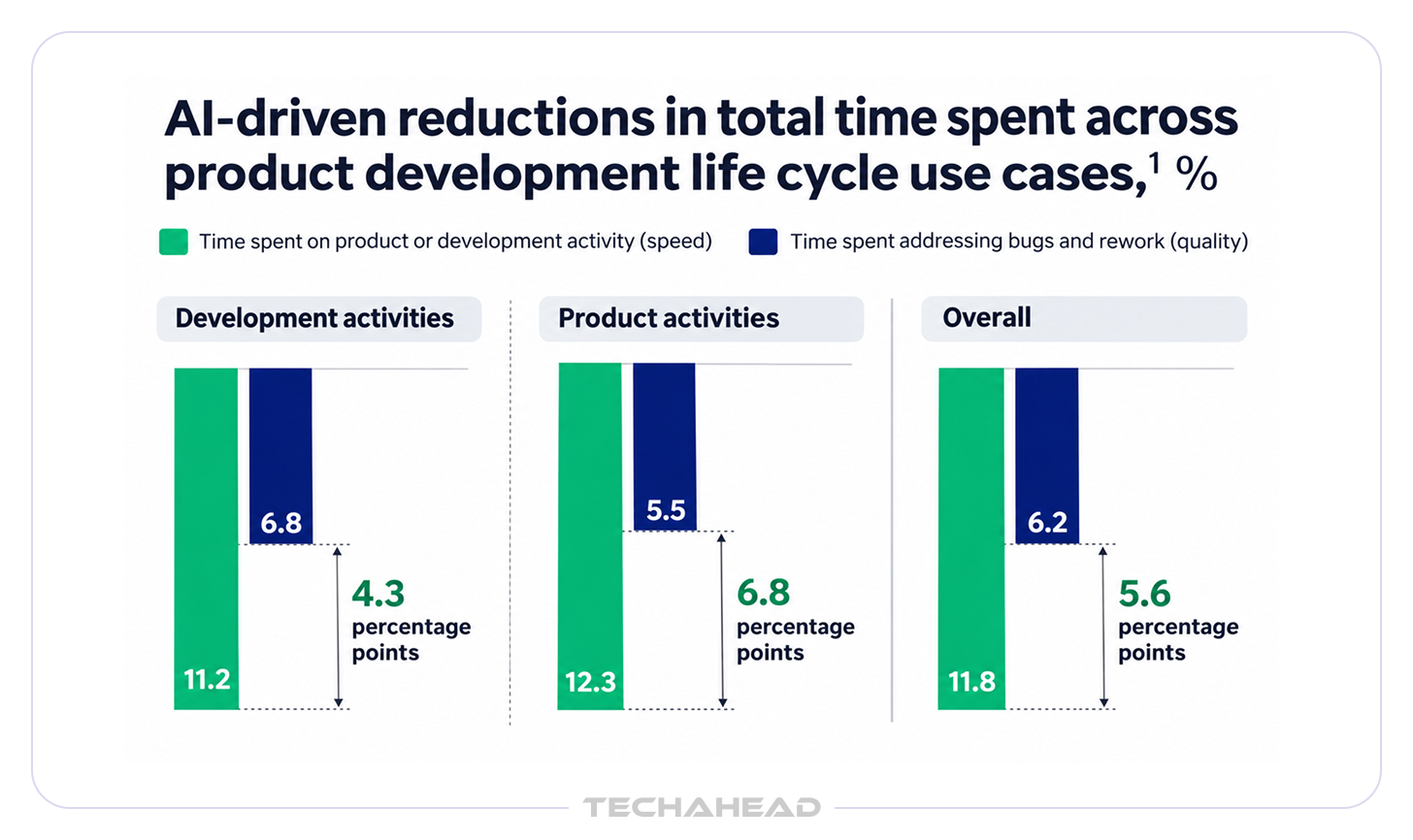
That gap matters for AI-generated code security. When a change is ready sooner, the release decision still depends on what your team can show about the rules customers and staff rely on. For business leaders, product owners, engineering teams, and organizations from startups to global enterprises, especially those working in regulated or complex environments – the issue is not whether AI speeds delivery, but how to verify, review, and approve AI-assisted changes without weakening trust or missing a security control.
For a business leader, how to secure AI-generated code is a question about what you’re prepared to put in front of customers. Your role is to make the business rules clear, give delivery teams the time to verify them, and know who can hold a release when the evidence falls short. That’s what secure by design means in this context. The protections your business depends on are agreed early enough to shape the feature, and the release decision takes account of whether they work in practice.
From there, the article looks at AI coding agent security, code review and reviewer assignment, independent security testing, production verification, risk-based release approval, and how TechAhead can help secure AI-assisted software development.
Also Read: Stabilize an AI-Built App That is Already in Production (A Roadmap for Enterprise Leaders)
The first question in how to secure AI-generated code often belongs to the business. The people who run a workflow know when an approval matters, what it covers, and when it should be revisited. If those details are open to interpretation, two versions of a feature can look equally convincing in a demo and still leave the business with very different obligations once customers start using it.
You transfer a concert ticket to a friend who can still make the show. Your friend accepts it, but the ticket still appears in your phone’s wallet. At the venue, your friend should be the one who can use it. The old pass might still be visible on your phone, so the venue needs a way to tell whether it still grants entry.
That’s threat modeling in a situation most readers can picture. For secure application development, the ticketing team spells out when the right to enter changes hands. In this example, once your friend accepts the transfer, their pass becomes valid and yours stops working. An explicit rule gives the team something it can build and the venue something it can rely on at the door.
Making the workflow secure by design gives the product owner two clear outcomes to look for:
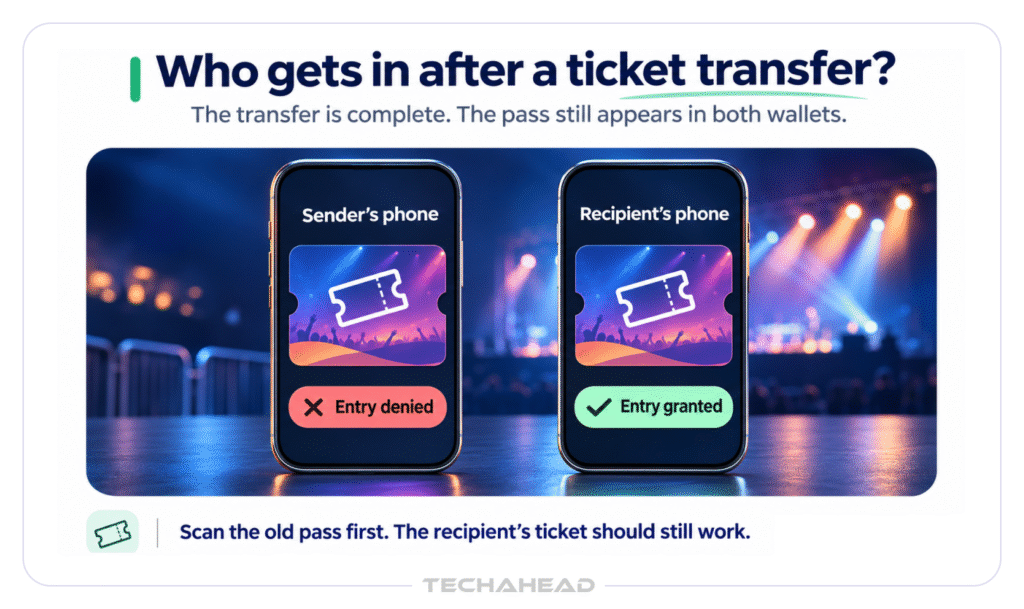
Independent security testing checks both outcomes against the agreed rule. In a secure software development lifecycle (secure SDLC), that evidence is available to the people deciding whether the feature can ship. ENISA’s draft advisory recommends setting security expectations, verifying the output, and recording the evidence.
Part of how to secure AI-generated code is understanding what the coding tool can reach on your behalf. Access to a report template carries a different exposure from the ability to read several projects or publish an update. For you, the distinction matters when deciding where AI assistance makes sense and which work still needs a separate approval. The wider the tool’s reach, the more parts of the business a mistake can touch.
Also Read: Best AI Models for Developers (H2 2026 Edition)
If the task is to tidy up a maintenance report, the tool may need the template, a sanitized sample, and the rules about what can appear in the report. The sample gives an AI assistant something to work from, and teams should use mock data instead of real credentials. Your team should never paste secrets directly into AI prompts, and keep AI tools away from sensitive data and confidential data by leaving live support exports outside the task.
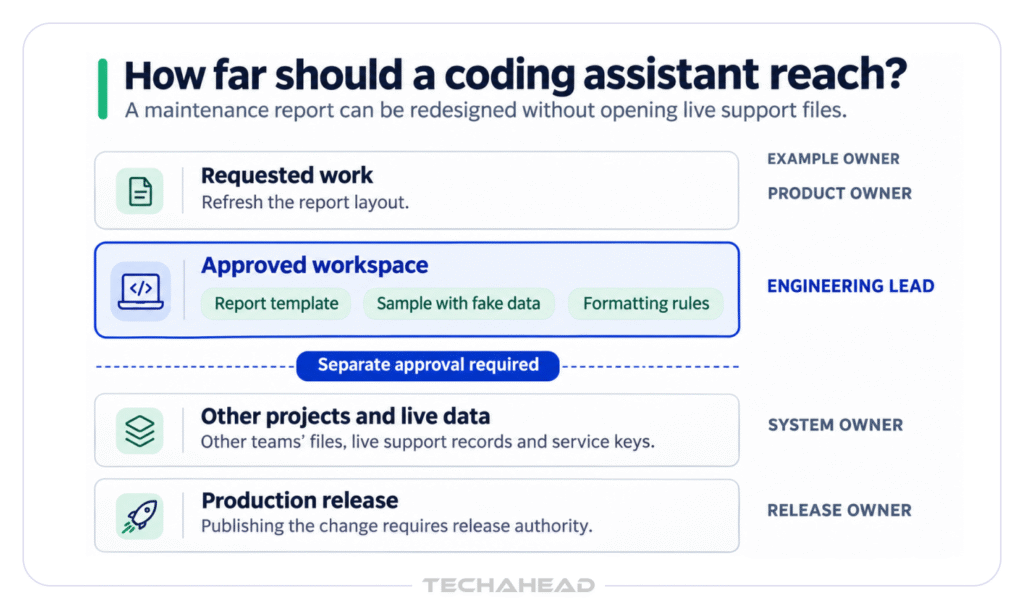
Least-privilege access means the tool receives only the permissions needed for its work. An AI coding agent security review can tell you whether the tool can reach another repository, read credentials, start a deployment outside its assignment, or even publish an update. An assistant with broad access can create security risks beyond the requested task. If it can, the business needs to know who approved that authority and what else is exposed. Authentication changes and data handling logic deserve human review because of their security implications. The engineering team can verify the limits in the systems that enforce them.
Related: Building a Secure CI/CD Pipeline for AI-Generated Code
The business concern behind how to review AI-generated code is whether a release touches more of the operation than you agreed to change. A demo may show that the new feature works. Review gives you a view of what else moved and whether the people responsible for those workflows have had a chance to assess the impact.
A team asks for a better search filter. The proposed change also replaces the package that reads overnight stock files. The search screen may work while the next import handles some rows differently. Ask why the package changed and who can confirm that the import still works. Dependency scanning with automated tools can check AI-suggested packages for known vulnerabilities, confirm that third-party dependencies actually exist, review their maintenance history, and help keep them secure and up to date. Some AI coding tools may recommend non-existent packages, which creates security issues if teams install them without verification. The owner of the import can explain whether it belongs in the release.
Teams can secure AI-generated code more effectively when someone can explain the purpose of the wider change. Maintain a software bill of materials so teams can track dependencies and audit them continuously against vulnerability databases. An AI-generated code review checklist gives the reviewer a consistent way to bring four points to the approval discussion:
Also Read: How to Secure an App Built With Claude Code for Enterprise Use
Assign the AI-generated code review to someone who can explain the effect of the change, and apply the same baseline standards to human written code and code generated with AI assistance while treating it as untrusted until verified; where useful, a human programmer should also confirm AI-specific risks were checked.
A product engineer can review a wording fix. Authentication changes should get human review and should use established authentication libraries instead of custom implementation. A scheduled job that gains new permissions may need the person responsible for its access. Use threat modeling to identify those sensitive paths, then check that the change follows least-privilege access. That’s also where AI coding agent security becomes a review concern, particularly when an agent can edit settings that affect its own access.
Once you know what changed, the next step in how to secure AI-generated code is deciding what the tests need to show. Start AI code validation with the rule the product or security owner agreed to. If the coding tool misunderstood it, tests written from the same interpretation can pass. At the handoff from AI-generated code review to QA, give the tester the original requirement and the workflows it affects.
Recommended: How to Build a Vibe-Coded App Testing Strategy?
Use the checks your secure SDLC already gives you. Use SAST to scan code in your CI/CD pipeline, where automated security checks and security scans should run on every AI-assisted change to application code, and dependency scanning surfaces known package issues. Automated tools can detect known vulnerabilities faster than manual reviews, but people still need to assess context-specific risks.
If you’re deciding how to verify AI-generated code against a permissions rule, ask for a test that reaches the part of the application that makes the decision and shows what happened.
A freight app checks a carrier’s eligibility when a booking is created. Dispatch fails, so the app schedules a retry. Before that retry runs, the carrier is suspended. Business logic testing gives QA a clear question to answer. Will the retry check the carrier’s current status before trying to dispatch the load again? Security tests should also cover negative paths, malformed inputs, and unauthorized actions.
Agree on the answer with the freight team before running independent security testing. To prove the workflow is safe beyond the happy path, include integration tests, verify error handling, require server-side checks for all user input, and use parameterized queries anywhere the flow touches a database to prevent injection attacks. The results should show three things:
Apply the same business logic testing when several screens or jobs can trigger one action. At handoff, AI code validation should give the next reviewer enough information to explain which paths were checked and which need more work.
For a CEO weighing how to secure AI-generated code, release approval is where the company decides what risk it’s willing to accept. The AI-generated code security evidence worth asking for depends on what could go wrong. If the sender’s old ticket still works after a transfer, the friend could be turned away at the door. The venue then has to resolve an ownership dispute while people are waiting to get in. A link that stays open after expiry can expose private material. Those outcomes call for different evidence and may need different people to sign off.
This AI code security checklist shows how the business rule shapes the release decision. The evidence column is what engineering brings. The last column shows where a leader has grounds to hold the release, even when the schedule is tight.
| Business rule | Evidence the approver should see | Who should review it | When to hold the release |
| Once a ticket transfer is accepted, only the recipient’s pass grants entry | An independent test shows that the recipient’s pass works and the sender’s old pass is declined. | Ticketing product owner and application reviewer | The sender’s pass still grants entry after the transfer. |
| A freight dispatch retry must check the carrier’s current eligibility | A workflow test shows that an eligible carrier can be dispatched and that a retry is stopped if the carrier is suspended after booking. | Freight workflow owner and QA reviewer | The test covers initial booking only, leaving the retry unverified. |
| A private training link must stop granting access after it expires | A pre-release test shows that expired links are denied. The rollout plan names who will repeat the check under live settings. | Application security reviewer and release owner | The check fails, or the team cannot explain how expiry will be verified in production. |
During release approval, ask for the AI-generated code review and independent security testing results that apply to the build going live. The evidence should make three things clear:
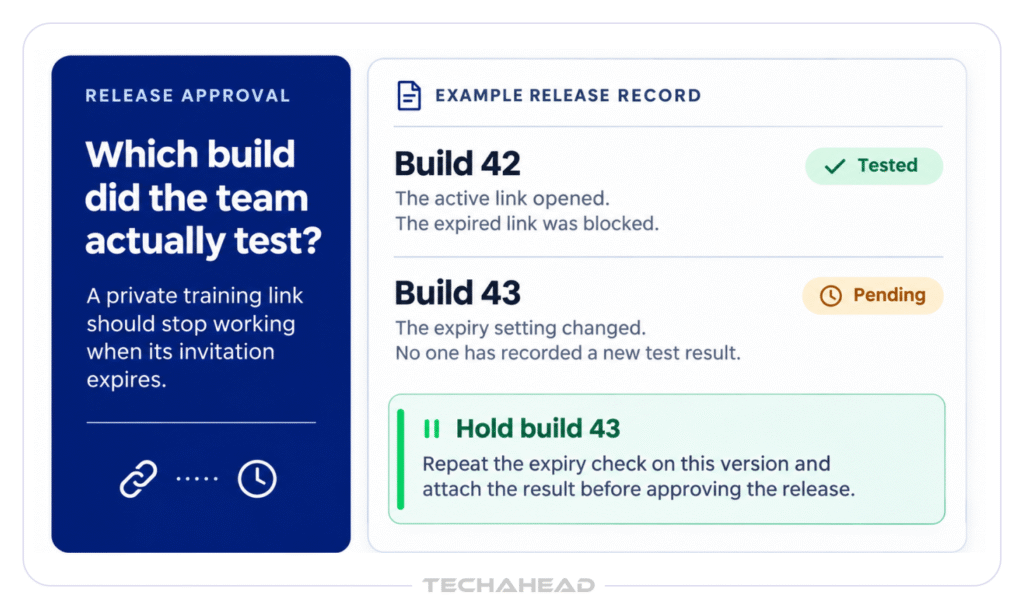
Plans for how to secure AI-generated code also need to account for the conditions customers will encounter. The AI code security checklist can capture who owns production verification and what result would justify pausing a rollout. That gives you a named person to turn to if the application behaves differently after launch.
Confirm that the approved version is running and check the behavior under live settings. For contractor offboarding, a dashboard may show that an account has been disabled. The team still needs to see whether it stays disabled after the overnight sync. A controlled test account and the corresponding audit event give operations a result they can verify.
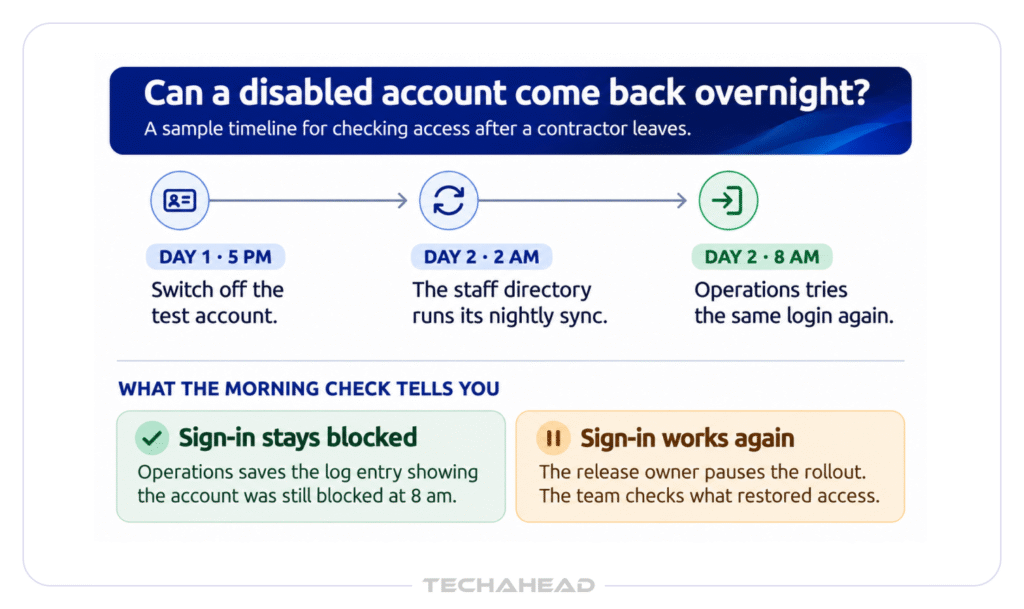
Agree on the expected result for production verification during release approval. If the sync restores access, the release owner needs to know who can investigate and whether to pause the wider rollout. Add the condition that caused the failure to the regression tests so future changes are checked against it. That’s how a secure by design requirement gets stronger as teams learn what happens in production.
Bonus Read: From AI Pilot to Production with Harness (A Software Delivery Blueprint)
These examples show what an enterprise review can uncover when you’ve used AI to build an app and are getting ready to roll it out.
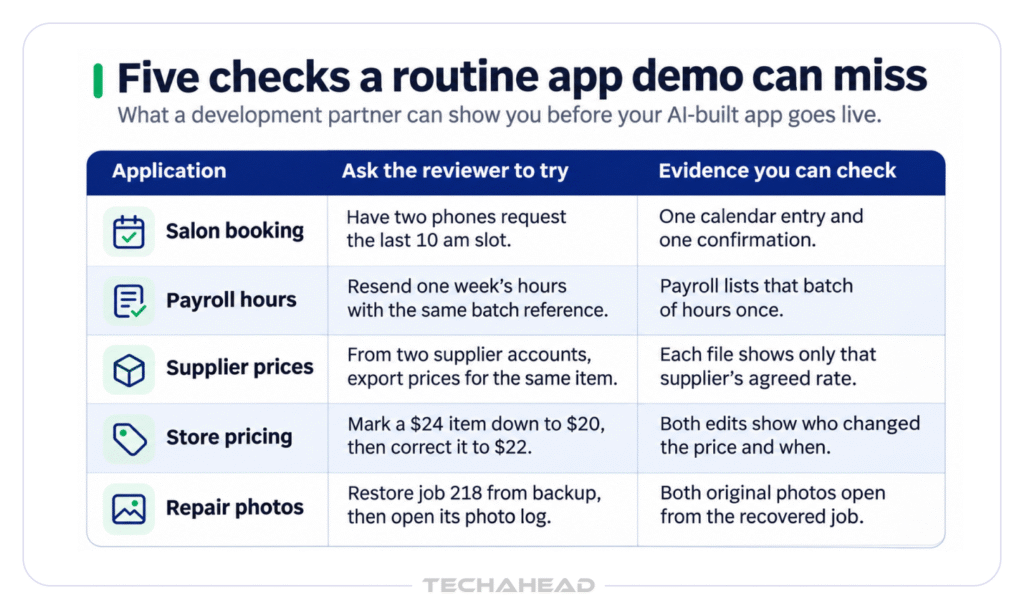
A review gives you a concrete basis for deciding which fixes need to happen before rollout.
A discussion with TechAhead can start with an upcoming release and a workflow that affects customers or operations. The decisions behind secure application development become easier to assess when your team can explain what it promised, what changed, and what evidence it used to approve the release. An unclear rule needs input from the business. A missed test needs engineering work. A final check with no owner needs a decision about responsibility.
That distinction helps you direct secure application development work to the right team.
At TechAhead, with our AI-assisted Secure Engineering services, we can review your security practices for AI-assisted development with your team, including prompts, generated code, dependencies, and deployments. Depending on where the gaps are, we can help with:
Prompt injection is an attack vector that can cause AI models to produce malicious code, so prompts and outputs both need review.
If a secret is exposed in committed code, rotate it immediately before the next release.
If you have an upcoming release, bring the workflow you need to protect and the evidence you already collect. We can help you see where the next check belongs. Connect with us today.
Start with the business rule the change must enforce. Treat AI-generated output cautiously: published testing found a 56% average security pass rate, and 44% of AI-generated tasks introduce detectable OWASP Top 10 vulnerabilities. Review what the code and its supporting files changed for common vulnerabilities and other security vulnerabilities, test the rule independently, and tie the results to the version going live. Assign someone to verify the behavior after deployment.
An application is secure by design when its protections are defined before the code is written. For example, a ticketing app should specify exactly when a transferred ticket stops working for the sender. That rule gives developers and reviewers a shared expectation.
AI coding agent security starts with approving the tools, limiting access to the repositories each task needs, and keeping sensitive information outside the assistant’s workspace. Actions such as changing deployment settings should follow the organization’s existing approval rules.
An AI-generated code review should look at changes to dependencies, permissions, settings, and existing tests. A small feature can affect a separate workflow if it changes a shared component. The reviewer should be able to explain why that wider change belongs in the release.
AI-written tests can help, but the same tool may carry one mistaken assumption into both the code and its tests. Independent security testing checks the application against the agreed business rule, including actions that should be denied or stopped.
Approval should follow the risk of the change. A routine wording update may need standard peer review. A change to who can see supplier prices may also need the person responsible for that access rule and evidence that it works.
Ask for the rule being protected, the test result for the version being delivered, and who approved it. A useful AI code security checklist also shows which checks remain open and who is responsible for following up.
For a SOC 2 examination, the relevant question is how your organization’s controls apply to the changes in scope. Review records, test results, and release approvals can help show how those controls operate. Your auditor determines the evidence needed.
NIST’s framework gives teams a common set of practices for a secure SDLC. For AI-assisted changes, it can help teams document security requirements, review and test the implementation, preserve release integrity, and assign ownership for fixing issues after launch.
Production verification confirms that the approved version is running and that a specific security rule holds under live settings. TechAhead can help define that check, who owns it, and what result should prompt an investigation or a pause.
An outside review can help before a pilot reaches customers or when your team can’t show how a sensitive workflow was tested. TechAhead can assess the code, integrations, and release process, then prioritize fixes based on what the business depends on.
Yes. TechAhead can review an existing application, identify security flaws where code or configuration falls short of a business rule, and help implement and retest priority fixes. The scope can start with one sensitive workflow or cover the broader release process. Because secure code review should verify ai suggestions as well as code completion output, our team uses ai powered tools and other ai systems to check for issues such as cross site scripting, and where needed we can coordinate multiple agents around the same review. AI tools have leaked secrets at a rate of 3.2% in public commits, and AI models show a 21.7% hallucination rate for open-source dependencies, which is why TechAhead reviews both credential exposure and suggested packages in ai powered workflows.
We use cookies to ensure our website functions properly, improve performance, and provide a personalized experience. You can choose which types of cookies to allow below.
Required for core functionality such as security, network management, and accessibility. These cannot be disabled.
Help us understand site traffic and user interactions so we can improve performance and usability.
Enable enhanced functionality and personalization such as language or region preferences.
Used to deliver relevant ads, track campaign performance, and measure advertising effectiveness.