


 Copy Link
 Share on X
 Share on Facebook
 Share on LinkedIn
Always Active
Required for core functionality such as security, network management, and accessibility. These cannot be disabled.

Uncover the transformative potential of digital and mobile solutions for your industry.



 Last Updated: Nov 16, 2026
Nov 16, 2026
 2
 18 min. Read


Key Takeaways
Applications need care long after they go live. The software they depend on changes, older versions lose support, and teams have to keep everything working through those updates. As AI helps researchers uncover security flaws in software that businesses have used for years, some fixes fit into a regular release. Others bring an upgrade forward because the current version can’t take the fix.
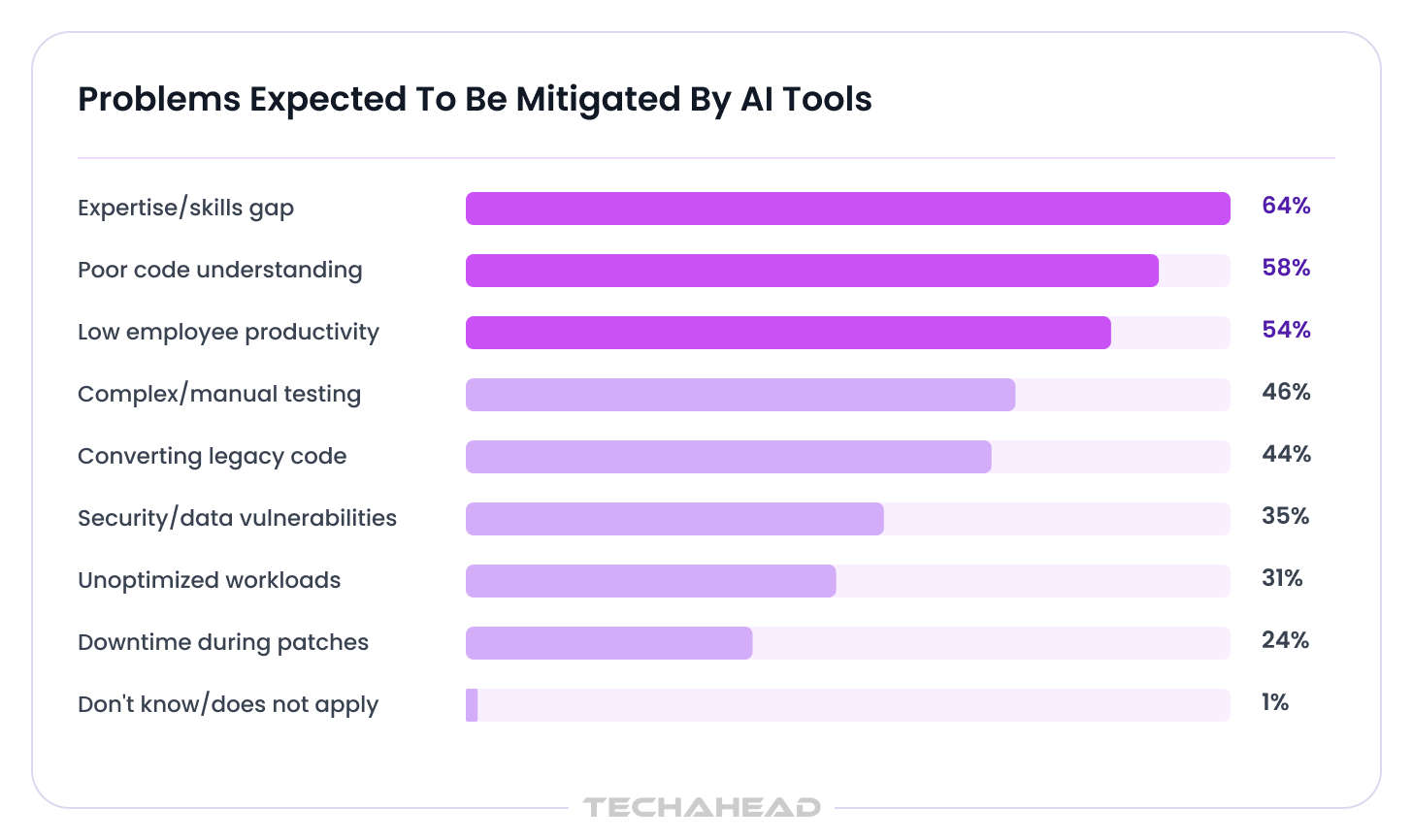
In Forrester Consulting’s 2026 survey, 35% of respondents expected AI tools to help address security or data vulnerabilities, while 58% expected help understanding existing code and 46% expected help with complex or manual testing. Those expectations span the work on both sides of a security finding. Understanding the code and testing the change help a team see whether a fix can go into a regular release or requires an upgrade to older software.
For your business, the opportunity is to see which parts of an application make every update harder than it needs to be. A security finding can make that clear. If the same framework or dependency keeps holding up releases, giving it more weight in your application modernization strategy can make future fixes easier to ship and protect time for planned product work.
Must Read: AI-Generated Code Security: Input Validation, Injection, and Business-Logic Risks
A finding creates work at three points before a fix reaches production.
The Cloud Native Computing Foundation has described what happens when the first part of that process speeds up. Open-source maintainers receive more credible findings alongside reports that sound convincing but turn out to be wrong. Both take time to review. The same pressure reaches companies further down the line, where an advisory may apply to one application and have little bearing on another that appears to use the same software.
Firefox gives a concrete view of what can happen when the findings are usable. Mozilla reported that its engineers validated AI-assisted findings and landed fixes ahead of Firefox 148. The work led to 22 published vulnerability records.
For businesses using the affected software, vulnerability remediation begins with a separate question: can their applications take the published fix?
Also Read: How to Secure an App Built With Claude Code for Enterprise Use
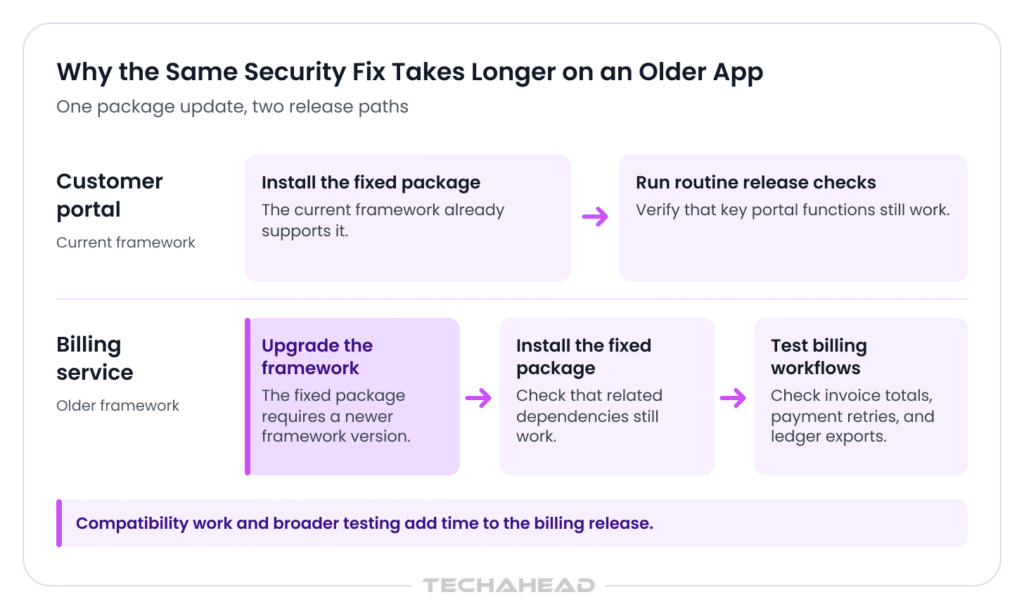
Imagine a B2B platform with a customer portal and a separate billing service. Both use the same software package. The portal runs on a framework that supports the fixed package, so the update can go into a regular release. The billing service runs on an older framework, and the fixed package requires a newer one.
The billing team may never have chosen the affected package directly. It might come bundled with something else the application needs. That’s one reason dependency updates can take more effort than the size of the change suggests. A package buried several layers down can be tied to the framework, and bringing that framework forward can affect parts of the application that have nothing to do with the original finding. Sonatype describes this as a structural source of vulnerability debt. The way the application is put together determines which fixes it can take.
A billing service can build and start successfully after an upgrade even when everyday billing rules have changed.
Regression testing covers the workflows the changed code could affect. In billing, that includes scheduled invoices and payment retries. Older systems may rely on business rules that live in the code or in the heads of the people who run month-end processing.
The release itself can have a similar complication. A portal, its admin console, and a background worker may look like parts of one product to the business, while running from separate builds. The portal can show the fixed version while a worker continues to use an older one. Google Cloud’s guidance on AI-assisted remediation also points to the need for human review and post-deployment controls when a proposed fix could change business logic.
Also Read: Understanding FinTech Application Security Hardening
A security advisory can arrive in the morning. How quickly a company can respond often depends on work done months earlier. The team may already know which versions are running, which ones still receive fixes, and which parts of the application are sensitive to change. When that information is scattered across old release notes and people’s memories, even a straightforward update can start with days of investigation. Assessing legacy systems should also include auditing code quality and operational bottlenecks.
Related: Overcoming Legacy System Complexities in Cloud Migration
Verizon’s 2026 Data Breach Investigations Report found that the median time to fully resolve known exploited vulnerabilities in its reporting dataset rose from 32 to 43 days. As AI helps researchers surface more flaws, application teams may have more findings to assess while still doing the work that gets each fix into production.
Three parts of everyday application maintenance shape how much work the next fix will take:
Over several releases, these details also give engineering leaders a clearer view of where modernization would help. If updates regularly stall because a component can’t move to a supported version, teams should prioritize applications with the highest business impact first, since that often protects the most business value.
If the delay comes from having to verify the same business rules by hand every time, better test coverage may make a bigger difference. Align modernization goals with measurable key performance indicators for better outcomes. Both problems can look like slow patching from the outside, but they call for different investments.
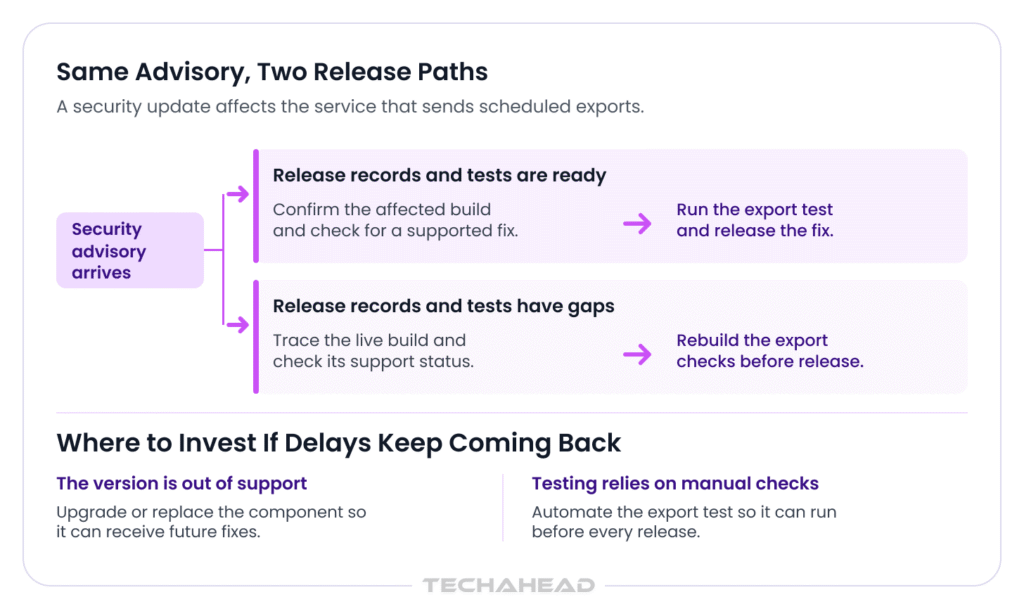
The answer depends on which fixes the deployed software can take and whether the same dependency keeps getting in the way. Those constraints help shape your successful application modernization strategy.
| What the finding reveals | What it means for the application |
| A fix is available for the version in use. | Security patching can fit into an existing release. The engineering work centers on testing and getting the fixed build onto the affected workloads. |
| The fix depends on a newer framework or runtime. | The issue brings compatibility work into scope. A planned upgrade may now have a reason to move forward. |
| A component keeps blocking updates. | Replacing that component may give the application a reliable way to take future fixes. The scope depends on how much business logic has grown around it. |
These application modernization patterns give teams a structured way to decide what should happen next, and they often choose the right path with frameworks like the 7 R’s. In practice, legacy application modernization strategies use that model to compare options such as Rehost, Refactor, and Retire based on current constraints and goals.
That distinction gives a robust application modernization strategy a firmer basis than the age of the software alone. A lift and shift rehosting move applications to the cloud without code changes and is usually a low-risk option. An older application can still be maintainable if it has a supported update path and its critical behavior is well understood. A newer service can be harder to maintain if it depends on a package the team cannot readily upgrade or replace.
These problems come from documented cases. The portal and billing service illustrate how they can show up in business software and how we’d handle them at TechAhead.
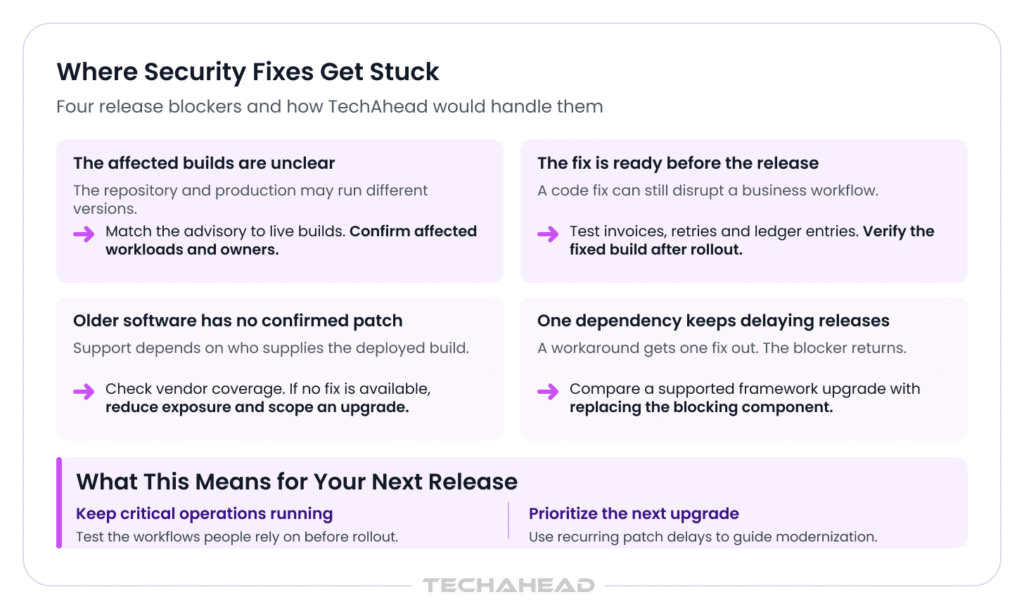
CNCF’s account of the growing review workload matters to businesses that run several versions of the same software. A security team may have a credible finding and a list of repositories that use the affected package. The application owner still needs to know which version is actually running in the portal, the admin console, and the worker that gets rebuilt less often. A repository alone may give an incomplete answer.
How we’d help. We’d compare the advisory with the builds and configurations running in production, then identify the owner of each affected workload. That gives the client a clearer view of vulnerability remediation across the estate. It shows:
Mozilla’s account of the patch gap shows the pressure on security patching. A fix can be ready in code while the release still needs stability testing across different configurations.
How we’d help. We’d build regression testing around the workflows affected by the change. For billing, that could mean comparing invoice totals against known cases, checking what happens when a payment is retried, and confirming how the final record appears in the ledger. The release plan would account for which workloads deploy separately and how we’d confirm that each is running the fixed build.
The recent PHP security vulnerabilities illustrate why the version you run matters. A fix may be available directly from the PHP project for one release, while another may depend on a fix from your hosting provider or operating system vendor. The PHP project publishes its support status, but a company using an older PHP release may also need to establish whether its hosting provider, distribution, or support vendor has supplied a fix for the build it actually runs. An application team can spend valuable time trying to establish that before it knows whether an upgrade is required.
How we’d help. We’d trace the deployed package to its supplier and check what coverage is available. Where there’s a verified fix, we’d scope the release and the checks it needs. Where unsupported software leaves the application without a confirmed update path, we’d work with the application owner on interim protections and scope the compatibility work for a supported release, including data security planning if the upgrade changes data handling and raises data migration risks such as inconsistencies and potential loss.
A temporary workaround can get one release out. If a package is tied to an older framework, the next fix may bring back the same compatibility problem.
How we’d help. We’d look at what keeps that dependency in place. If a supported framework upgrade preserves the billing rules and integrations, that may be a manageable piece of work. When repeated release delays persist, modernizing legacy software can improve agility and lower maintenance costs. If one abandoned component is doing most of the blocking, we’d assess how much of it can be replaced without changing the rest of the service. Budget overruns are common when undocumented legacy code hides dependencies and deepens technical debt.
An application modernization assessment would make the difference visible to the client: which workflows each option touches, how the release could be phased, and whether the result gives the team a supported route for future updates.
An advisory can change the order of work on an application modernization roadmap when a planned upgrade becomes necessary to ship a fix.
McKinsey uses the PHP disclosure to describe a broader shift in software security. As discovery accelerates, more of the work sits in fixing findings and changing the software so the same problems don’t keep coming back. At the application level, that makes a history of delayed releases useful evidence. It shows what a future upgrade would actually improve. A sound application modernization strategy should anchor modernization efforts to measurable business metrics so teams can tie technical changes to business goals and business objectives.
Over half of modernization projects take a year or less, which makes phased app modernization more practical than waiting for a full replacement. On the roadmap, that can also shift priorities toward cloud-native architectures for better scalability and flexibility, while setting up some upgrades to break monolithic applications into microservices.
In the illustrative platform, the portal patch can ship first. The billing upgrade can still deserve more engineering time if the framework has delayed several fixes. That’s the case for legacy application modernization here: the team can point to specific releases it struggled to ship and explain which constraint the upgrade would remove. A modernization plan should follow a phased roadmap with controlled waves and DevOps pipelines.
For applications still running on PHP 7.4 or 8.1, our PHP migration guide explains what that upgrade involves, including the compatibility checks and release planning that help keep critical workflows running.
Sometimes the case for legacy software modernization is narrower still. An internal tool might have years of useful business logic and only one component that keeps it tied to end-of-life software. Replacing that component can be enough to restore a supported update path. This application modernization journey is an ongoing process, and only eighteen percent of organizations have reached continuous modernization. The useful question when considering how to modernize legacy applications is how much of the software has to change before its owners can maintain it reliably again.
A security fix can turn into a larger engineering project when it depends on a framework upgrade or a component that’s no longer supported. Through our AI-native modernization services, we help you build an application modernization strategy around the work needed to get the fix into production. We trace what’s blocking the release and identify which business workflows, integrations, and background jobs could be affected. That gives you a clearer scope for legacy application modernization, whether the work calls for a supported framework upgrade or the phased replacement of one component. Our application modernization services also support successful application modernization by aligning current and future application needs with business goals, available resources, and the right modernization pattern.
For your team, that means a clearer view of what can ship in the current release and where a deeper change would make future fixes easier to deploy. If an older component is holding up a security release, talk to TechAhead about what it would take to ship the fix.
Use your existing vulnerability remediation process. AI can surface more findings for review, but the release decision still depends on whether the finding is valid, which production versions are affected, and how urgently the business needs to respond.
Compare the advisory with the software version and configuration actually running in production. Check separately deployed services and background jobs too. A repository can show that a dependency was updated while an older build is still running.
Give priority to vulnerabilities known to be exploited, especially on internet-facing systems. Then consider the application’s access to sensitive data and its role in critical operations. These details help distinguish an urgent release from work that can follow.
Confirm whether your hosting provider or support vendor offers a fix for the deployed build. If none is available, restricting access or disabling the affected feature can reduce exposure while you plan an upgrade or replacement.
An engineer should review the change, verify that it addresses the finding, and run regression testing on the workflows it touches. TechAhead can help scope those checks around the application’s business rules, integrations, and separately deployed services.
Bring it forward when the deployed framework prevents the application from taking a needed fix, or when the same dependency has delayed several releases. An application modernization strategy can use that history to explain why the upgrade matters now.
Compare the list of affected workloads with deployment records and confirm which build each service is running. Include workers and admin tools that release separately. A follow-up scan, where applicable, can help confirm the finding has cleared.
Keep the advisory, affected systems, risk rating, approval, test results, and evidence of the production deployment. If a patch was deferred, record why, who accepted the risk, what temporary protection is in place, and when the decision will be reviewed.
For in-scope systems, PCI DSS Requirement 6.3.3 requires applicable patches for vulnerabilities ranked critical to be installed within one month of release. Other applicable patches follow time frames based on the organization’s assessment of risk to its environment.
Yes. A TechAhead application modernization assessment can identify what keeps the dependency in place, which workflows rely on it, and whether a supported upgrade or targeted replacement would give the team a reliable way to ship future fixes.
We use cookies to ensure our website functions properly, improve performance, and provide a personalized experience. You can choose which types of cookies to allow below.
Required for core functionality such as security, network management, and accessibility. These cannot be disabled.
Help us understand site traffic and user interactions so we can improve performance and usability.
Enable enhanced functionality and personalization such as language or region preferences.
Used to deliver relevant ads, track campaign performance, and measure advertising effectiveness.