


 Copy Link
 Share on X
 Share on Facebook
 Share on LinkedIn
Always Active
Required for core functionality such as security, network management, and accessibility. These cannot be disabled.

Uncover the transformative potential of digital and mobile solutions for your industry.



 Last Updated: Nov 2, 2026
Nov 2, 2026
 10
 20 min. Read


Key Takeaways
A PHP upgrade proposal should explain what needs to change and what that change will mean for the business. When an application handles orders, billing, or customer accounts, “we’ll update the server and test it” leaves too much unanswered. Which parts of the application need work? What happens to transactions during the switch? Who checks the results?
Datadog’s February 2026 State of DevSecOps report found that 13% of the PHP services in its analysis used an end-of-life runtime.
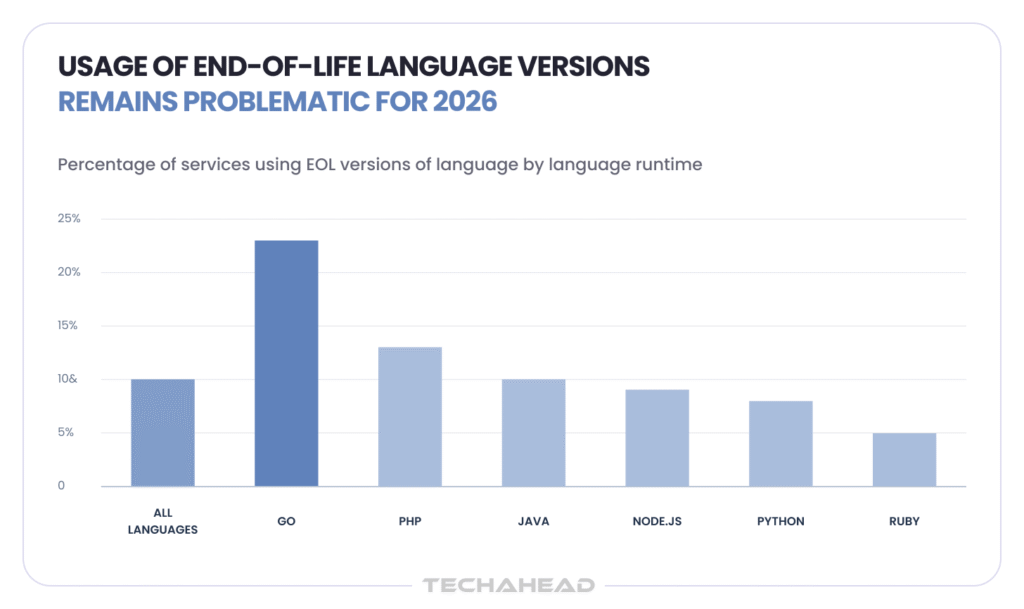
Getting off an unsupported version takes some planning, particularly when other systems depend on the application.
This PHP migration guide explains how to upgrade your PHP version with those dependencies in mind. For US business owners and engineering leaders, it covers the differences between starting on 7.4 and 8.1, the work behind an estimate, and the choices involved in testing and releasing the upgraded application.
Recommended Read: Critical PHP Security Vulnerabilities: What Businesses Need to Assess and Fix
The version number gives you a starting point. The framework, packages, and custom code tell you more about the work ahead. An application on 8.1 can still have a difficult upgrade if an essential dependency has been abandoned.
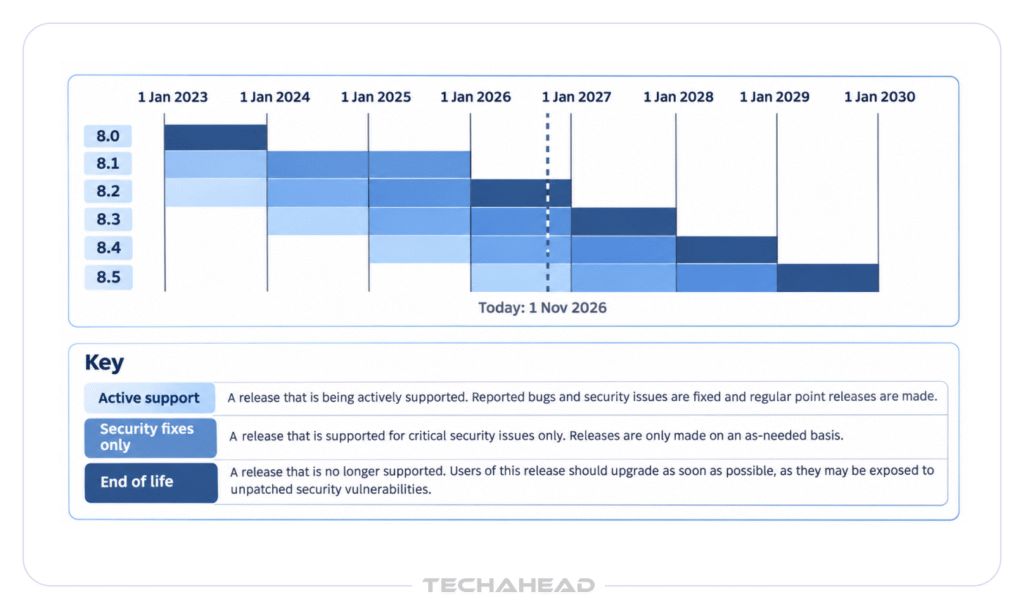
Is PHP 7.4 still supported? Community support ended on November 28, 2022, the PHP 7.4 end of life date. PHP 8.1 end of life followed on December 31, 2025, according to PHP’s unsupported-branches list. If your hosting company or software vendor supplies maintained packages, check what its separate support agreement covers.
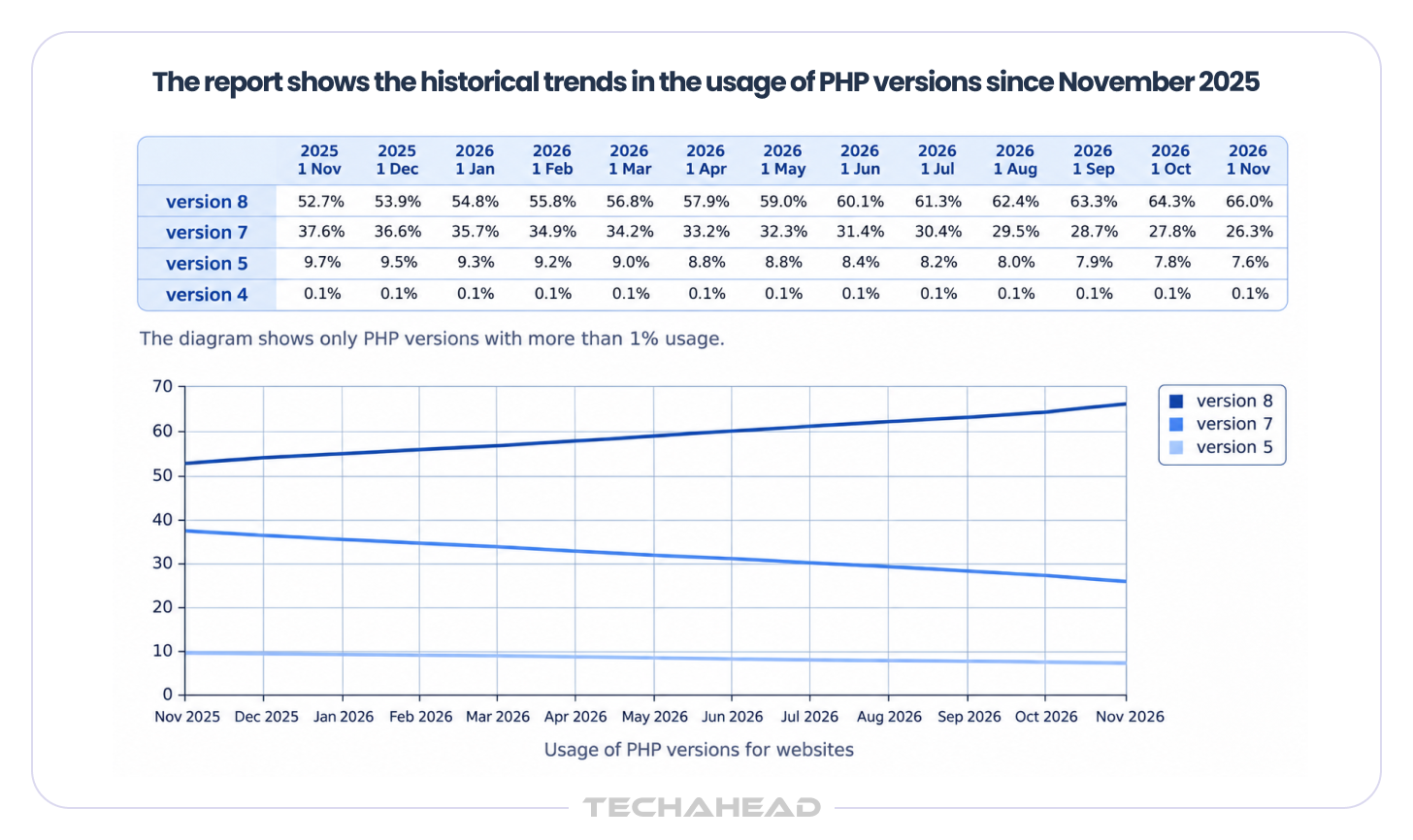
W3Techs’ website measurements put PHP 7 at 26.5% of PHP-version usage on November 1, 2026.
A PHP 7.4 migration crosses the change to PHP 8.0, then picks up the changes in each later release on the way to your chosen version; newer PHP 8 releases also introduce performance-related changes such as JIT compilation, though the main migration work is still compatibility-focused. The official PHP migration guide for 8.0 covers removed features, stricter error handling, and changes to comparisons between numbers and non-numeric strings.
The effects of a PHP 7 to 8 migration can show up in ordinary business functions:
Some failures will be obvious. Others will produce a plausible-looking result that someone needs to check against the expected output.
An application on 8.1 has already crossed the PHP 8.0 boundary. You can concentrate on the later changes, alongside whatever framework and package updates the move requires.
Those changes include dynamic-property deprecations in 8.2 and implicitly nullable parameter deprecations in 8.4. Your developers need to find where the affected patterns occur and whether a package update resolves them. Custom code may need its own changes.
An 8.1 application with maintained packages and useful tests may be straightforward to upgrade. An old payment integration with no supported replacement deserves a closer look before anyone commits to a release date.
It’s tempting to choose whichever release needs the least work today, but even a new minor version can still require real testing and effort. The trouble comes when that release is also close to losing support. You could finish one project and soon find yourself arranging another.
As of October 30, 2026, PHP’s security-support deadlines are December 2026 for 8.2, December 2027 for 8.3, December 2028 for 8.4, and December 2029 for 8.5.
The decision comes down to what your application can support:
You may be able to upgrade PHP 8.1 to 8.4 without extensive changes. If the same dependencies already support 8.5, it’s worth comparing the additional work with the longer support period.
Some projects should still move one version at a time through the relevant migration path, even if every intermediate PHP version never goes into production. A framework upgrade may, however, require changes in a particular order.
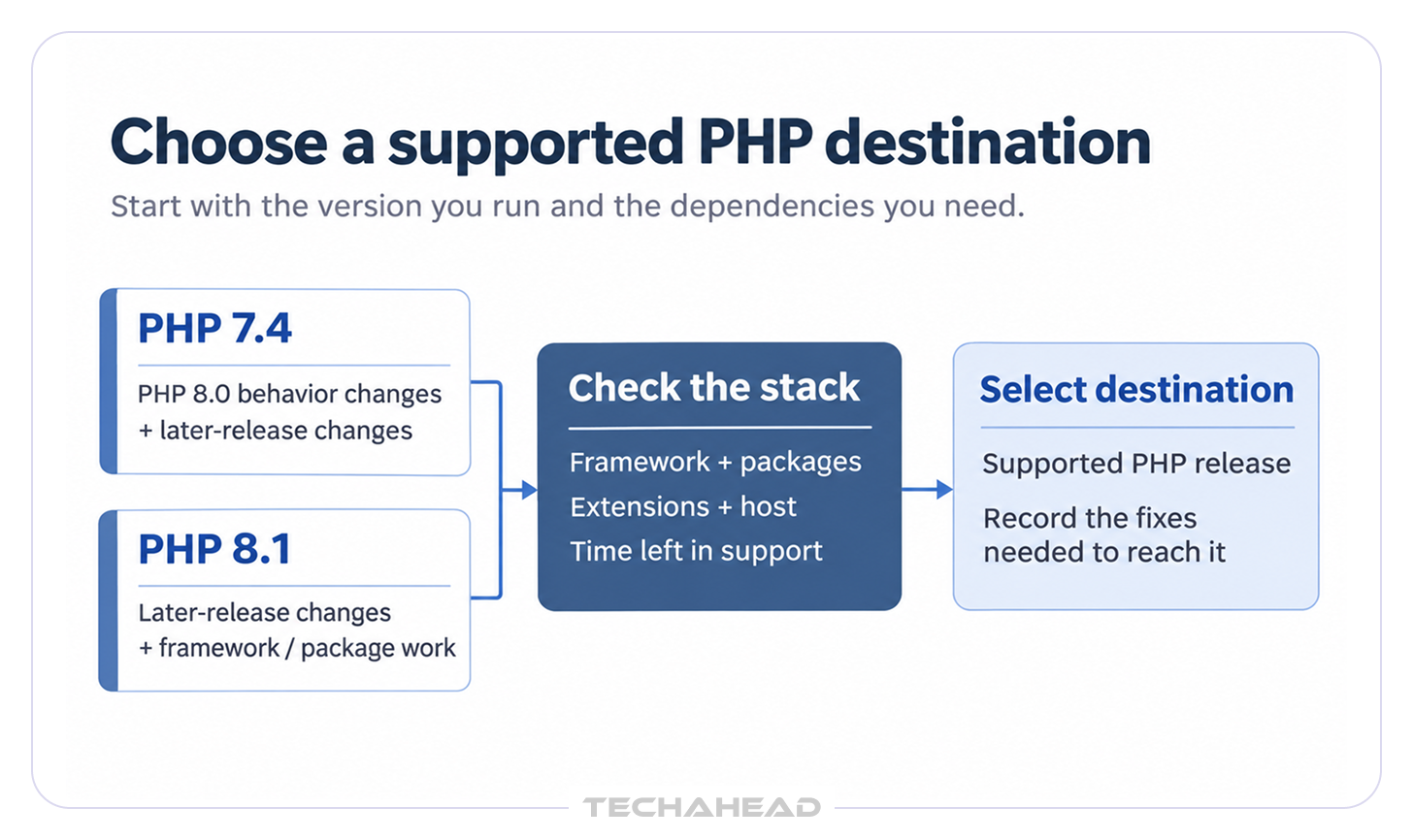
When the application cannot move immediately, PHP 7.4 extended support or maintained distribution packages may buy time. Establish what is covered and when that arrangement ends, then include the migration in the delivery schedule.
The work can be concentrated in a few packages rather than spread across the whole codebase. Datadog’s 2026 research found that the median dependency in its application analysis was 278 days behind its latest major version. A package that hasn’t been updated for several releases may bring its own changes into the project.
What compatibility issues should be checked before a PHP upgrade? Start with the installed application and its actual execution environments. A list of package names is useful, but you also need to know where they run and which processes depend on them.
The customer portal may use one PHP configuration while the nightly invoice script uses another. A PHP version upgrade has to account for both.
The inventory should include:
It’s also worth asking the operations team about infrequent work. A monthly reconciliation or annual export is easy to miss if the review covers only a typical day.
For PHP dependency management, the installed versions and lock file matter. Composer’s dependency and platform checks help identify packages that prevent an upgrade and verify declared runtime requirements. Also reconcile any live server hotfixes with version control before assessing dependency and runtime changes.
The findings usually lead to a few different choices:
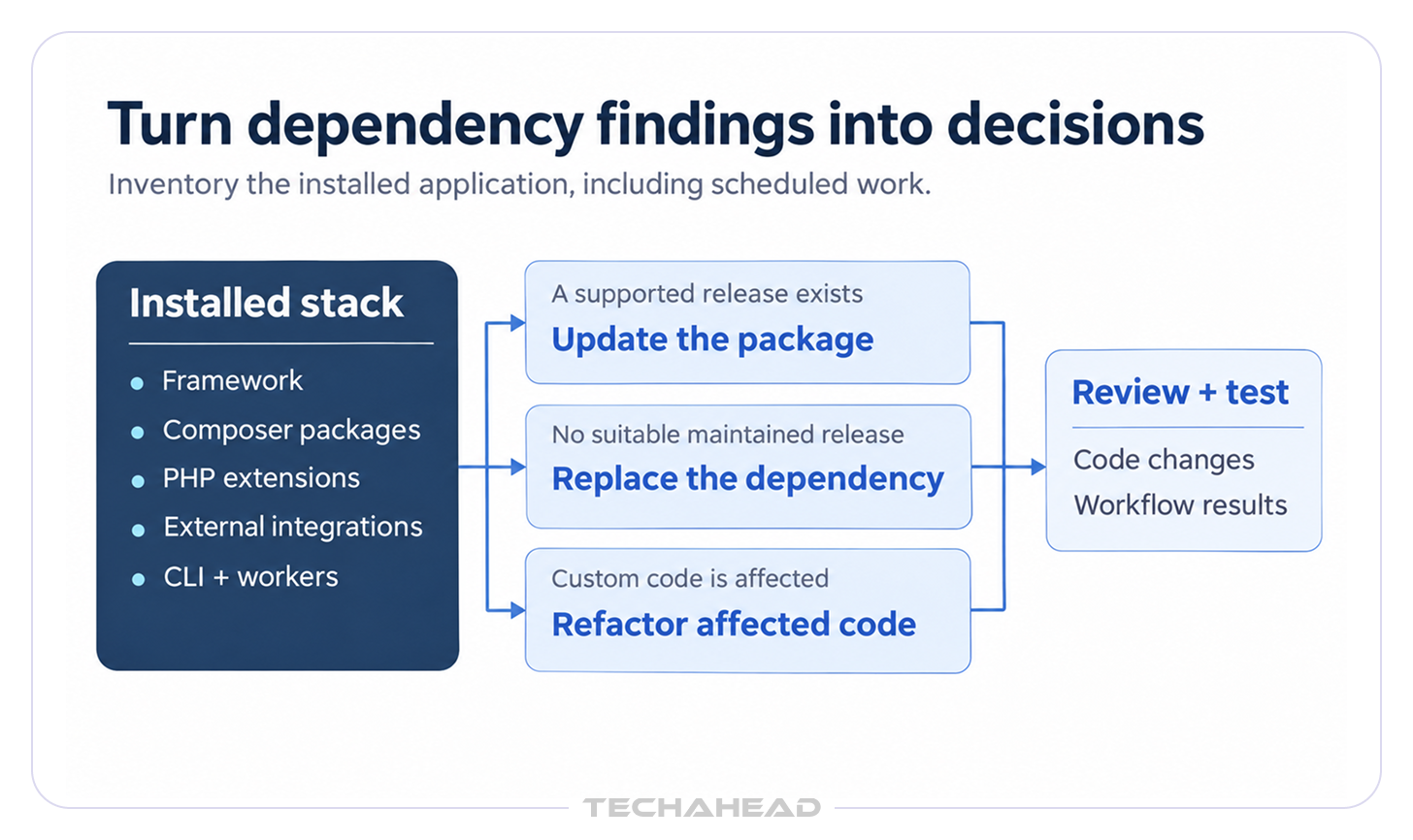
The code review also needs to cover removed features and PHP deprecated functions, together with the PHP 8 breaking changes that affect this application.
A PHP compatibility checker, such as PHPCompatibility for PHP_CodeSniffer, can help locate known problems by scanning code for syntax that breaks on target PHP versions. Its maintainers explain that coverage is incomplete, so the results need to be considered alongside code review and runtime tests.
PHP static analysis helps investigate types and code paths, while automated refactoring can take care of repetitive edits. PHPStan can find type errors and dead code without executing the application. Rector rewrites code with version-specific rule sets, but each fix still needs review. Before accepting the updated Composer dependencies, review the code changes and test the affected workflows. Update CI/CD pipelines to run the test suite against the new PHP runtime and, where missing, run tests and analysis tools on every pull request.
Also Read: Building a Secure CI/CD Pipeline for AI-Generated Code
A payment SDK update might change how errors are returned. An API client might encode a value differently. The connection can work while the application handles the response incorrectly.
Check the outcomes your business depends on: a successful payment, a decline, an expired token, a delayed webhook, or a request repeated after a timeout. For each, the application should leave the right records and trigger the right next action.
For PHP regression testing, a useful question is whether the upgraded application produces the same approved results for the same inputs. That includes exceptions, permissions, and background work, as well as the usual customer journey.
JetBrains’ State of PHP 2025 found that 32% of surveyed PHP developers did not write tests at all. If your application has little coverage, allow time to work with its users and establish what correct behavior looks like.
The finance team may know about a rounding rule that isn’t documented anywhere. Support staff may know which account types need a different approval. Those details belong in the tests for the application’s business logic. Existing defects should be recorded separately so they aren’t accidentally treated as requirements.
| Business Workflow | What the Tests Need to Establish |
| Orders, Discounts, Tax, and Refunds | Totals, rounding, status changes, and accounting records are correct |
| Payments and Webhooks | Success, failure, repeated events, and retries are handled correctly |
| Access and Permissions | Users can complete permitted actions and cannot access restricted records |
| Reports and Exports | Records, dates, encodings, totals, and file formats match the expected output |
| Scheduled Jobs and Queues | Work completes as intended, with failures and retries visible and duplicate effects prevented |
For US operations, include the relevant time zones, daylight-saving changes, and business-specific tax or billing rules. Use protected, authorized test data and isolate external payment and messaging effects during rehearsal.
Run PHP regression testing against an environment that reflects production extensions, configuration, database behavior, and integrations. Manual QA is still needed to check critical user journeys and key database interactions that automated tests may not fully cover. Findings from PHP static analysis can help identify additional cases to investigate.
Before the release, engineering and business owners need to agree on:
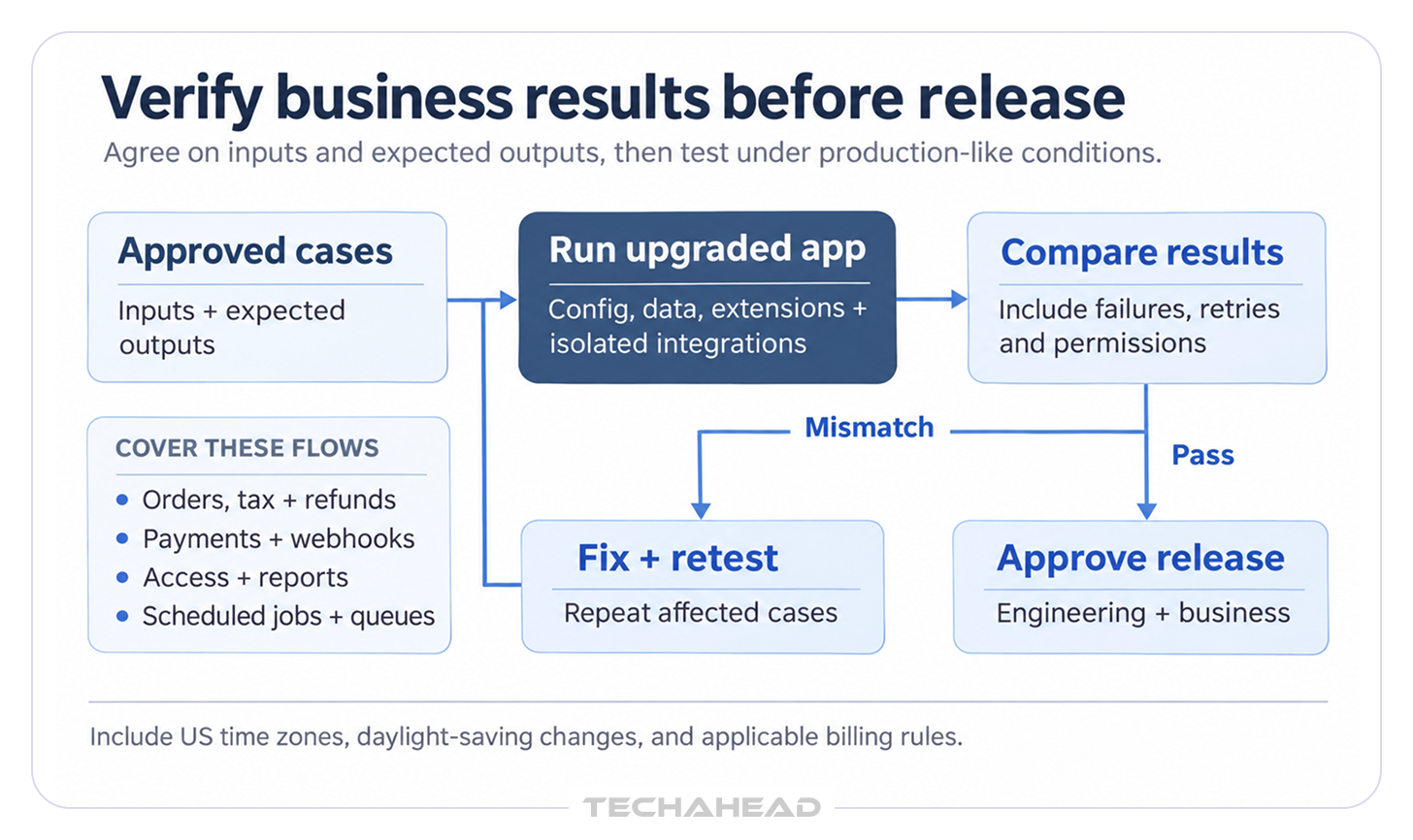
In a PHP 7.4 migration, pay particular attention to PHP 8 breaking changes that alter results without stopping execution. A report that finishes on time can still contain the wrong numbers.
How can businesses migrate PHP applications without disrupting operations? The answer depends on whether the application can keep processing work while old and new instances coexist. Some systems can make a gradual switch; others need an agreed maintenance window.
The stakes can be substantial. Uptime Institute’s 2026 outage analysis, drawing on its 2025 annual survey, reports that 57% of respondents said their most recent major outage cost more than $100,000. One in five said their most recent impactful outage cost more than $1 million.
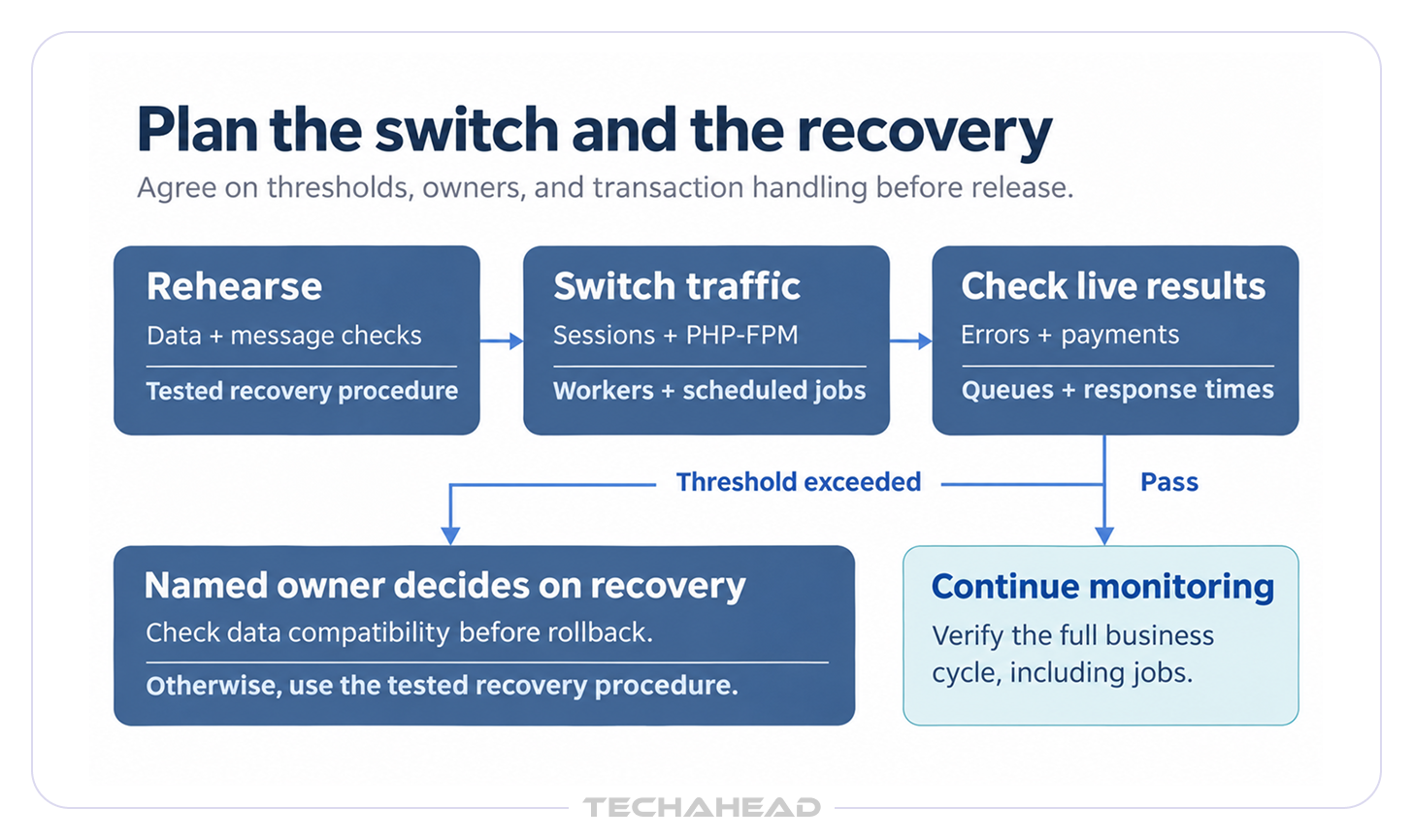
Before deployment, work through what happens to sessions, uploads, database writes, caches, workers, and scheduled tasks. If both application versions run at once, they need to understand the shared data and message formats. Include restarts or replacement of PHP-FPM processes and long-running workers in the release plan where applicable.
The team needs to know which release it would return to, what would trigger that decision, who can make it, and how to handle transactions received since the switch.
Keeping an old container image helps, but there may also be database changes to consider. If the new application writes data the previous version cannot read, changing the runtime back won’t resolve the problem. Restoring an earlier database could also remove legitimate orders placed after deployment.
A recovery plan needs to cover:
Agree on the conditions for stopping the release before it begins. Payment failures, unexplained discrepancies, or a growing job backlog need a named decision-maker and an agreed threshold.
After deployment, compare errors, response times, completed transactions, and scheduled processing with the earlier baseline. Keep checking through the relevant business cycle. An overnight billing run or month-end export may reveal a problem after the initial release monitoring has finished.
A well-documented PHP 7.4 migration with maintained packages can be easier to estimate than legacy code with missing tests or poorly understood behavior, even when the application is already on 8.1 and the deployment process is uncertain.
Also Read: Legacy System Modernization (Key Strategies for Future-Proofing Your Enterprise)
For a PHP version upgrade, the proposal should make clear:
A PHP Security & Upgrade Services review should give you a better basis for approving that estimate, including the issues that still need investigation.
When should a PHP application be upgraded instead of rewritten? Keep the project focused when the application still serves the business, its important behavior is understood, and its dependencies have a maintainable way forward, since moving to a newer version is often the better path when the system still fits the business.
| What the review finds | Work worth considering |
| Maintained framework and a manageable set of incompatibilities | Runtime and dependency upgrade |
| Useful application with a few obsolete components | Upgrade with selective replacement or refactoring |
| Unsupported framework and tightly connected code throughout the application | Phased modernization, with cost and continuity assessed together |
| Application no longer fits how the business operates | Replacement assessment, including the transition of data and integrations |
If your PHP 7 to 8 migration involves substantial framework replacement, we can compare the upgrade with a phased approach through our legacy modernization services. The comparison should explain what each option preserves, changes, and costs to maintain, especially because some legacy PHP applications may justify phased modernization while an old PHP version by itself is not enough reason to rewrite.
Your existing developers may be the right people to deliver the upgrade, but the team may also need skills relevant to the specific framework version and deployment approach involved in the migration. They know the application and its exceptions. The practical question is whether they also have time for the investigation, testing, and production work.
Outside PHP migration services can help when the project involves:
The work can be shared. Your engineers might verify the business logic while a partner investigates compatibility problems or supports deployment. Agree on that division early, including who owns acceptance and who is available if something fails after release.
Through our PHP Security & Upgrade Services, we would use the official PHP migration guide to review the changes affecting your code, then examine the dependencies and operating conditions around it, mapping realistic PHP migration paths based on the application, framework, and dependencies.
What should a PHP migration assessment include? You should come away knowing which version is feasible, what prevents the move today, and what the next piece of work involves. That includes:
Supported PHP versions matter for security and compliance planning, especially when an unsupported branch no longer receives an official fix from the PHP project.
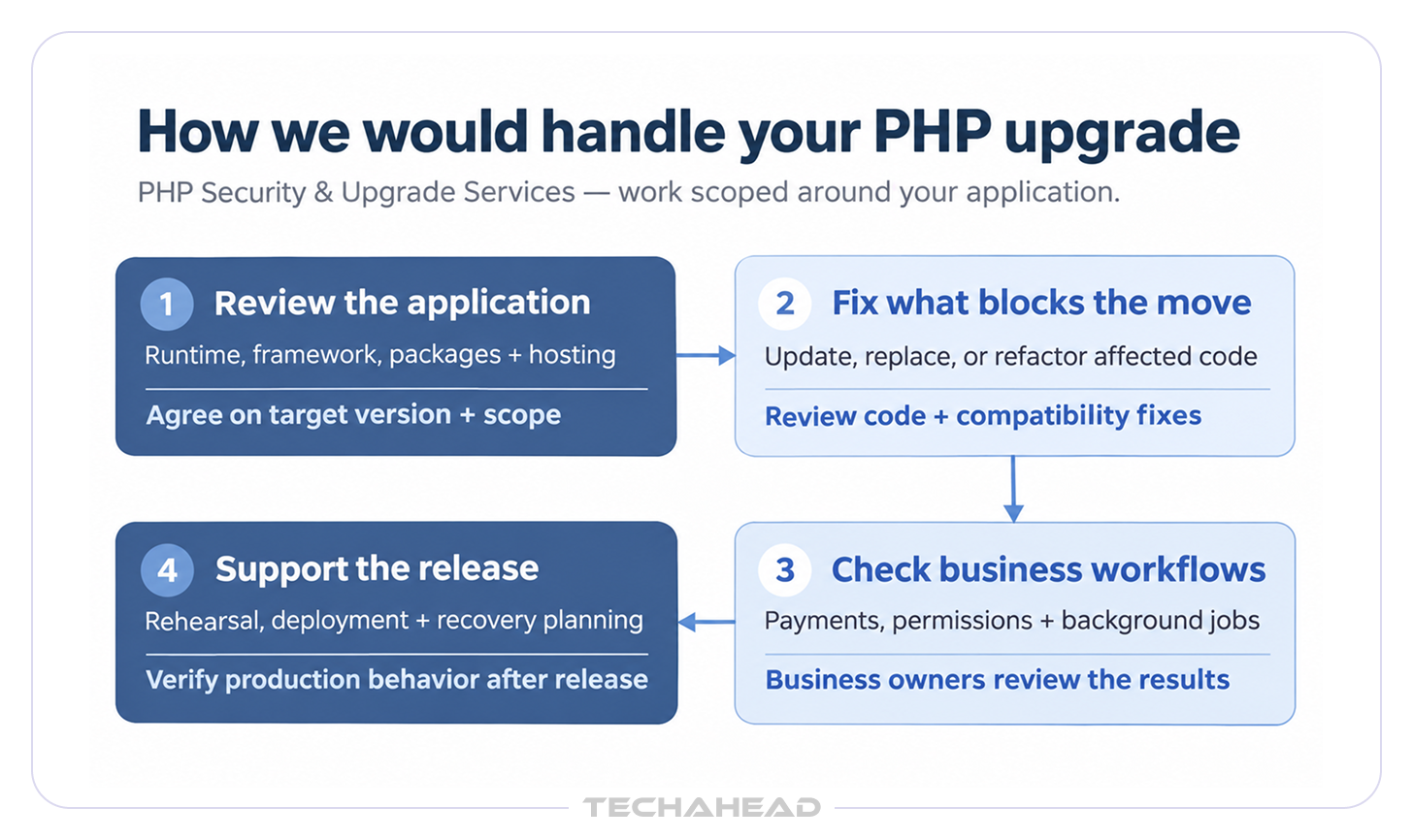
The application’s condition would determine where we spend our time, with human review alongside automated checks before changes are approved:
We would check whether the framework and custom modifications can reach a maintained release, and identify components that need replacing. That gives the PHP 7.4 migration a defined scope before wider changes are proposed.
After PHP 8.1 end of life, staying on an old integration may prevent a necessary upgrade. We would compare an updated SDK, a replacement package, or changes around the integration, then test the affected payment or authentication flow.
We would agree on acceptance cases with the people who own the application. PHP compatibility checker findings would inform the code changes; workflow tests would establish whether the business logic still produces the approved results, while building a repeatable test suite if the application starts with few useful tests.
We would coordinate the environment changes with your host and agree on the release window. The PHP migration services scope would identify who handles rehearsal, worker restarts, production checks, and recovery.
Ongoing PHP dependency management is easier to budget for when it has an agreed place in maintenance work:
Gartner estimates that by 2028, infrastructure and operations leaders using structured methods to manage infrastructure technical debt will report 50% fewer obsolete systems than those who do not. A maintenance owner and a recurring review give the application a better chance of staying off the overdue-upgrade list.
Use this PHP migration guide to question the scope of a proposed PHP version upgrade. You should know the destination, the changes required, how the important workflows will be checked, and who is responsible for deployment and recovery. Remaining security findings and deferred improvements also need an owner.
Through PHP Security & Upgrade Services, we can help you examine those questions against your application.
Contact us to discuss the version you’re running, what is making the upgrade difficult, and the work needed to move it forward.
Yes, when the framework and dependencies support the destination. A PHP 7.4 migration still needs a review of PHP 8 breaking changes and intervening releases. Some projects move one version at a time when major-version gaps, framework constraints, or testing risk make that safer, and some framework upgrades require staged changes before the final production switch.
For a PHP version upgrade planned in late 2026, evaluate PHP 8.4 or 8.5 against framework compatibility, PHP extensions, and hosting support. Use the latest security patch in the chosen branch and compare its remaining support period. PHP 8.2 is close to or past its support deadline in this timeline, so teams should plan beyond it unless there is a short-term constraint.
Review installed Composer dependencies, the lock file, framework requirements, PHP extensions, and vendor SDKs. Composer’s dependency checks identify declared version conflicts. PHPCompatibility checks target PHP versions for syntax issues, while PHPStan finds type errors in application code without running it. TechAhead can help decide which components to update, replace, or refactor before the upgrade.
No. A PHP compatibility checker identifies known language issues, but coverage is incomplete. Combine its findings with PHP static analysis, dependency reviews, and PHP regression testing of payments, permissions, reports, and background jobs before approving deployment, and ensure automated findings still receive human review before deployment approval.
Start by documenting approved results for revenue-critical workflows and their exceptions. Build PHP regression testing around payments, billing, access, and scheduled jobs. Legacy code often needs extra characterization because deprecations, warnings, or removed behavior can become fatal errors in a later release. At TechAhead, we would agree acceptance cases with application owners before changing business logic.
Possibly, if old and new application instances can safely share data, sessions, and queue messages. Rehearse the deployment, monitor transactions, and define recovery thresholds. Manual checks should cover critical user journeys on the site as well as order and payment flows. Use a maintenance window when the application cannot support a gradual switch.
Define rollback triggers, decision-makers, the previous release, and a tested recovery procedure. Check database compatibility, new transactions, queued work, and external payments. Reconcile activity since deployment before restoring data or returning traffic to the previous application.
No. A PHP version upgrade can help address vulnerability-management requirements, but PCI DSS also covers the wider payment environment. Compliance programs often expect supported PHP versions and current standards such as the latest version of PCI DSS. Document patches, security testing, change approvals, and remaining findings; confirm applicable requirements with your PCI assessor.
Review how the PHP migration affects access controls, audit logs, backups, and electronic protected health information. Update the risk analysis, protect test data, and document verification. A runtime upgrade alone does not establish HIPAA compliance.
Ask for an application-specific scope covering compatibility fixes, workflow tests, deployment responsibilities, and post-release checks. A specialist should assess the custom code, framework path to the target version, and release-impacting features or breaking changes. TechAhead’s PHP migration services would focus on the identified blockers, with your team involved in business acceptance and release decisions.
We use cookies to ensure our website functions properly, improve performance, and provide a personalized experience. You can choose which types of cookies to allow below.
Required for core functionality such as security, network management, and accessibility. These cannot be disabled.
Help us understand site traffic and user interactions so we can improve performance and usability.
Enable enhanced functionality and personalization such as language or region preferences.
Used to deliver relevant ads, track campaign performance, and measure advertising effectiveness.