


 Copy Link
 Share on X
 Share on Facebook
 Share on LinkedIn
Always Active
Required for core functionality such as security, network management, and accessibility. These cannot be disabled.

Uncover the transformative potential of digital and mobile solutions for your industry.





 Last Updated: Oct 26, 2026
Oct 26, 2026
Last Updated: Oct 26, 2026
Oct 26, 2026  9
9  24 min. Read


Key Takeaways
Your customer portal is working. Orders are coming through, employees can sign in, and nobody has reported an outage. Then an advisory about critical PHP security vulnerabilities arrives, and a routine question becomes difficult to answer: which of your applications actually use the affected runtime?
The public website may belong to a hosting provider. Your portal may run in containers maintained by another team. An older application may still depend on the server configuration its original developer left behind.
Your first assessment should establish which applications have a verified fix, which need an update, where compatibility is blocking that update, and whether suspicious activity needs investigation. Some applications may still be unassessed. That uncertainty needs an owner and a decision about exposure while the facts are established.
The scale deserves attention. W3Techs’ October 25, 2026 snapshot identifies PHP on 69.2% of websites whose server-side programming language it can determine.
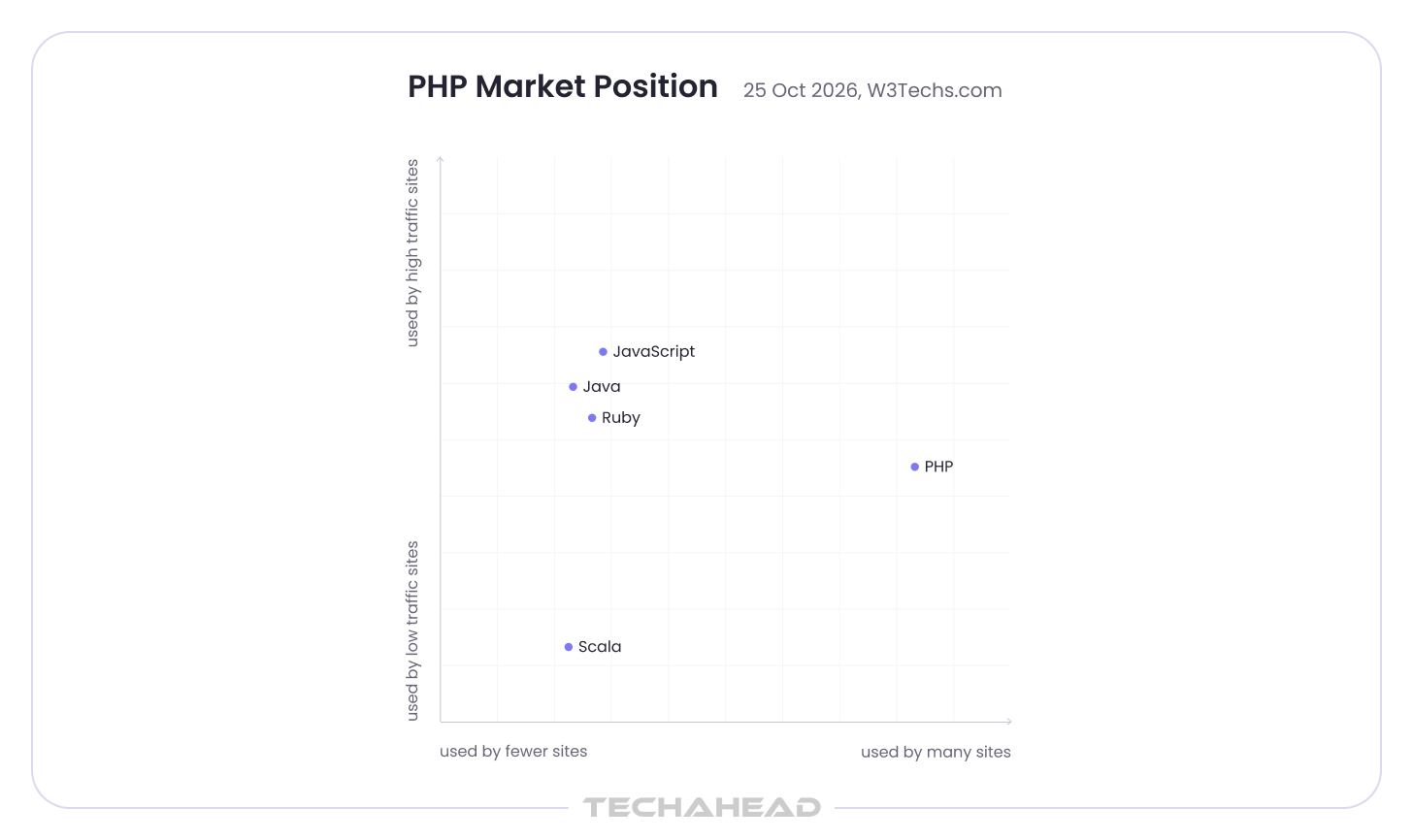
That measures usage, not the percentage of websites vulnerable or compromised. However, the immediate question should be: where do the disclosed PHP security vulnerabilities affect your applications, what needs to change, and how will you know the fix is complete?
The October 2026 disclosures concern flaws in the PHP engine, the software executing your application code. A well-maintained framework or recently updated CMS can still sit above an affected runtime.
The original pair, commonly discussed as PHP2Shell, can allow unauthenticated remote code execution under applicable conditions. In practical terms, an attacker could execute code with the affected web worker’s privileges. Researchers also demonstrated disclosure of sensitive information from worker memory.
The maintainers’ advisories distinguish the underlying failures:
| Verified vulnerability | What goes wrong | Why it matters to your application |
| CVE-2026-109618 | An out-of-memory interruption can leave internal request data partially initialized; cleanup then handles invalid state. | Exploitation can occur below your application logic. A login screen does not establish protection against a path reached before that logic runs. |
| CVE-2026-109619 | Request-owned state can remain accessible after its memory has been released and be reused by a later request. | Worker reuse and relevant application behavior matter. Restarting a worker may clear its current state, but a lasting fix requires updated code. |
Both received CVSS v4.0 scores of 9.2. The official out-of-memory advisory and stale-state advisory document the confirmed impact and deployment-specific requirements.
Wiz’s original research demonstrated attacks against WordPress, Drupal, and Joomla deployments, while explaining that the vulnerable code belongs to PHP itself. Those demonstrations do not limit the concern to CMS websites. Your custom portal or commerce platform also needs assessment.
This is different from an injection flaw introduced in an application’s database query. Fixing the runtime closes the disclosed runtime vulnerabilities; application-level security still needs its own evidence.
OpenAI’s coordinated-disclosure account describes work across maintainers, researchers, and providers to prepare fixes and protections. Your organization still needs to establish where those fixes have reached production.
| October 23 update: PHP subsequently identified CVE-2026-115560 involving an unusual combination of session configuration and application behavior. Its informational advisory explains the affected configuration and recommends disabling session upload progress pending the regular bugfix release for that vector. Your team should check those conditions separately from the original two vulnerabilities. |
A PHP vulnerability assessment starts by connecting each business application to the runtime actually answering requests. You need to establish which installation serves it, whether the applicable fixes are active, and who owns the next action.
That includes systems you did not develop. PHP may be bundled within a vendor product, hosting package, appliance, or administrative tool. CERT-EU’s advisory identifies web-serving deployments including PHP-FPM, Apache mod_php, php-cgi, FrankenPHP, and LiteSpeed. It highlights mod_php as the highest-risk setup while keeping the wider deployment scope in view.
Ownership often takes longer to establish than the software version. The person responsible for the customer experience may have no permission to change PHP. The infrastructure team may control the host but lack the application knowledge to validate an upgrade.
A useful assessment connects:
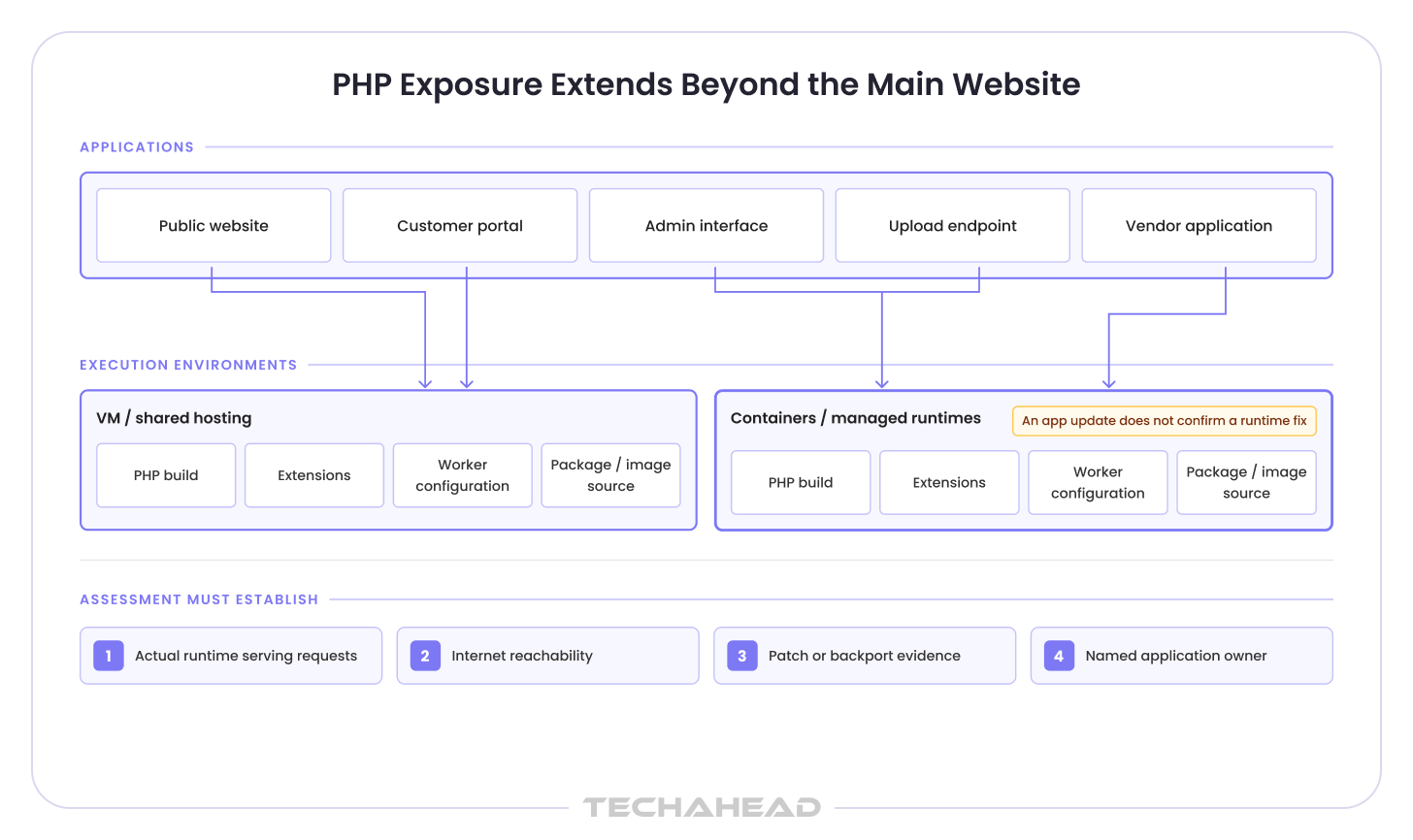
For an IT review, the useful output is a status for each application: verified fixed, affected and awaiting remediation, or not yet assessed, with suspected compromise tracked separately. An inconclusive scan or a provider response without supporting details belongs in the unresolved group. The record should name who will obtain the missing evidence and when it will be reviewed.
A developer might begin with this small inventory check:
| php –version php –ini php -m |
These commands show the selected command-line interpreter, its configuration files, and loaded modules, as documented in the PHP command-line manual. They do not prove that your website uses that same interpreter. A host can have multiple PHP installations, while a container or FPM pool serves the application through another one.
That distinction matters when someone reports, “We checked PHP and it is current.” You need to know which PHP installation was checked.
If that information is scattered across teams and providers, our PHP Security & Upgrade Services can help connect the application inventory with exposure findings and a defined remediation scope.
Prioritizing PHP security vulnerabilities means looking at how each application is exposed and what it can access. An internet-facing portal holding customer records presents a different containment decision from a restricted internal application. Both need assessment, and an unknown patch status needs investigation rather than an assumption that your hosting provider has handled it.
Consider a commerce platform. Its storefront, payment callback endpoint, and administration interface might use different deployment paths. Taking the storefront offline may leave another PHP endpoint reachable. The containment decision needs the application’s actual request paths and dependencies.
For a customer portal, the consequences may extend to database credentials or integration secrets available to the worker. For an internal enterprise system, tightly coupled processes can make even a brief interruption expensive.
You need security and application owners in the same conversation: which exposure must be reduced now, which workflows must remain available, and what controlled change can close the gap? If a fix is deferred, the business owner and the person authorized to accept the remaining risk need to understand the proposed controls, their limits, and the next review point. An engineering blocker should not silently become permission to leave an application exposed.
The initial upstream fixes for the original two vulnerabilities were released on October 21, 2026.
| PHP branch | Initial fixed upstream release for CVE-2026-109618 and CVE-2026-109619 |
| PHP 8.2 | 8.2.35 |
| PHP 8.3 | 8.3.36 |
| PHP 8.4 | 8.4.27 |
| PHP 8.5 | 8.5.12 |
These are incident-specific fixed releases. A later release or additional advisory may change the appropriate deployment target. PHP’s release notice also directs organizations using distribution and LTS packages to their vendors, which may backport fixes without adopting the same upstream version string.
That is why a version scanner and a provider’s patch statement can appear to disagree. The resolution is the vendor’s advisory and complete package-build information, followed by evidence from the running application.
An update also has to reach the processes handling requests. Replacing a package on disk leaves work unfinished if old workers continue running. Some managed environments are updated automatically, while others still require rebuild and redeploy steps to apply patched PHP.
Container deployments require attention to deployed replicas and the images used for future releases. Google Cloud’s response guidance illustrates how responsibilities vary across managed runtimes, custom containers, and redeployment arrangements.
Temporary controls can reduce exposure while that work proceeds. Their limits need to remain visible:
The maintainer’s stale-state advisory describes path-specific measures, including session upload-progress settings. It does not turn those measures into a complete substitute for patching the original vulnerabilities.
Memory-related changes also have availability implications. Removing PHP’s memory cap without appropriate surrounding controls can create resource-exhaustion problems. Any such measure needs review against the current official guidance and your deployment.
PHP vulnerability remediation often stalls over a business workflow nobody wants to break. When your team says “we cannot patch yet,” the useful next question is which dependency or application behavior is preventing the update.
Perhaps a document-processing extension has not been tested on the proposed release. A payment integration may rely on an older package. The person who understands the overnight import may have left the company.
These are specific engineering questions. They become harder to manage when grouped into a general fear of upgrading.
An application already running a supported branch may have a much narrower remediation path than one that needs to move across major versions. Keeping those changes distinct helps you avoid turning an urgent patch into an unnecessarily large project.
For a commerce application, useful acceptance checks might cover:
Your test plan should combine regression and integration testing so you can check both existing functionality and the connections affected by the PHP update.
Imagine a customer portal that accepts documents during the day, where file uploads can also belong in the regression scope because upload handling may trigger the out-of-memory condition, and processes them through a scheduled import overnight. A candidate upgrade passes sign-in and upload tests, but the import fails because a required extension is missing from the new environment.
Your team now has a specific deployment problem to resolve: provide a compatible extension, rebuild the candidate environment, and validate the import and resulting records. That finding may require a bounded change rather than a redesign of the portal. Until deployment is complete, the original runtime’s exposure still needs a separate decision.
The test scope should reflect what your application does with money, records, access, and external commitments. A successful homepage request provides very little evidence about those behaviors. Even when upgrade testing must continue, immediate patching still matters.
Older environments make this problem more visible. In its October 25 snapshot, W3Techs reports PHP 7 on 26.8% of websites identified as using PHP. That usage estimate does not reveal each site’s vendor support or patch status. However, it does explain why older-branch remediation deserves serious coverage, because older versions outside active support can leave organizations exposed to unresolved security and compatibility problems.
Your options may include a vendor-supported backport, a package replacement, a bounded code change, or a staged upgrade to a supported branch. Each needs a support position and validation plan. Organizations should update to the latest version available for a supported branch rather than remain on unsupported releases.
If the dependency problem extends beyond the runtime, comparing legacy application modernization approaches can help you distinguish a targeted refactor from a more substantial platform change.
When dependencies block PHP security patches, our PHP Security & Upgrade Services can help identify the incompatibility, assess supported alternatives, and implement the changes needed to deploy the update.
PHP vulnerability remediation is complete only when the applicable fix is active across the affected applications. A deployment ticket records an attempted change; closure also needs evidence from the running runtime and the business workflows it supports.
That means identifying the patched package or build, confirming the running runtime, replacing affected workers, and checking application behavior; remediation records should also show whether the relevant web server workers or PHP-FPM processes were replaced. Images and deployment templates matter too; otherwise, the next routine release can bring the older runtime back.
Review web server access logs and PHP-related process activity as part of verifying remediation and checking for suspicious behavior.
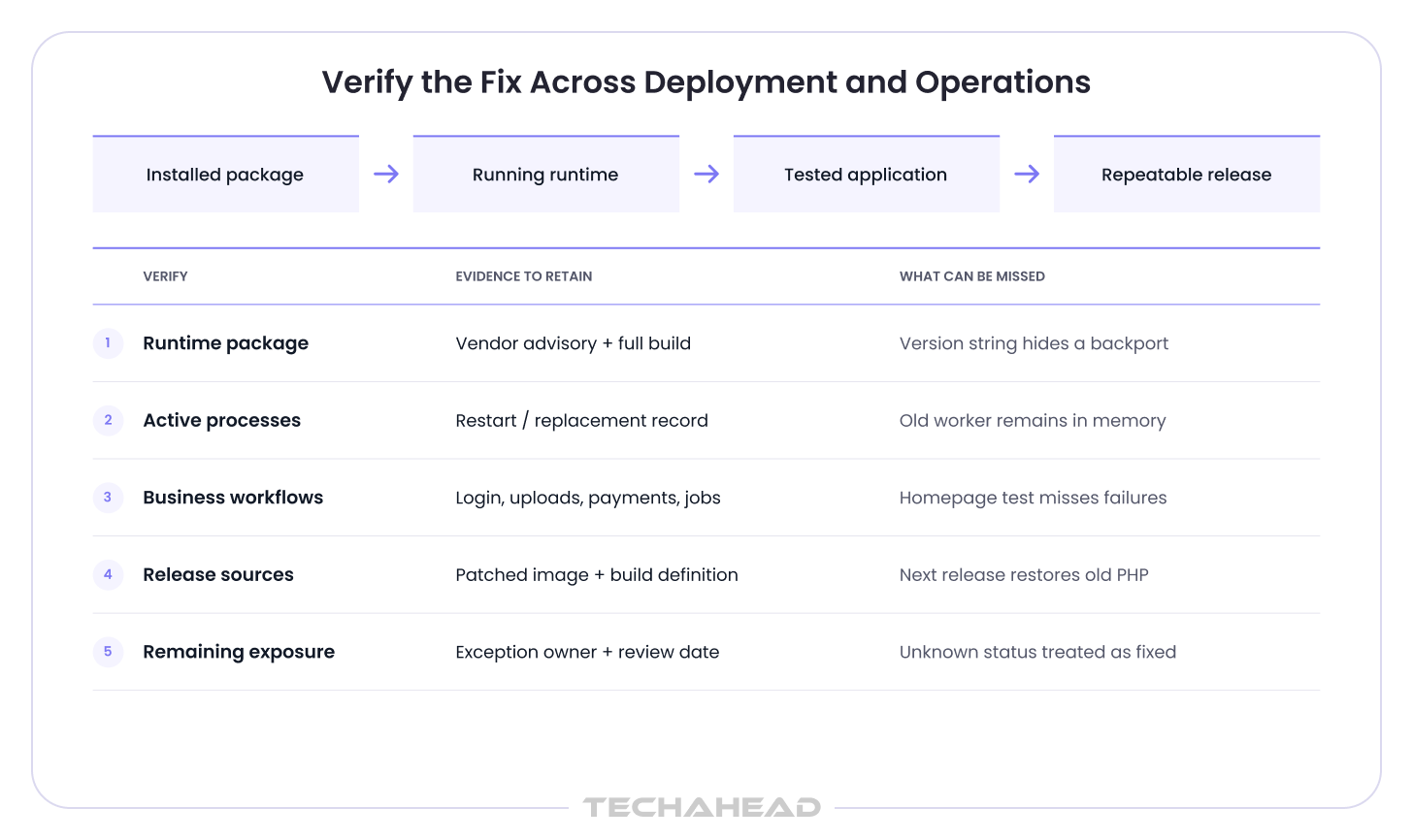
A useful remediation record connects the affected application to the advisory reference, fixed build, deployment evidence, and critical-flow results. It also separates completed work from unresolved exceptions. Each exception needs an owner, a temporary control where appropriate, and a review date; the person approving closure should be able to see exactly what remains outside it.
If AI-assisted tools helped prepare upgrade changes, those changes still need review, dependency checks, and regression tests. Our guide to building a secure CI/CD pipeline for AI-generated code explains how to incorporate those checks into delivery. That principle applies when an assistant proposes an upgrade fix as readily as when it generates a new feature.
Mandiant’s M-Trends 2026, based on its 2025 investigations, identifies prior compromise as the initial infection vector in 10% of intrusions globally.
This finding concerns intrusions across technologies. For your PHP application, the question is whether an attacker established access before the update and could retain it afterward, as a bad actor may persist through stolen session material or exposed credentials even after patching.
Unexpected worker child processes, unexplained application-file changes, unusual outbound activity, or potentially exposed credentials may warrant investigation. They are leads to examine in context, not standalone proof of an attack. If compromise is confirmed, affected services may need to rotate secrets and ask users to change passwords.
The UK NCSC guidance specifically calls for compromise assessment when an organization cannot promptly update or disable an affected system.
Knowing which release contains a fix is only part of the work. You may still have an older application nobody has checked, a provider whose update notice is unclear, or a dependency that breaks when PHP changes. Here is how we would approach six of those situations with your team.
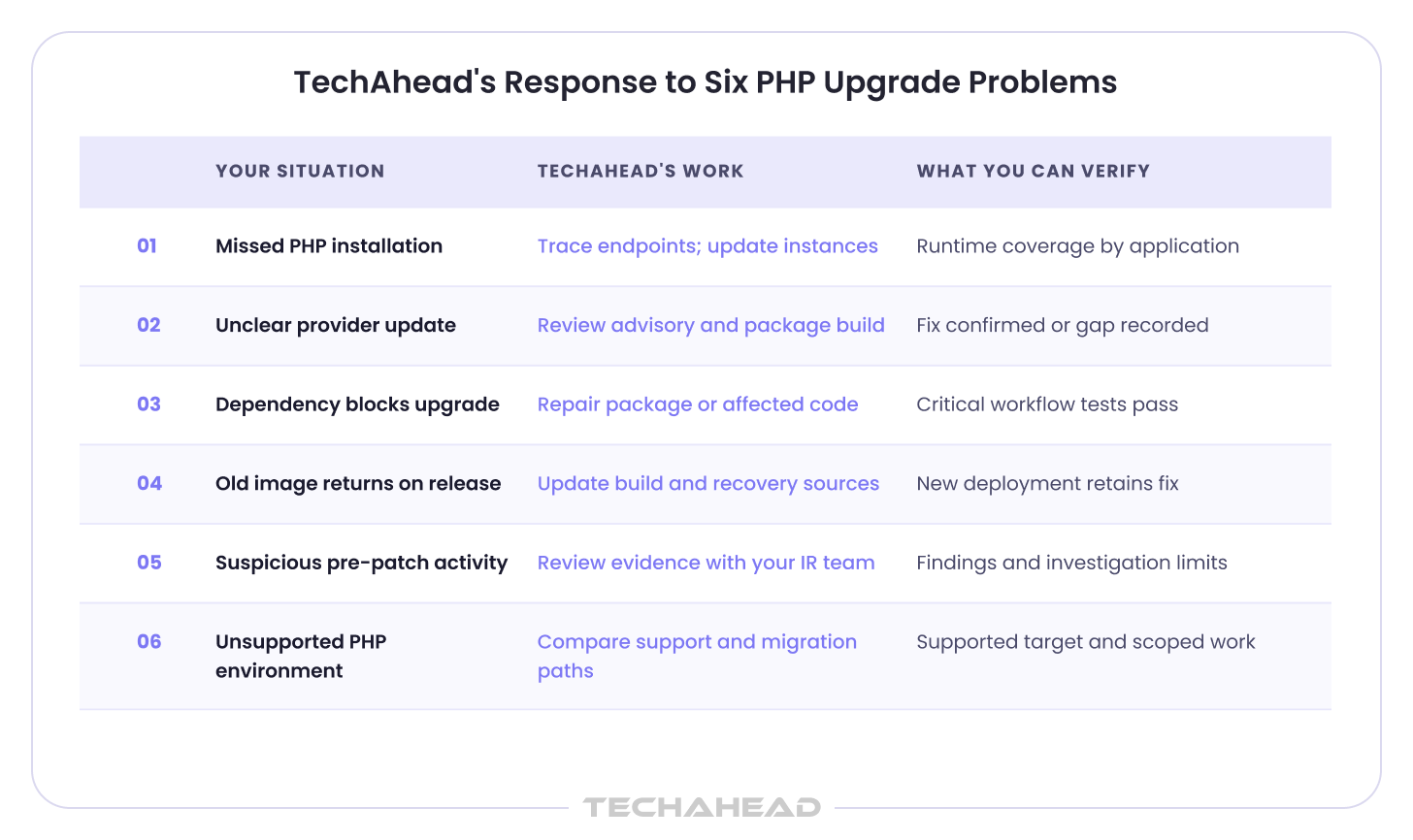
Your customer portal and its administration site might look like one application while running on different PHP installations. The portal gets updated. The admin site, perhaps maintained by another team, is missed.
At TechAhead, we trace where those parts of your application run and which PHP version each uses. That gives us a basis for fixing the missed installations and testing the work they support. If nobody can confirm who maintains an older endpoint, we keep that question open until you have someone responsible for it.
An older version number can be legitimate when a provider has backported the security fix. A general email saying “maintenance completed,” however, leaves you with very little to go on.
We work through the provider’s advisory and package details with your infrastructure team, then compare those details with the installation serving your application. If the provider controls access, we help you ask for the specific confirmation you need. You should know which finding is resolved and which answer you are still waiting for.
An old reporting package may work perfectly on your current system and fail on the proposed PHP version. Replacing it might affect reports your finance team uses every morning. Keeping it indefinitely leaves the upgrade blocked.
The first job is to find what actually fails. We examine the dependency and the affected code, then test whether a supported package release or a small application change resolves the problem. Where replacement is necessary, the work includes checking the reports or transactions that depend on it. You can then judge the change by its effect on the business process.
Suppose your team patches production, but the release pipeline still builds from an old container image. The next feature release can quietly reverse the fix.
We review how your application is built, released, and restored after a failure. That includes the images and fallback versions your team would actually use. Updating those sources and checking a subsequent deployment helps make the patched environment repeatable, so the work survives beyond the emergency change.
A file changed unexpectedly. A PHP worker launched an unfamiliar process. You have applied the update, but you still need to understand the activity.
We help review the available evidence with your security or incident-response team and identify what needs further investigation. Findings may call for revoking credentials, replacing affected components, or rebuilding an environment. If older logs are unavailable, we explain how that limits the investigation. You need that uncertainty made clear before deciding whether to restore normal access.
Your application may still handle daily work reliably, even though its PHP branch no longer receives standard upstream security releases. A vendor may offer a supported fix for the current advisory, but you also need to understand who will maintain that installation when the next issue appears. This becomes difficult when PHP, the operating system, and the application framework have all fallen behind.
We establish what support is actually available and what moving to a maintained environment would involve. That includes the hosting setup, framework, extensions, and application code. You can then compare a supported interim option with a planned migration, including the work and budget each requires. If the existing application can be retained with targeted changes, those changes form the proposal. Broader replacement needs a reason grounded in the application’s condition.
When the work involves several dependent components, an application modernization roadmap helps organize the changes, testing, and release sequence while your team continues addressing the immediate exposure.
Fixing PHP security vulnerabilities can reveal deeper maintenance problems. Even so, one difficult update does not establish that your application needs rebuilding.
A separate assessment becomes useful when the same maintenance problems recur: security releases repeatedly require unsupported workarounds, essential dependencies have no viable support path, deployments cannot be reproduced, or critical behavior cannot be tested with confidence.
The question is how much change would restore maintainability.
Replacing one extension may be enough. Another application may need a framework upgrade and regression coverage. A tightly coupled subsystem may justify staged replacement while the rest of the platform remains in service.
The assessment should explain:
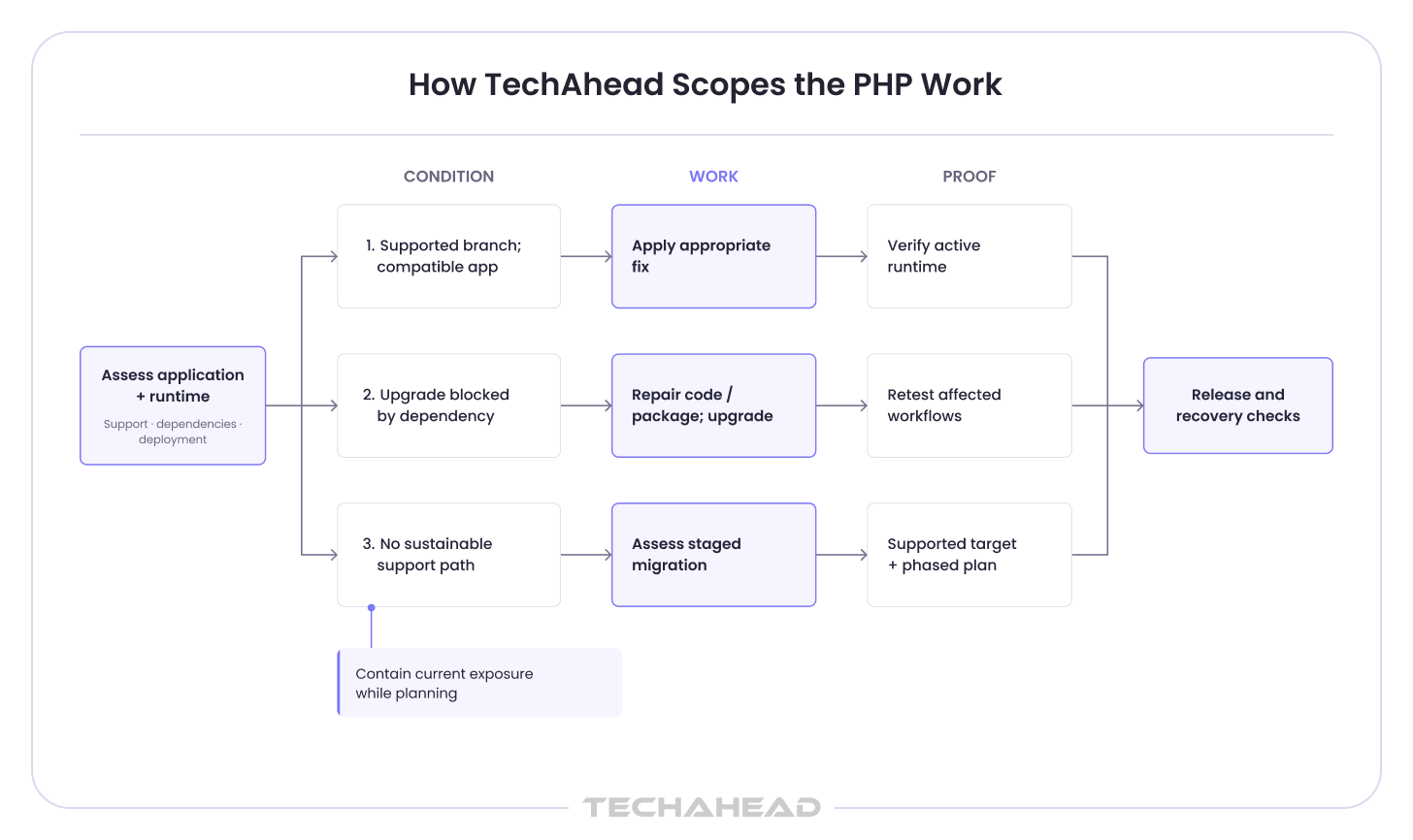
Emergency containment and remediation should continue while that longer-term decision is evaluated. Your application needs protection during the assessment, not just a proposal for a future architecture.
The budget depends on what has to move and what needs to keep working through the change. A small website with a few integrations requires a different effort from a portal handling payments, customer records, and scheduled processing across several environments.
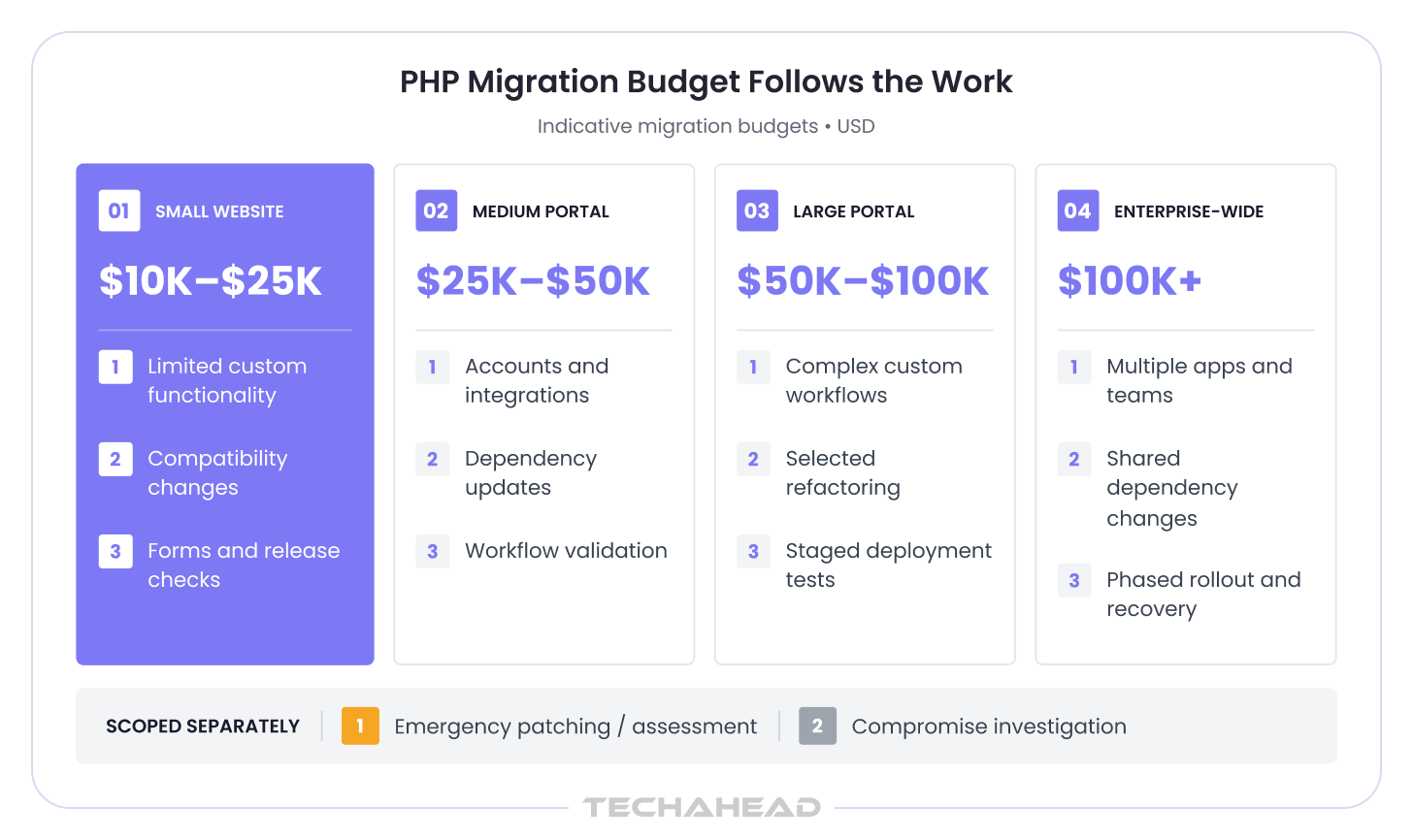
For planning a migration to a supported PHP environment, below are the approximate cost estimates:
These ranges apply to migration projects. A supported-branch security patch, provider confirmation, or focused exposure assessment needs its own scope and estimate; the migration figures should not be used as their starting price. An investigation into suspected compromise also needs to be scoped separately.
Application size alone does not determine the quote. An older extension used by one critical workflow can take more effort to replace than a larger, well-maintained codebase takes to upgrade. We review the dependencies, integrations, test coverage, and deployment constraints with you before recommending the work and confirming the budget. Any hosting, licensing, or ongoing support charges should be identified separately in the proposal.
Addressing PHP security vulnerabilities takes application knowledge as well as runtime updates. You may already have people who can install the package, while still needing support with PHP vulnerability assessment, compatibility work, cross-team coordination, or verification that every affected deployment has received the fix.
Our PHP Security & Upgrade Services can bring those activities into an agreed scope around your affected applications. We can help map runtime exposure, examine dependency blockers, implement appropriate changes, test critical workflows, review provider notices, validate deployment evidence, and help PHP users update immediately where exposure remains unresolved.
The agreed engagement should leave you with practical outputs:
Those records give your security and engineering teams a shared basis for closing the advisory response and deciding whether further application work is warranted.
Contact TechAhead to discuss your PHP application exposure and upgrade blockers. We’ll help define the assessment and remediation work around the systems your business depends on.
Yes. PHP2Shell affects the PHP runtime beneath your application, including custom portals and commerce systems. Assess the actual runtime, configuration, and patch status across every deployment; updated application code or CMS plugins alone do not establish protection.
For CVE-2026-109618 and CVE-2026-109619, the initial fixed releases are PHP 8.2.35, 8.3.36, 8.4.27, and 8.5.12. Vendor backports may retain older version numbers. Check applicable later advisories separately, including the session-configuration issue CVE-2026-115560.
No. WAF rules and configuration changes can reduce specific attack paths, but they do not replace PHP security patches for the original vulnerabilities. Where patching is delayed, evaluate access restrictions or temporary isolation while arranging verified remediation.
Scope the change around dependencies, integrations, and critical workflows, including login, uploads, payments, and background jobs. TechAhead can support PHP vulnerability remediation by addressing compatibility issues, testing affected behavior, and validating the deployed runtime with your team.
Identify the exact framework, extension, or package blocking the move to supported PHP. TechAhead can assess vendor-backed fixes, targeted code changes, and staged upgrades. Consider modernization separately when recurring support limitations prevent a maintainable upgrade path.
Request the applicable advisory, complete package build, affected applications, and confirmation that relevant workers were restarted or replaced. PHP vulnerability assessment should distinguish vendor backports from unpatched installations and verify the runtime actually serving your application.
Retain the application inventory, relevant advisory, patched build, deployment records, runtime verification, and critical workflow test results. TechAhead can help assemble PHP remediation evidence, with unresolved exceptions, accountable owners, and review dates clearly separated from completed work.
No. Patching fixes the disclosed software weakness but does not remove access an attacker may already have established. Investigate suspicious processes, file changes, outbound connections, and possible credential exposure, preserving evidence before making changes that could destroy it.
For systems within PCI DSS scope, Requirement 6.3.3 requires applicable critical security patches within one month of release. Urgent PHP security vulnerabilities may warrant faster action. Retain risk rankings, deployment evidence, and verification records for your assessment.
If your PHP application handles electronic protected health information, include unpatched software in HIPAA risk analysis and risk management. Document remediation, relevant testing, and remaining risks. Applying a PHP patch alone does not establish overall HIPAA compliance.
No. Runtime fixes do not prevent security flaws in application logic or input handling across many web applications. For example, SQL injection occurs when untrusted input is directly concatenated into SQL queries, so PHP security best practices still include prepared statements and parameterized queries. Cross-site scripting happens when user-supplied content is executed as JavaScript in a browser, which is why output escaping is crucial and implementing a Content Security Policy adds another layer of defense. Cross-site request forgery tricks a user into executing unwanted actions in a web application, so generating anti-CSRF tokens is vital for protecting state-changing requests. Secure PHP development also depends on employing strict typing and input validation, using context-aware checks, and validating user input with allow-lists to reduce injection and XSS risk.
Proper session management includes secure cookie settings and session ID regeneration after authentication or privilege changes. Session timeouts and regular expiration also help reduce exposure if a token is stolen or left active longer than intended.
Insecure deserialization allows attackers to inject malicious code through user-controlled serialized data when unsafe patterns are present. Avoid using PHP’s unserialize function on untrusted input, and use JSON instead where practical to reduce deserialization risk.
Beyond the disclosed runtime issues, review for file inclusion vulnerabilities that occur when an application processes user input for file path management. Also check password handling, because weak password storage can expose user credentials when poor hashing algorithms were used.
We use cookies to ensure our website functions properly, improve performance, and provide a personalized experience. You can choose which types of cookies to allow below.
Required for core functionality such as security, network management, and accessibility. These cannot be disabled.
Help us understand site traffic and user interactions so we can improve performance and usability.
Enable enhanced functionality and personalization such as language or region preferences.
Used to deliver relevant ads, track campaign performance, and measure advertising effectiveness.