


 Copy Link
 Share on X
 Share on Facebook
 Share on LinkedIn
Always Active
Required for core functionality such as security, network management, and accessibility. These cannot be disabled.

Uncover the transformative potential of digital and mobile solutions for your industry.





 Last Updated: Oct 16, 2026
Oct 16, 2026
Last Updated: Oct 16, 2026
Oct 16, 2026  96
96  19 min. Read


Key Takeaways
A warehouse robot reports a recurring drive fault. Support can see the warning, but dispatch still needs answers: which unit is affected, what has already been attempted, who can perform the repair, whether the correct replacement component can reach the site, and after the visit, whether the robot is actually ready to resume its intended work.
This is the operating problem behind robotics field service management software: a platform for organizations that operate and maintain industrial robot fleets, including robotics OEMs, enterprise service managers, technicians, and IT teams that turns robot fault alerts into accountable investigations, authorized repairs, and verified recoveries. Your monitoring system supplies a signal; the service workflow carries it through case creation, work orders, technician dispatch, parts reservation, repair evidence, recovery checks, and customer acceptance.
In its September 14, 2026 announcement, Universal Robots referenced more than 100,000 industrial deployments worldwide. Supporting that installed footprint requires service records and workflows that remain usable as units, components, technicians, and sites change, because uptime, reliability, safety, and service quality depend on coordinating eligibility, parts availability, repair verification, and the systems around the job.
Below, we follow an illustrative AMR fault from intake through customer acceptance, including how robotics service workflows connect telemetry with CRM and ERP data and how implementation choices affect day-to-day operations. The design decisions apply across robot fleets, while procedures, permissions, and recovery criteria must reflect your particular equipment and sites.
Also Read: Robot Fleet Management Software Buying Guide
An end-to-end field service workflow for robot fleets connects records with different responsibilities:
Your platform may combine some records, but their meanings must remain distinguishable. One case can require multiple visits, and many alerts can belong to one investigation. A closed appointment may still leave an unresolved fault.
For our AMR example, establish a case against its persistent identity and installed configuration. Across facilities, multi-site robot fleet management should preserve each unit’s site assignment and configuration history. Link the originating events, affected component, customer site, operational impact, and current owner. The robotics field service workflow should make the next action visible without requiring support to reconstruct it from messages.
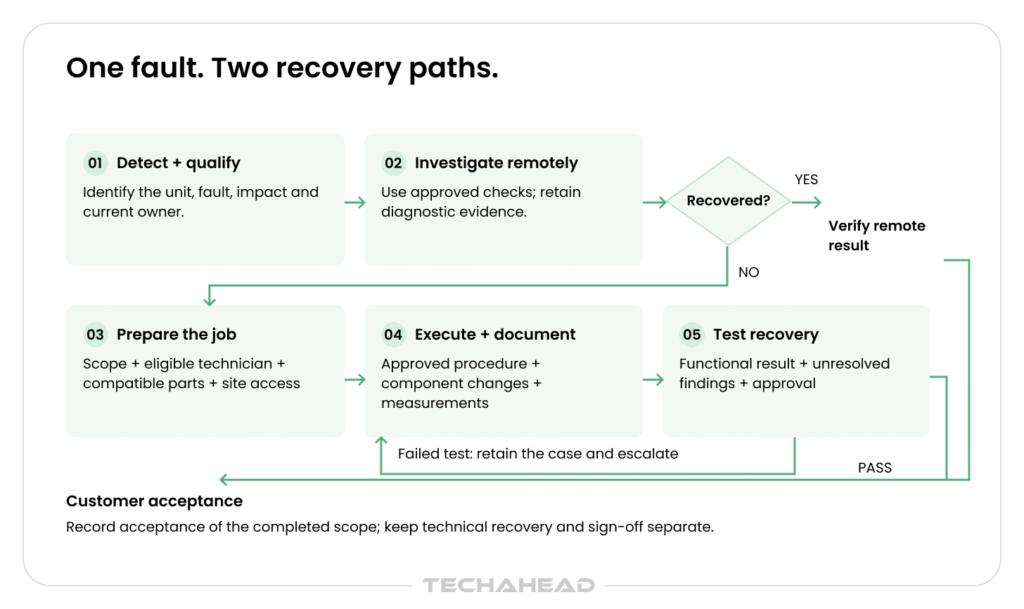
Use explicit states such as investigating, awaiting parts, ready for scheduling, executing, awaiting verification, and awaiting acceptance. Each blocked state needs a reason and an owner. If a reservation is withdrawn, for example, the job must lose its ready status and return to the parts coordinator’s queue.
Start by separating robot telemetry alerts from actionable service demand. The intake record should preserve:
Alert correlation should group duplicate alerts for the same unresolved condition while retaining evidence of worsening behavior.
Assess fault severity alongside business impact. A communication gap may make status uncertain without proving mechanical failure. Multiple robots reporting similar symptoms after a network change may require site investigation before independent repairs are authorized.
Enrich the case from installed-base records and robot service history. Check recent changes and service entitlement before authorizing work. Your robotics field service management software should carry that context through the case-to-work-order workflow, preserving escalation ownership when support needs OEM engineering or another specialist.
Microsoft’s connected field service documentation illustrates a useful distinction: an alert can lead to a case for remote investigation, then a work order if remote identification or resolution is unsuccessful. Your robotics implementation should define its own escalation conditions.
Remote diagnostics should test a bounded hypothesis using approved actions. For the AMR, support might inspect logs, verify a connection, or guide a site operator through an authorized check. Record the procedure, actor, result, and remaining uncertainty.
A command acknowledgement alone does not establish recovery. Use three exit conditions:
For the AMR drive fault, a successful restart might clear the warning temporarily. If the agreed check requires a representative task and the fault returns during that task, the case remains unresolved. Preserve both observations for the technician.
Separate software access from permission to perform physical or safety-related work. The service application can enforce recorded prerequisites; equipment safety remains governed by the applicable robot and site procedures.
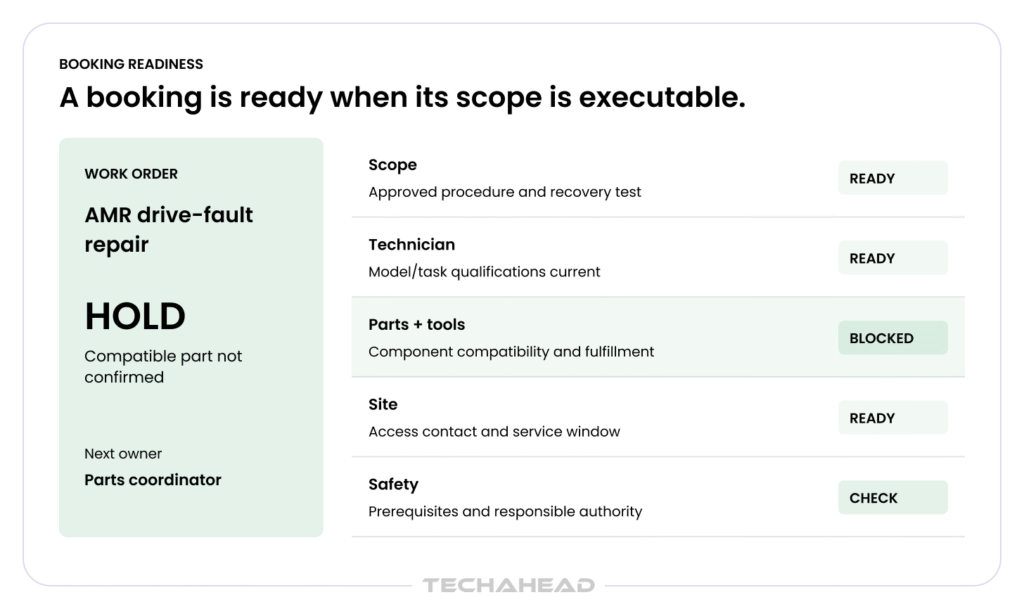
Effective robot maintenance work order management starts with a bounded repair scope. Include the suspected failure domain, authorized tasks, procedure revision, required qualifications, expected parts and tools, site contact, service window, and test that will demonstrate recovery.
An exploratory diagnosis visit can be valid even without a confirmed replacement part. Label that scope explicitly. Otherwise, a repair appointment may be booked when only an investigation is realistically possible.
Check readiness against the authorized scope:
| Requirement | Evidence before dispatch | Owner when blocked |
| Repair scope and authorization | Approved task, procedure, and escalation route | Support or engineering |
| Technician eligibility | Current qualifications for the model and task | Dispatch or service management |
| Parts and tools | Compatible component committed to the job, or an approved diagnosis-only scope | Parts coordinator |
| Site access | Confirmed contact, access authorization, and permitted service window | Site coordinator |
| Safety prerequisites | Required checklists and the responsible on-site authority identified | Authorized site/service personnel |
| Recovery criteria | Defined functional test and approval responsibility | Engineering and operations |
Treat dispatch readiness as a live condition in your robotics field service management software. A missing part, expired qualification, or changed site window should trigger replanning. Overrides need a named approver, reason, and revised scope.
Locus Robotics’ October 6, 2026 release reports more than 22,000 robots, with customer operations across more than 360 sites in over 20 countries. A dispatch system serving distributed fleets needs site-level contacts, access rules, and calendars; fleet-wide availability alone cannot establish that a visit is executable.
Robotics technician dispatch software should first establish eligibility, then evaluate scheduling preferences. AI-powered job scheduling and real time scheduling help match the right technician using skills, proximity, and availability before dispatchers confirm service appointments.
Connected robot diagnostics can help service teams respond faster. ABB states that its Connected Services offering can deliver up to 60% faster response time and 25% fewer incidents through monitoring, diagnostics, and asset optimization.
For skill-based dispatch, evaluate the candidate against three groups of conditions:
Preserve dispatcher review when a recommendation requires an exception or revised scope, even when automated workforce scheduling can assign tasks, reduce delays, support customer satisfaction, and lower operational costs.
For an industrial cell, the appropriate competence may extend beyond the robot to its tooling or associated controls. For an AMR, a repair may need a particular calibration capability. The nearest available technician is not automatically eligible.
Robotics spare parts management should distinguish physical stock from stock committed to a job. Identify component compatibility against the installed robot configuration, then record the reservation, fulfillment location, and expected delivery, since robotic parts are often high-cost and require specialized inventory tracking.
Microsoft’s inventory documentation distinguishes allocated inventory from consumed inventory. That distinction is useful when connecting your FSM to warehouse and finance records.
Design the parts lifecycle explicitly:
Reassignment should revalidate parts location, tools, qualifications, and access. If two jobs need the last available component, the authoritative inventory system must govern allocation. A cached stock count should not independently authorize both commitments. This also supports accurate accounting across inventory, finance, and returns records for reserved and consumed parts. Connect these transactions to robot service and maintenance software so replacements, warranty decisions, and returns remain linked to the unit’s service history.
Begin with record ownership. A typical allocation to assess against your existing systems is:
In PwC’s 2025 Digital Trends in Operations Survey, 47% of respondents cited integration complexity and 44% cited data issues as reasons operations technology investments had not fully delivered expected results. The survey covered 610 US operations and supply chain leaders across industries. For this workflow, record ownership and reconciliation are requirements to test before rollout.
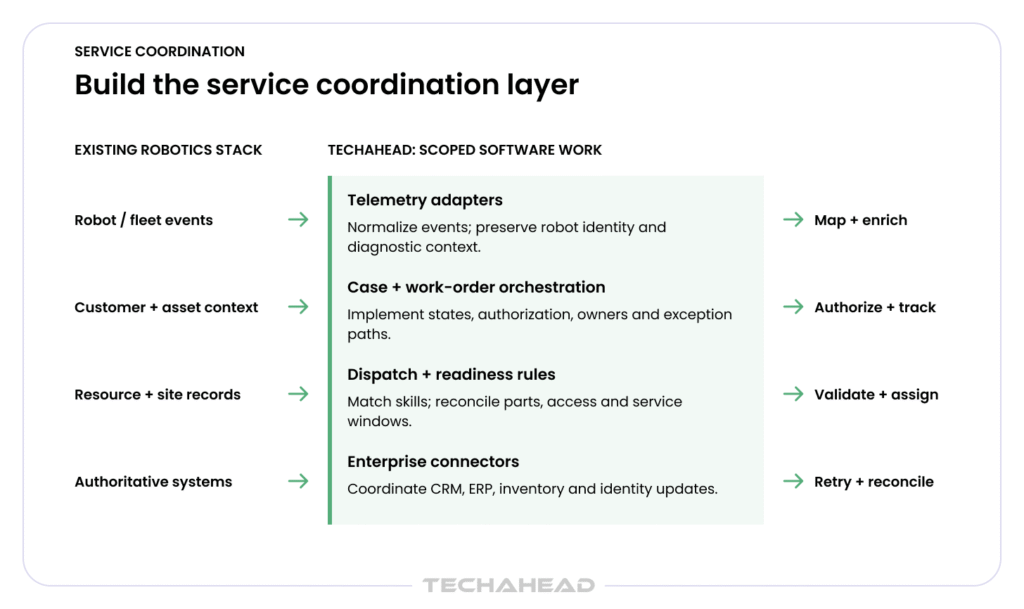
Robot telemetry integration should preserve identifiers and translate fault data into service context. Use fleet diagnostics integration to link evidence to the correct asset. The robotics data and enterprise integration layer connects that evidence with service and business records.
Connecting customer data with operational data gives teams real time data and real time visibility that improve service delivery efficiency and customer experience while reducing delays and operating costs significantly. Control and safety functions remain with the existing robotics stack.
For humanoid deployments, connect the service workflow to the relevant layers of the software stack for humanoid warehouse robots, so diagnosis can account for perception, task orchestration, and warehouse-system handoffs.
Our robotics field service software development approach connects these layers around your existing stack. For each interface, we define inputs, ownership, permitted updates, failure behavior, and acceptance checks.
There are three common integration problems to resolve:
Identity and access management should restrict records and actions by customer, site, asset, and role. Field service CRM integration must preserve customer boundaries, keep customer records consistent across integrated systems, and support an all in one platform view; ERP integration and inventory synchronization must preserve transaction meaning. Retain an audit trail across linked actions so support can trace a job without searching unrelated systems.
When evaluating robotics field service software with CRM and ERP integration, ask what happens during partial failure, not just whether connectors exist. A successful demonstration should include failed acknowledgements and recovery.
Choose the implementation route against the requirements:
Scope custom field service software for robotics around demonstrated gaps. Document the responsibilities of new modules, retained platforms, and maintained interfaces before development begins.
A technician mobile app should open with the work package, giving field technicians mobile access and instant access to job details, customer details, and customer history at the job site: robot identity, service history, approved repair procedures, required parts, site instructions, and escalation contact.
Guided repair should follow the applicable procedure revision and record deviations requiring approval.
During the AMR visit, service checklists should capture:
If inspection identifies a connector issue rather than the suspected failed drive, update the diagnosis and repair scope. Record the approved corrective action and release the unnecessary drive-component reservation. The final record should explain the change from the original work order and note any customer expectations that affect follow-up.
For offline evidence capture, define:
A robust mobile app should keep job completion records and assigned work available without an internet connection and sync changes automatically when connectivity returns.
Parts data retrieved earlier may support reference, but a disconnected device should not promise globally available stock, since asset management decisions still depend on current system data and mobile workforce continuity reduces delays and operating costs when technicians can keep working offline.
Microsoft documents offline inspections that synchronize after connectivity returns. Your implementation must also define behavior for attachments, procedure versions, signatures, and related inventory transactions.
Where remote engineering directs physical checks, capture decision authority and approved scope. A diagnosis that changes during the visit should create a visible scope update, with its parts and authorization consequences.
Post-repair functional testing should be agreed before execution. For the illustrative AMR, applicable tests might establish component installation, calibration, supported motion, docking, and the ability to perform a representative task under authorized site conditions. Select tests from approved procedures; a generic checklist cannot certify every deployment.
In robotics field service management software, keep these milestones separate:
Repair evidence should identify the unit, procedure revision, technician, component changes, results, timestamps, and unresolved findings. Recovery verification needs a recorded basis, including what it confirms about asset performance across the service lifecycle. Silence from the alert feed is insufficient if the robot is disconnected or has not performed the required test.
Generate the service report from structured job data, measurements, and approved attachments. Ask the customer to acknowledge the scope actually completed. During sign-off and acceptance, real time communication through status updates, attachments, and signatures reduces update-seeking phone calls. This visibility can improve customer satisfaction and supports overall customer satisfaction by making completed scope and outstanding concerns clear to the customer. If sign-off is delayed, retain an awaiting-acceptance state while accurately reporting the technical result.
A failed test should preserve the unresolved condition and trigger engineering escalation. Recurring faults require a defined reopen policy, linking earlier repairs and observations. Record whether the new symptom belongs to the same investigation or warrants a separate case.
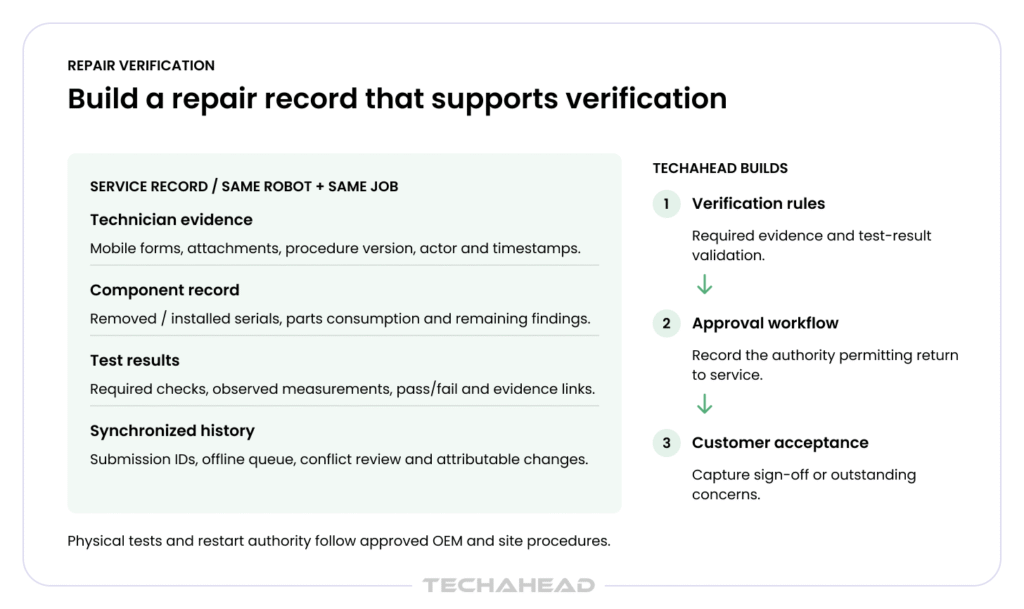
This distinction also matters in a field service workflow for RaaS providers. Define which event satisfies each contractual commitment: response, arrival, restoration, or another agreed measure. An administratively closed ticket should not automatically stop a restoration clock if the required condition remains unproven.
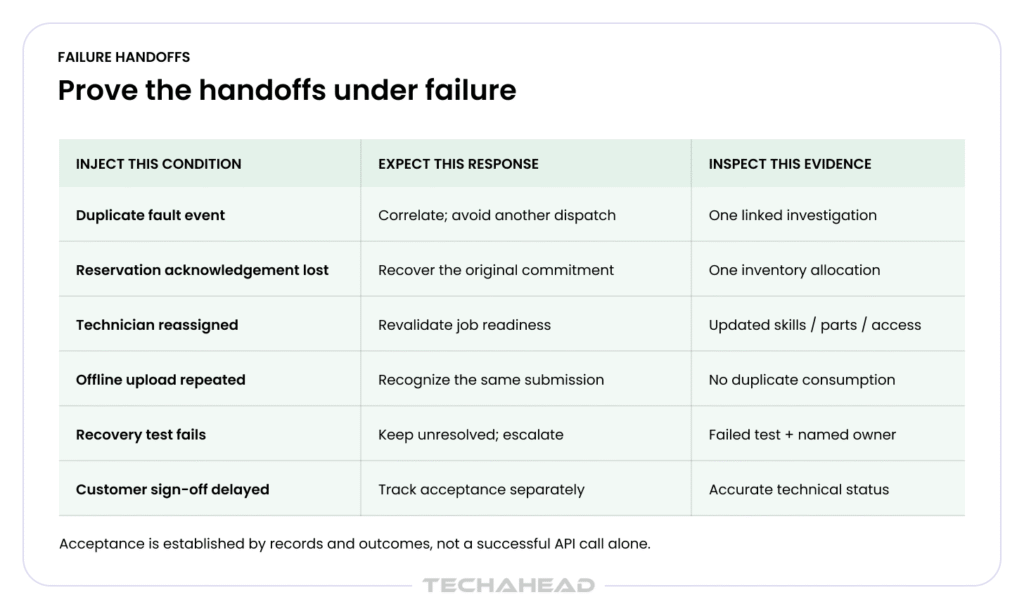
Pilot robotics field service software against representative failure conditions. Check the records, transactions, permissions, and physical-work implications at each stage. In the pilot, test whether effective FSM software can achieve materially faster resolution time, such as 35% faster resolution time, against the documented baseline.
| Scenario | Expected workflow behavior | Acceptance evidence |
| Same fault event delivered twice | Keep one authorized investigation; retain relevant evidence | Linked event identifiers; no duplicate dispatch |
| ERP acknowledgement lost after reservation | Recover the original result before retrying allocation | One commitment in the authoritative inventory record |
| Technician reassigned | Recheck eligibility, parts location, and site access | Updated readiness conditions and ownership |
| Offline report uploaded twice | Process each submission/transaction once | Complete evidence without duplicate consumption |
| Repair completed but testing fails | Keep recovery unresolved and escalate | Failed result; visible owner and next action |
| Customer acceptance delayed | Preserve technical status and pending acceptance separately | Accurate report and outstanding acceptance record |
| Fault returns after closure | Apply the reopen policy and preserve repair continuity | Linked history and new diagnostic evidence |
Agree the measures before reporting improvements, using historical data for baseline comparison and future planning:
This also supports predictive maintenance from failure patterns so teams can plan interventions before repeat breakdowns.
Use robotics data and fleet analytics to examine component failure history by model, revision, site, and repair procedure. Compare pilot results with a documented baseline, retaining missing-data flags and exclusions so the comparison remains inspectable.
We begin by tracing a real service event through your current tools, teams, and records. That exposes missing context, repeated manual entry, unclear authorization, and inconsistent completion rules. We then define the workflow and the software scope around the systems you want to retain, mapping how service requests, service jobs, and workforce management move across those systems.
When evaluating custom field service software for robotics OEMs, ask for concrete delivery artifacts:
We develop and integrate the agreed modules, validate the handoffs, and roll out by site or region. Our robotics field service management software development service covers cases, technician matching, schedules, parts, reports, customer sign-off, and enterprise connections for field service operations, whether for a small service business or a more complex robotics organization.
The completed workflow should let your team trace the dispatch decision, repair actions, test results, and acceptance from the same linked service record.
Contact TechAhead to assess your alert-to-repair process. Bring a representative fault, your current service records, and the systems involved. We can help identify the software work needed to connect them into a verifiable service lifecycle.
TechAhead develops robotics field service management software around your existing robot and enterprise systems. The scope can connect telemetry, service cases, work orders, technician dispatch, parts, repair evidence, and customer sign-off, with requirements defined for your fleet.
Link the alert to the robot’s identity, configuration, diagnostic logs, service history, and entitlement. Correlate repeated signals, assess operational impact, and create an authorized work order when remote investigation establishes that on-site diagnosis or repair is required.
Use remote diagnostics when approved checks can identify the issue and verify recovery. Dispatch a qualified technician when physical inspection, component replacement, calibration, or unresolved evidence requires on-site work. Preserve previous troubleshooting results within the service case.
Match technicians to the robot model, repair scope, credentials, tools, territory, and service window. Confirm parts and site access before dispatch. Recheck eligibility whenever diagnosis, assignment, or appointment conditions change, with approval recorded for any exception.
Reserve a compatible component against the authorized work order, then track fulfillment, transfers, installation, and consumption separately. Release unused reservations after cancellation or changed diagnosis, and link failed-part returns to the robot’s component identifiers and service history.
TechAhead can develop robot telemetry integration and connectors for your existing fleet, FSM, CRM, ERP, inventory, and identity systems. Implementation should define record ownership, access permissions, duplicate protection, and recovery procedures for delayed updates or partial failures.
Provide assigned jobs, approved procedures, and relevant asset history locally. Capture measurements, photos, component identifiers, and sign-off with submission tracking. Synchronize when connectivity returns, flag conflicting updates, and prevent repeated uploads from creating duplicate parts-consumption transactions.
The workflow should record technician authorization, site access, approved procedures, and hazardous-energy controls, including OSHA 29 CFR 1910.147 where applicable. Software supports documentation and approval gates; qualified personnel remain responsible for physical safeguards and safe execution.
Record completed repair tasks, component changes, approved functional tests, results, and unresolved findings. Separate recovery verification, authorized return to operation, and customer sign-off. A cleared alert or completed appointment alone does not establish that the robot can resume work.
TechAhead can scope a pilot around a representative fault and the systems involved. Acceptance tests should cover duplicate alerts, technician reassignment, parts conflicts, offline evidence, failed recovery tests, and delayed customer acceptance before expanding across sites.
We use cookies to ensure our website functions properly, improve performance, and provide a personalized experience. You can choose which types of cookies to allow below.
Required for core functionality such as security, network management, and accessibility. These cannot be disabled.
Help us understand site traffic and user interactions so we can improve performance and usability.
Enable enhanced functionality and personalization such as language or region preferences.
Used to deliver relevant ads, track campaign performance, and measure advertising effectiveness.