


 Copy Link
 Share on X
 Share on Facebook
 Share on LinkedIn
Always Active
Required for core functionality such as security, network management, and accessibility. These cannot be disabled.

Uncover the transformative potential of digital and mobile solutions for your industry.





 Last Updated: Sep 18, 2026
Aug 17, 2026
Last Updated: Sep 18, 2026
Aug 17, 2026  370
370  20 min. Read


Key Takeaways
Most enterprise leaders do not have an automation problem. They have a decision problem.
The technology to automate almost any repetitive process now exists and is affordable. What remains hard is the choice underneath it: should you automate the process as it stands, integrate intelligence into it, or rebuild the workflow entirely? That single decision shapes your cost for years, your ability to scale, and whether the investment compounds or quietly turns into technical debt.
This is where the AI automation vs RPA question usually starts, and where it usually goes wrong. Teams frame it as a tooling choice when it is really a workflow choice. Pick RPA for a process that should have been redesigned, and you automate the dysfunction. Commission a custom build for a task a bot could have handled in a fortnight, and you overspend. The three options, RPA, AI automation (often called intelligent automation), and custom software, are not competitors on a single ladder. They solve different problems, at different costs, on different timelines.
This guide is written for business owners like you who already understand what these technologies are and now need a defensible basis for choosing between them. We will define the boundaries cleanly, give you a decision matrix, break down the real cost drivers, and walk through where each approach has actually earned its keep.
The fastest way to misjudge this decision is to compare the three on capability alone. Compare them instead on the kind of work they are built to carry.
It uses software robots to automate rule based tasks such as data entry. A bot logs into systems, moves data between fields, copies from one screen to another, and triggers the next step, exactly as scripted. It excels when the process is stable, the inputs are structured, and the rules do not change, helping remove manual tasks and manual processes when the work stays predictable. RPA sits on top of your existing systems rather than inside them, which is its great strength and its central weakness. It requires no re-architecture, but it breaks the moment an interface shifts or an exception appears that the script never anticipated.
The practical answer to the robotic process automation vs AI comparison, is intelligent automation: a form of business process automation that combines RPA with artificial intelligence, including machine learning and natural language processing. Instead of rigid rules on clean data, it uses these automation technologies to process unstructured data, handling unstructured data such as contracts, emails, images, and free text, and supporting more complex tasks than RPA. It classifies, extracts, summarizes, routes, and increasingly acts through autonomous agents that plan and execute multi-step work. The distinction that matters for your decision is simple: RPA handles repetitive tasks in existing processes, while AI automation is built for end to end automation and cognitive reasoning.
It does not automate the workflow. It replaces it. Where RPA and AI automation both accept the existing process and layer automation onto it, a custom build re-examines the process itself, then engineers a system purpose-fit to the outcome you actually want. This is the most expensive and the slowest path to first value. It is also the only one that removes the underlying friction rather than routing around it, which is why it tends to produce the most durable return.
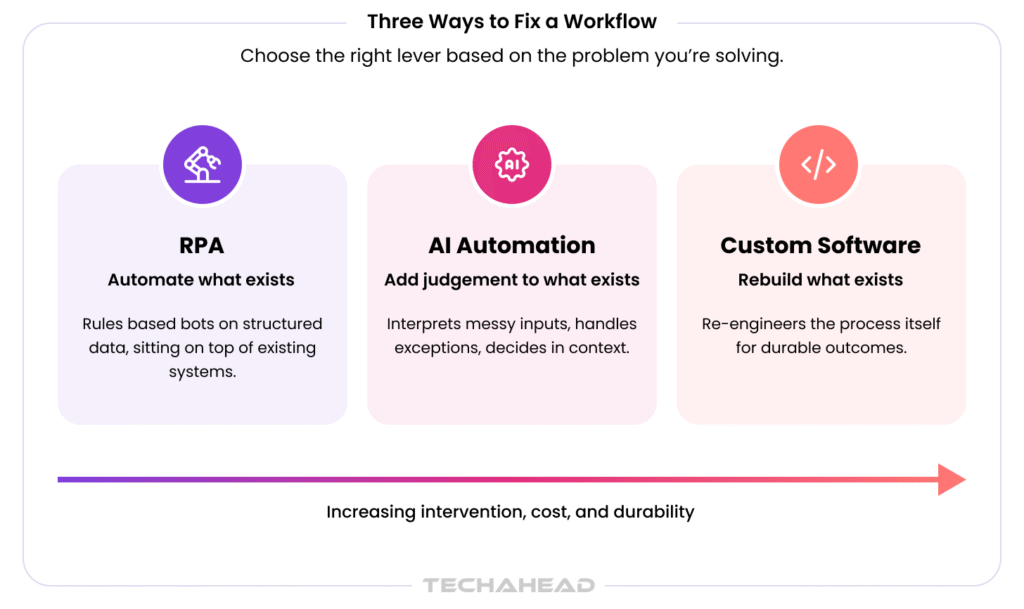
Hold those boundaries in mind, because nearly every hard case in this decision comes from a process that sits between two of them.
Before we go deeper, here is the comparison across the axes that actually drive the choice. Read it as a diagnostic, not a scoreboard. The right column is not “better”; it is “right for a different problem.”
| Decision Axis | RPA | AI Automation | Custom Software |
| Nature of the process | Rules-based, predictable | Judgment-based, exception-heavy | Structurally broken or strategic |
| Primary input | Structured data | Unstructured and mixed data | Any, redesigned at the source |
| Rate of change / exceptions | Low; stable processes | High; adapts to variation | Process itself is re-engineered |
| Time to first value | Weeks | Weeks to a few months | Several months and up |
| Total cost of ownership | Low upfront, rises with maintenance | Moderate, tied to model and data upkeep | High upfront, lowest long-run friction |
| Scalability ceiling | Limited by bot fragility | High, within governed guardrails | Highest; built for your scale |
| Best fit when | The process is fine, the labor is manual | The process needs judgment at scale | The process itself is the problem |
The pattern to notice: these are the key differences in automation capabilities – RPA handles repetitive tasks in structured workflows, AI automation extends that reach to more complex business processes, and custom software redesigns the process itself. The sections that follow expand each column into a decision you can actually defend to a board.
There is a temptation, in an AI-saturated market, to treat RPA as obsolete. That is a mistake, and an expensive one. For a large class of processes, RPA remains the correct and most economical answer.
The question of when to use RPA resolves cleanly around three conditions:
Classic fits include:
In these cases, RPA delivers value in weeks, requires no re-architecture, and carries a low upfront cost. When processes are stable, it can automate repetitive tasks and reduce manual processes such as data entry, with ROI for organizations often cited in the 30%-200% range. When the goal is to remove manual keystrokes from a process that is otherwise working, RPA is not the compromise choice, but an efficient one.
The honest caveat belongs here too, because it sharpens the whole comparison. RPA’s low entry cost is partly an illusion sustained by low change. Every system update, interface redesign, or new exception type adds maintenance load, and a large RPA estate can quietly accumulate a bot-maintenance burden that erodes the original saving. This is precisely why the workflow automation vs RPA distinction matters: RPA works best for existing processes that are predictable, not for workflows that change frequently, because otherwise you are automating a moving target and the tool is fighting the process. When that happens repeatedly, the signal is not “fix the bots.” It is “reconsider the layer below them.”
AI automation earns its place the moment a process requires interpretation rather than repetition. If the work involves reading unstructured documents, making judgment calls, handling frequent exceptions, or adapting to inputs that vary every time, rules-based automation will either fail or demand endless manual patching. This is the territory where intelligent automation, and increasingly autonomous agents, handles unstructured data with technologies such as optical character recognition, natural language processing, and machine learning rather than relying only on fixed rules.
Consider the workflows where the “rule” is really a pattern of judgment learned from experience:
Here, AI automation does what RPA structurally cannot: it extracts meaning from messy inputs, decides based on context, and improves as it sees more cases. It learns from historical data to improve performance, continuously learns from new data to improve accuracy, can handle exceptions autonomously, and reduces human intervention over time. TechAhead’s own AI automation engagements report an average 70 percent reduction in manual effort within the first six months, a figure that comes almost entirely from processes RPA alone could not have touched, because the inputs were never clean enough for fixed rules.
The market is moving decisively in this direction. Gartner projects that 40 percent of enterprise applications will embed task-specific AI agents by the end of 2026, up from under 5 percent in 2025. The direction of travel is clear, but direction is not a mandate to over-reach, and this is where a neutral reading matters most.
The same analysts issue a warning worth heeding before any agentic investment. Gartner also predicts that more than 40 percent of agentic AI projects will be canceled by the end of 2027, citing escalating costs, unclear business value, and inadequate risk controls. They also name a pattern called “agent washing”: rebranding ordinary RPA, chatbots, and assistants as agentic without the underlying capability.
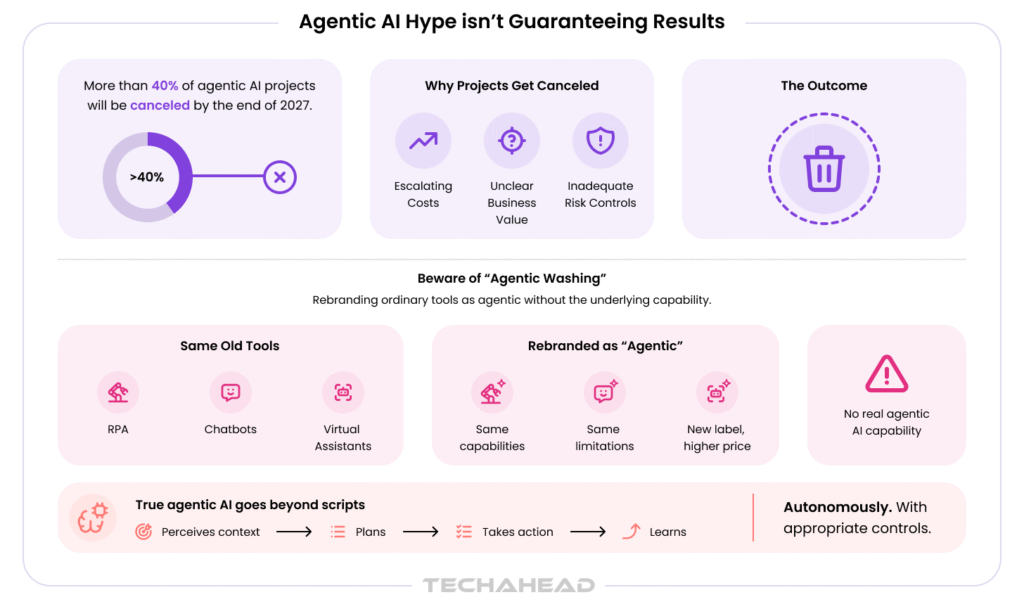
The practical lesson is that AI automation is the right answer when the problem genuinely needs judgment, serving as an intelligent automation solution for more complex tasks rather than a substitute for simpler, cheaper rule-based work. Deploying an agent to do a bot’s job is how organizations end up in that 40 percent.
Sometimes the honest conclusion is that no amount of automation layered on top will fix the problem, because the problem is the workflow itself. That is the case for building custom software, and it is the decision most teams postpone longest, because it is the hardest and most expensive.
The question of when to build custom software turns on a specific diagnosis. A custom build treats the cause rather than the symptom when any one of these is true:
Here is the plain version for anyone weighing it: if your bots keep breaking every time the process changes, the process, not the automation, is what needs rebuilding.
This is not opinion; it is what the strongest performers actually do. McKinsey’s State of AI research, published in late 2025, found that redesigning workflows is one of the single strongest predictors of meaningful value from AI, and that high performers are more than three times as likely as their peers to intend genuinely transformative change rather than incremental efficiency. The lesson generalizes beyond AI: layering tools onto a broken process makes the process faster, not better. Rebuilding the workflow is what compounds.
“The most expensive automation we see is the kind that succeeds at the wrong thing. A bot that flawlessly executes a broken process just helps you fail faster. When a client’s exceptions outnumber their rules, that is not an automation problem to solve, it is a workflow to redesign, and that is the point at which custom software stops being the expensive option and becomes the economical one.”
— Deepak Sinha, Chief Technology Officer, TechAhead
Architecturally, the custom path is also the only one that lets you own the data model, the integration layer, and the scaling behavior end to end. RPA and AI automation both inherit the constraints of the systems they sit on. A purpose-built system, engineered with your compliance, security, and scale requirements designed in rather than bolted on, removes those ceilings. That is why custom software development carries the highest upfront cost and, for the right processes, the lowest long-run friction. For workflows that span many enterprise systems, this often extends into full enterprise application development, where the rebuild replaces a tangle of point tools with one coherent platform.
There is a fourth framing that quietly sits underneath this whole decision, and it is worth making explicit: build versus buy versus automate as part of a broader automation program and the wider automation journey. Before committing to a custom build, the disciplined question is whether a configurable commercial product already covers the need, and before committing to RPA, whether the process deserves to exist in its current form at all.
The trap in the custom software vs off-the-shelf decision is treating “buy” as automatically cheaper. A commercial platform is cheaper to acquire, but if it forces your workflow into someone else’s assumptions, the cost reappears as friction, workarounds, and, often, a layer of RPA bridging the gaps the product left open, creating brittle automation workflows instead of helping teams optimize workflows.
Conversely, building something the market already sells well is a classic way to overspend on differentiation that does not differentiate. The build vs buy software question deserves its own rigorous treatment, and we will address it fully in a dedicated analysis. For this decision, hold one rule: buy the commodity, build the advantage, and automate the stable remainder. Where you land on that line determines which of the three primary approaches you actually need.
Cost is where these three automation tools diverge most sharply in cost profile, and where the headline price is the least useful figure. What matters is total cost of ownership over the life of the process, not the cost of the first deployment.
The table below breaks down the drivers by approach. The figures reference the published investment bands for the enterprise-grade end of this work, so that the ranges are grounded rather than hypothetical.
| Cost driver | RPA | AI automation | Custom software |
| Upfront build | Lowest | Moderate | Highest |
| Time to value | Weeks | Weeks to months | Months |
| Ongoing maintenance | Rises with change and exceptions | Model tuning, data upkeep, monitoring | Standard product maintenance |
| Hidden costs | Bot fragility, per-change rework | Data quality, governance, oversight | Discovery and change management |
| Typical enterprise investment | Lower end of range | Mid-range | Full range, US $250K to $500K+ |
Three cost dynamics deserve emphasis, because they are the ones that surprise buyers:
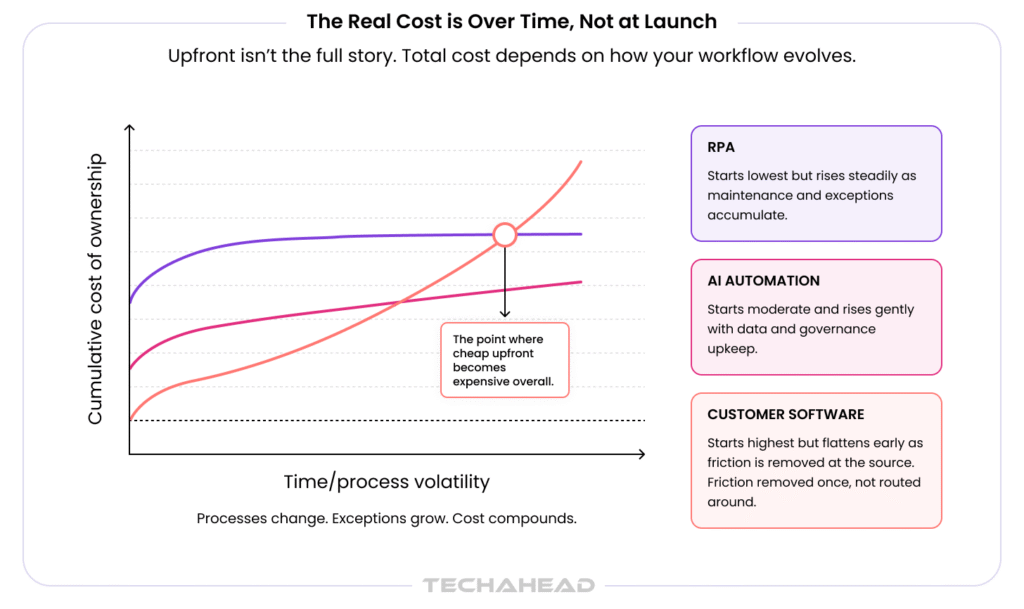
The number is higher upfront precisely because the friction it removes is permanent. For the right process, that is the cheapest total cost of the three. For the wrong one, it is the most expensive way to solve a problem a bot could have handled.
Theory settles arguments slowly. Delivered outcomes settle them faster. Each of the following reflects a different point on the decision, drawn from TechAhead’s own portfolio.
The through-line across all three is that the right answer was dictated by the problem, not by a preference for the newest technology. That is the discipline this decision rewards.
Reduced to its core, the choice follows a short diagnostic path to help automate processes across the right business process. Ask these questions in order, and stop at the first “yes.”
| If this is true of your process | The right approach is usually |
| It is stable, rules-based, and runs on structured data | RPA |
| It needs judgment, handles messy inputs, or has frequent exceptions | AI automation |
| Its exceptions outnumber its rules, or it is a strategic advantage | Custom software |
| A commercial product already covers it well without forcing workarounds | Buy, then automate the remainder |
The uncomfortable truth in the intelligent automation vs RPA debate, and in the wider three-way choice, is that most costly mistakes are not made by picking a weak tool. They are made by picking a capable tool for the wrong problem: RPA where the workflow needed rebuilding, an expensive agent where a bot sufficed, a custom build where a configured product would have served. Intelligent automation is designed for entire business processes, while RPA remains best for narrower repetitive work. The tool is rarely the failure point. The diagnosis is.
For processes that touch revenue operations specifically, the same logic extends into systems like custom CRM and revenue operations platforms, where the choice between configuring a commercial CRM and building a bespoke one is the same build-buy-automate question in a different costume.
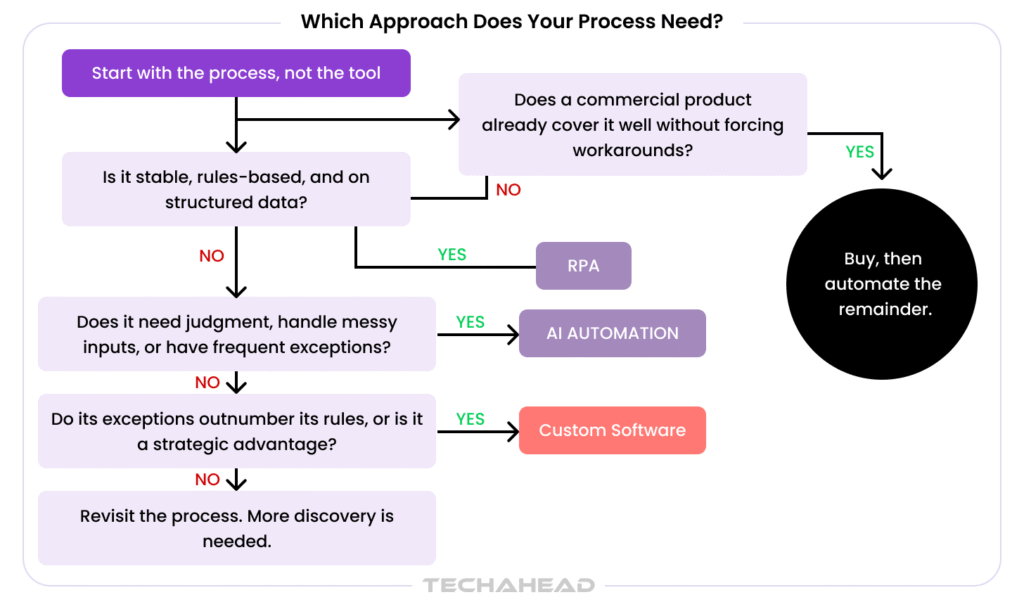
None of this requires committing to one approach forever. The strongest programs sequence them:
What ties the sequence together is a single decision made honestly at the start: which process are you trying to fix, and does it deserve to be automated, made intelligent, or replaced. Answer that, and the AI automation vs RPA vs custom software question stops being a technology debate and becomes what it always was: a workflow decision with a clear, defensible answer.
TechAhead builds across all three approaches as Claude & OpenAI Services Partner and an AWS Advanced Tier partner, with SOC 2 Type II, ISO 27001, and ISO 42001 certification underpinning the governance that enterprise automation demands. That range is deliberate. It is what allows the recommendation to follow the problem rather than the product.
RPA follows fixed rules on structured data, basically a bot doing keystrokes. AI automation, often called intelligent automation and also referred to as intelligent process automation, combines RPA with AI to read messy inputs, work with unstructured data, and understand natural language requests. Put simply, RPA executes a task while AI automation interprets a situation.
Reach for RPA when the process is stable, rules-based, and runs on structured data with few exceptions. It’s ideal for software robots handling repetitive tasks like data entry with minimal human intervention. Knowing when to use RPA comes down to this: if the work needs judgment, that’s AI automation territory.
The tell is simple. When your exceptions outnumber your rules, or bots break every time a system changes, you’re automating a broken process. That’s usually the signal for when to build custom software and fix the workflow itself, not patch around it.
They work well together, and increasingly should. A common pattern lets AI handle the judgment, reading and deciding, then hands deterministic steps to RPA bots for reliable execution. In shared workflows, cognitive automation extends rpa capabilities so each layer handles the part it does best.
Usually because the workflow underneath them keeps shifting. RPA sits on top of your interfaces, so every system update or new exception can snap a bot. When that’s constant, the workflow automation vs RPA math has tipped and the process needs rethinking.
Bake governance in from day one, not as a procurement afterthought. That means full audit trails on every decision, role-based access, human-in-the-loop checkpoints, and region-specific data handling. Certifications like SOC 2 Type II and ISO 42001 are fast becoming table stakes.
Look for SOC 2 Type II, ISO 27001, and increasingly ISO 42001 for AI governance, since procurement teams now treat these as non-negotiable. TechAhead holds all three, alongside OpenAI Services Partner and AWS Advanced Tier status, so governance is built in rather than bolted on.
Not always. Buy the commodity, build the advantage. Off-the-shelf wins when a product genuinely fits your process. The custom software vs off-the-shelf call tips toward building when the product forces workarounds, or when the workflow is a real competitive edge.
You want a partner that builds all three, RPA, AI automation, and custom software, so the advice follows your problem, not their product line. TechAhead does exactly that for enterprises, mapping each process to the right approach before writing any code.
Start with the process, not the tool. Map your top manual workflows, then score each on input type, exception rate, and how strategic it is. Stable and structured points to RPA, judgment-heavy to AI automation, structurally broken to a custom build, with those manual workflows scored as part of business process management and longer-term automation initiatives.
We use cookies to ensure our website functions properly, improve performance, and provide a personalized experience. You can choose which types of cookies to allow below.
Required for core functionality such as security, network management, and accessibility. These cannot be disabled.
Help us understand site traffic and user interactions so we can improve performance and usability.
Enable enhanced functionality and personalization such as language or region preferences.
Used to deliver relevant ads, track campaign performance, and measure advertising effectiveness.