


 Copy Link
 Share on X
 Share on Facebook
 Share on LinkedIn
Always Active
Required for core functionality such as security, network management, and accessibility. These cannot be disabled.

Uncover the transformative potential of digital and mobile solutions for your industry.





 Last Updated: Sep 22, 2026
May 29, 2026
Last Updated: Sep 22, 2026
May 29, 2026  893
893  17 min. Read


Key Takeaways
What if you could build a collaboration tool that serves 100 million users while keeping editing seamless? That’s exactly what Notion achieved; powering over 50% of Fortune 500 companies and managing 200 billion blocks with sub-second latency. With enterprise software spending hitting $1.25 trillion in 2025 and the custom software market projected to reach $334 billion by 2034, business leaders need tools that scale without compromise. However, how does a block-based editor handle massive scale while maintaining performance? In this deep dive, we unpack Notion’s complete tech stack; from React-based frontend architecture and custom contenteditable implementations to sharded PostgreSQL databases and the engineering decisions that make this collaboration possible. Let’s dive in:
Notion’s core innovation is simple yet revolutionary: “everything is a block”. Unlike traditional word processors that treat a page as a single unit, Notion breaks content into individual building blocks: text, images, headings, to-do lists, databases, and more. Each block is a self-contained unit with its own ID, type, properties, and content, inspired by the Lego system.
This block-based model gives enterprises unmatched content flexibility. Blocks can be dragged, rearranged, copied, or transformed into any other block type instantly without losing data. Indentation changes the actual structure by nesting blocks within parent blocks, organizing information hierarchically.
For enterprise teams, it means content can be reused, restructured, and repurposed across projects. A single block can live in multiple pages, update in real-time everywhere, and adapt to different workflows.
Notion powers over 100 million users and serves 50% of Fortune 500 companies with a scalable tech stack built for real-time collaboration. The company crossed $500 million in annual revenue by late 2025 and employs around 800-1,000 people, with 389 dedicated to product and engineering.
Instead of complex web microservices, Notion relies on highly optimized pipelines:
Notion’s backend handles massive-scale real-time operations with better server-side architecture:
Notion uses a data layer for reliability and fast access:
Notion relies on cloud infrastructure for global scalability, for example:
This stack allows Notion to deliver real-time collaboration, sub-second latency, and 99.9% uptime; these are crucial benchmarks for such popular productivity tools.
Notion’s data model is built on an atomic, graph-like architecture where every piece of content is a block; such a design allows users to customize how information is moved, and shared at a granular level.
Notion blocks have specific attributes that determine how information is rendered and organized:
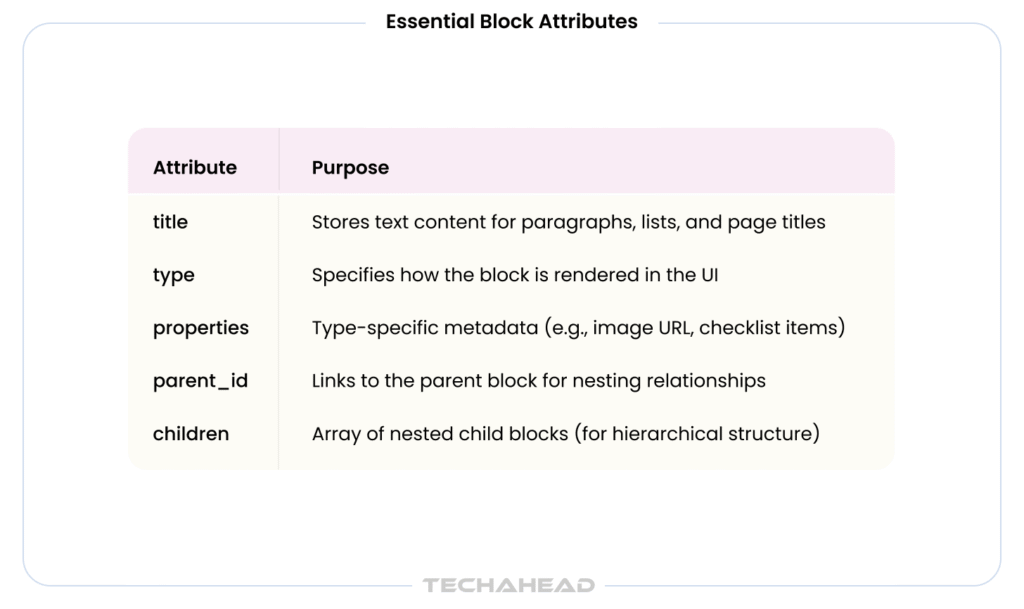
Changing a block’s type does not change its properties or content;—only the type attribute changes, so information is rendered differently or ignored if the property is not used by that block type.
Notion organizes blocks hierarchically through parent-child relationships:
Notion block types organized into six basic categories:
This graph-like, atomic data model brings flexibility, for instance you can change the block types, move freely and create customized tools.
Learn More,
Notion AI Agents: Complete Guide with Pricing, 5 Enterprise Use Cases & ROI Analysis (2026)
Notion’s frontend is built on React, but it takes a custom approach rather than relying on standard editor libraries. Each text block functions as an independent React component with its own contenteditable div, allowing fine-grained control over rendering and user interactions.
Instead of using React’s default rendering pipeline, Notion implements a custom render queue. Components call forceUpdate(), and Notion batches these updates to avoid excessive re-renders. Sub-second latency even with millions of blocks.
Every edit creates a transaction containing operations that modify block data. The view then re-renders data using React, maintaining consistency across the application. This approach allows reliable undo/redo functionality through inverted operations stored in a stack.
Notion does not use off-the-shelf editor libraries like Tiptap, ProseMirror, or Slate. Instead, Notion maintains a custom contenteditable codebase built from scratch. It gives Notion full control over the block-based editing experience.
Off-the-shelf libraries like Tiptap and Slate are excellent starting points for building block editors, but they lack the granular control needed for enterprise level collaboration. Notion’s custom implementation allows:
Each block handles its own editing independently. Layout uses CSS Flexbox for simple, responsive arrangements. Non-text blocks (images, embeds, databases) are regular DOM elements without contenteditable, reducing cursor logic complexity.
Notion’s backend handles hundreds of billions of blocks across 100M+ users using a Node.js monolith; a deliberate architectural choice that prioritizes data locality, operational simplicity, and low-latency access to Notion’s complex block graph over the overhead of decomposed services.
Client applications interface with Notion’s database via a dedicated API server, operating on a cluster of Node.js web servers. The connection to the database is managed through PgBouncer connection pooling, enhancing performance and scalability.
Every resource in Notion’s API has an object meta property that tells you what kind of object is being dealt with. With the REST API, you can read, create, and update nearly everything in a workspace — pages, databases, users, comments, and more.
Rather than decomposing into independently deployed services, Notion’s backend runs as a unified Node.js application. Notion kept the monolithic backend to maintain operational velocity and data locality, essential for their complex “block” graph — and focused entirely on sharding the persistence layer. It means block creation, page hierarchy management, search indexing, and real-time sync coordination all operate within the same application process, communicating in-memory rather than over a network.
This is a key distinction: Notion scales by sharding its database, not by splitting its application. The monolith handles routing requests to the correct database shard via workspace ID, while PgBouncer manages the connection pool to the sharded PostgreSQL fleet.
Notion’s platform leverages WebSocket-based real-time synchronization with conflict resolution algorithms to enable seamless collaborative editing across millions of concurrent users. WebSockets replace polling with persistent socket connections, and the conflict resolution layer ensures that concurrent edits from multiple users merge deterministically — without data loss or manual conflict prompts.
Transaction-Based Model
Concurrency Strategies
In 2021, the Postgres database was sharded to 32 physical instances with each instance comprising 15 logical shards. In 2023, they increased to 96 physical instances with 5 logical shards per instance, maintaining a total of 480 logical shards throughout.
This architecture — a monolith application layer routing to a massively sharded database — allows Notion to maintain sub-second latency while serving enterprise-scale workloads without the operational complexity of a full microservices stack.
Real-time collaboration needs advanced concurrency control to prevent data conflicts:
Notion’s PostgreSQL database was sharded from 1 to 32 physical database instances housing 480 logical shards:
This architecture allows Notion to maintain sub-second latency while serving enterprise-scale workloads.
Building a block-based editor like Notion presents different engineering hurdles. Notion serves over 100 million users and manages 200 billion blocks. Here are the key challenges and how Notion solved them:
Notion’s data growth was exponential; doubling every 6-12 months as hundreds of billions of blocks accumulated.
Multiple users editing the same block creates conflicts that must be resolved without data loss.
Notion’s technology infrastructure uses WebSocket-based real-time synchronization with conflict resolution algorithms to enable seamless collaborative editing across millions of concurrent users.
Block transformations and data migrations require preserving relationships and preventing data loss.
Maintaining sub-second latency while serving 100M+ users requires careful optimization.
These engineering solutions on Notion deliver real-time collaboration and maintain flexibility, data integrity.
Enterprise owners building block-based collaboration tools face complex decisions. Here are seven actionable lessons from Notion’s journey serving 100M+ users and 50% of Fortune 500 companies.
Notion does not use Tiptap, Slate, or ProseMirror; it built a custom contenteditable codebase from scratch. For enterprise tools requiring unique features like block-based editing, buying rarely works. Custom development costs more upfront but provides full control over performance, features, and scalability.
Notion started with a single PostgreSQL database that could not handle 200 billion blocks doubling every 6-12 months. They sharded to 32 physical database instances housing 480 logical shards with only 5 minutes of downtime. Lesson? Choose databases and infrastructure that support horizontal scaling from day one. Notion’s stack—PostgreSQL, Redis, AWS, Kubernetes; handles heavy workloads.
Building real-time sync is hard. Notion built a centralized WebSocket signaling and state broadcast pipeline to meet performance standards. Real-time collaboration needs sub-second latency and conflict resolution that off-the-shelf solutions struggle to deliver.
Notion employs around 1,000 people, with 389 dedicated to product and engineering. That is nearly 40% of the workforce focused on engineering. For custom tools, you need specialized engineers (database architects, real-time systems experts, frontend specialists), not just generic developers. Quality trumps quantity.
Notion crossed $500 million in annual revenue by late 2025 and spends ~10% of revenue on AI providers. Building custom software involves ongoing costs: infrastructure, maintenance, security, compliance, and updates. Pre-built solutions offer transparent, predictable subscription costs but sacrifice control. For enterprise tools, build only when ROI justifies multi-year development.
Enterprise buyers require SOC 2, GDPR, SSO, and admin controls. Notion’s features serve Fortune 500 brands because they meet compliance standards. Do not bolt security on later; build it into your architecture. Data encryption, access controls, and audit logs are non-negotiable for enterprise tools.
Notion’s exports are raw data in hashed folders, not user-friendly. Moving large datasets between workspaces is difficult! So you need to build clean API endpoints, export formats, and migration tools from the start. Enterprises need data portability for compliance and vendor lock-in concerns. Poor data portability becomes a major buying barrier for enterprise customers.
Building a block editor like Notion requires $50M+ in development costs, specialized talent, and 3-5 years to reach maturity. Buying makes sense when speed-to-market matters. Building makes sense when unique features, control, and long-term ROI justify the investment. For enterprise collaboration tools, the decision hinges on whether your differentiator is the technology itself or the business problem you are solving. Ready to build a custom enterprise platform? At TechAhead, we specialize in building custom solutions and seamlessly integrating them with your existing systems whether legacy infrastructure or modern platforms. Contact TechAhead today for a free technical consultation and let’s build a custom solution that drives real ROI for your business.
Block-based editors can integrate NLP for smart text suggestions, ML models for auto-complete and content generation, computer vision for image recognition, and AI-powered spell-check. Transformer-based models like GPT allow AI writing assistants, while clustering algorithms help organize content automatically for enhanced productivity.
Enterprise platforms use multi-region cloud storage with automated daily backups, real-time replication across data centers, and versioned snapshots. Disaster recovery involves failover clustering, RPO under 15 minutes, RTO under 1 hour, and regular backup testing for business continuity during outages or data loss events.
Block editors face XSS attacks through content injection, CSRF vulnerabilities in block operations, and data leakage via synced blocks. Mitigation includes input sanitization, Content Security Policy headers, CSRF tokens, end-to-end encryption for sensitive blocks, role-based access controls, regular security audits to prevent unauthorized data access.
JavaScript/TypeScript with React is ideal for frontend development, offering rich ecosystem support. Rust or Go work well for backend services requiring high performance. Python serves AI/ML integration. PostgreSQL handles relational data, while Redis provides caching. This tech stack balances performance, scalability, and developer productivity effectively.
Building a custom block-based editor costs $200,000 for MVP development, $50M+ for enterprise-scale platforms with real-time collaboration. Monthly infrastructure costs range $10,000-$100,000 depending on user scale. Ongoing maintenance adds 15-20% of initial development costs annually for updates, security, and feature enhancements.
We use cookies to ensure our website functions properly, improve performance, and provide a personalized experience. You can choose which types of cookies to allow below.
Required for core functionality such as security, network management, and accessibility. These cannot be disabled.
Help us understand site traffic and user interactions so we can improve performance and usability.
Enable enhanced functionality and personalization such as language or region preferences.
Used to deliver relevant ads, track campaign performance, and measure advertising effectiveness.