


 Copy Link
 Share on X
 Share on Facebook
 Share on LinkedIn
Always Active
Required for core functionality such as security, network management, and accessibility. These cannot be disabled.

Uncover the transformative potential of digital and mobile solutions for your industry.





 Last Updated: Sep 22, 2026
Jul 20, 2026
Last Updated: Sep 22, 2026
Jul 20, 2026  388
388  13 min. Read


Key Takeaways
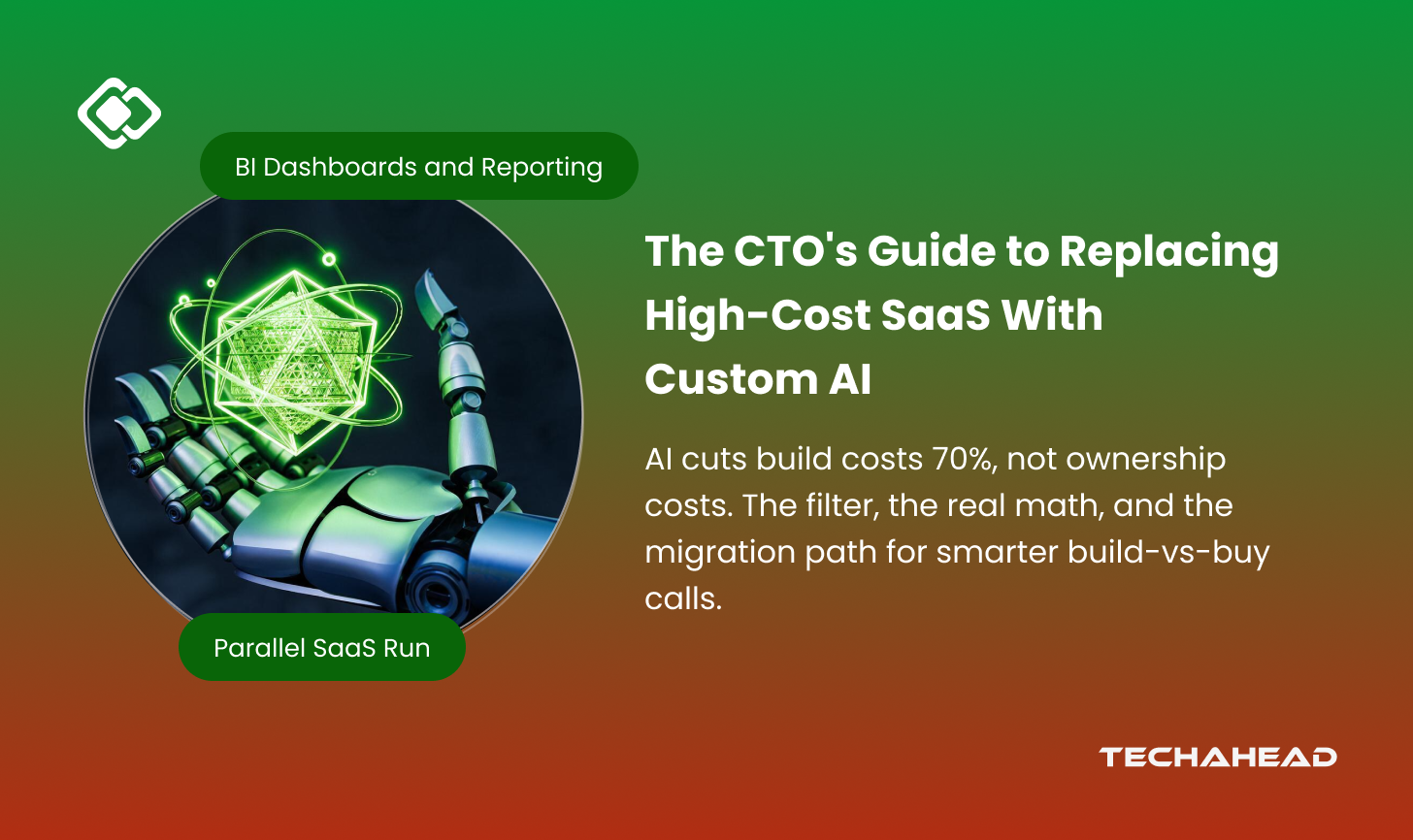
What to build, what to buy, and how to tell the difference, with the actual arithmetic.
Every CTO has had this meeting.
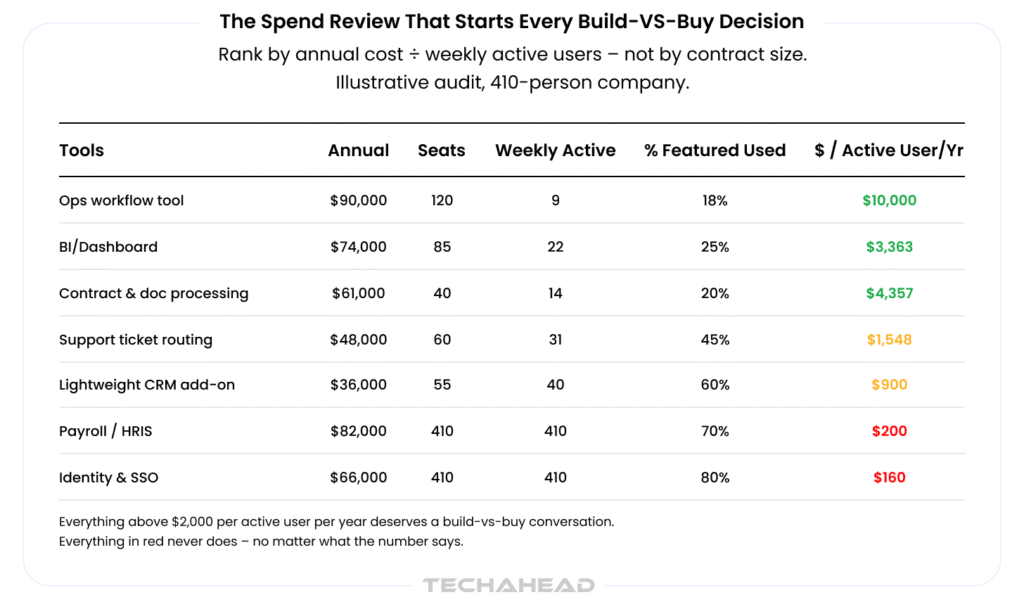
Renewal season, a spreadsheet with sixty-odd line items, roughly $1.2M of annual software spend, and somewhere around row 31, you find it: a $90,000-a-year workflow tool, 120 seats provisioned, nine people who open it in a given week.
It moves records between two columns and emails somebody when they get stuck.
Two years ago, the meeting ended the same way every time.
Someone said, “We don’t have the engineers,” everyone nodded, and the renewal got signed.
That sentence has stopped being true, and it has left a lot of CTOs without a script.
An engineer with AI assistance can now stand up that tool in a fortnight. For more complex, integration-heavy replacements, enterprises may also use AI development services to accelerate architecture, implementation, and production readiness without expanding their internal team overnight.
So the question changed, from can we build it to should we own it, and most teams are answering the new question with vibes, a vendor’s pricing page, and whoever spoke loudest in the meeting.
This guide is the script, written for whoever has to defend the answer in a board deck.
A filter for deciding what’s replaceable, the real total cost of ownership model, a migration sequence that doesn’t detonate, and the five ways this goes wrong. No manifesto. Some of the answers here are to keep paying the vendor.
Here’s the thing: almost every “SaaS is dead” post gets it wrong.
AI has collapsed the cost of building software. It did not increase the cost of owning it. That asymmetry is the entire decision.
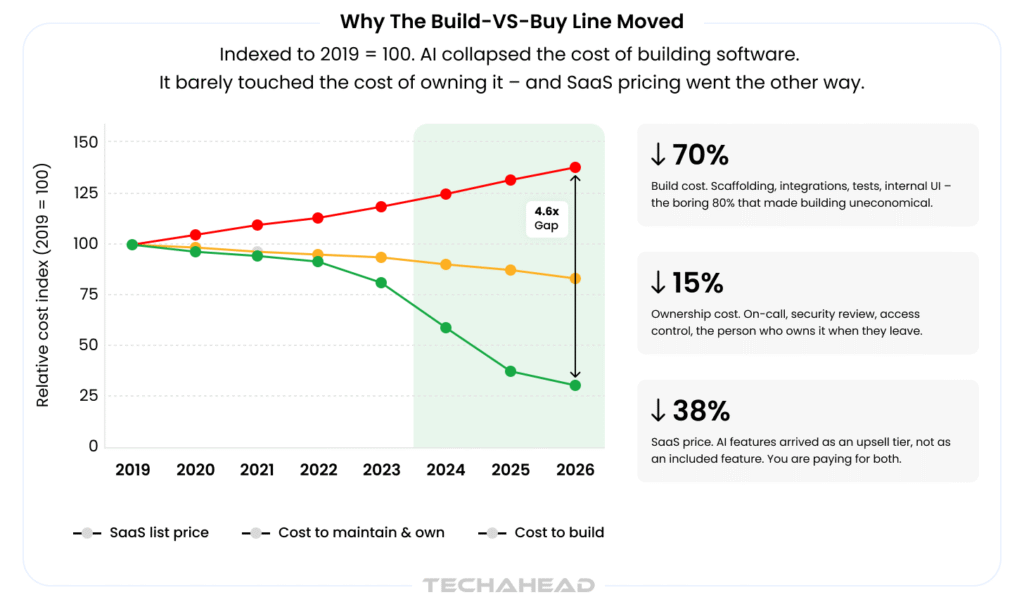
What changed: scaffolding, CRUD, integrations, test coverage, and internal UI.
The boring 80% that made building internal tools uneconomical for a decade. That work is now dramatically cheaper, call it a 70% reduction on a well-scoped internal application.
What didn’t change: maintenance still runs 15-25% of build cost annually, forever. Security review. Access control. On-call. The migration when your auth provider changes. The person who owns it, and the handover when they leave.
Here’s the part that should make you uncomfortable: SaaS pricing was underwritten by the old build cost.
When a vendor charged $750 a seat for a tool containing maybe 400 lines of genuine business logic, that price wasn’t anchored to their cost of delivery. It was anchored to the cost of building it, a number that used to be $400,000, and eighteen months of a roadmap you didn’t have. Every per-seat price in your stack contains that assumption.
Most of those assumptions are now stale.
And SaaS pricing moved the other way. Vendors are shipping AI features as an upsell tier rather than an included capability, which means the tool you’re already overpaying for now has a more expensive version of itself sitting one line up in the quote.
That gap is the opportunity. It’s also narrower than it looks, because it only opens for a specific class of tool.
Run every line item through these. Most fail at question one or five.
1. Who absorbs the regulatory risk? If the vendor files your returns, signs your SOC 2 evidence, or carries liability when it breaks: You are not buying software. You are buying indemnity. Indemnity has no build option. Skip it!
2. Is there a network effect? If value comes from people outside your walls , your customers logging in, an ecosystem of integrations, a partner workflow, you cannot rebuild that. You’d be rebuilding the product, and none of the reasons it works.
3. What percentage of the feature set do you actually use? Under 20% is the classic signal. You are funding 80% of a roadmap written for someone else’s company.
4. Is it a thin layer over your own data? Admin panels, approval routing, reporting, ops consoles. Your data, your schema, your business logic, rented back to you at $750 per seat. This is the highest-yield category by a wide margin.
5. Who owns this in 18 months? The question that kills more internal tools than any technical constraint. If you cannot name a person and point at a maintenance budget, the answer is buy, regardless of what the other four questions said.
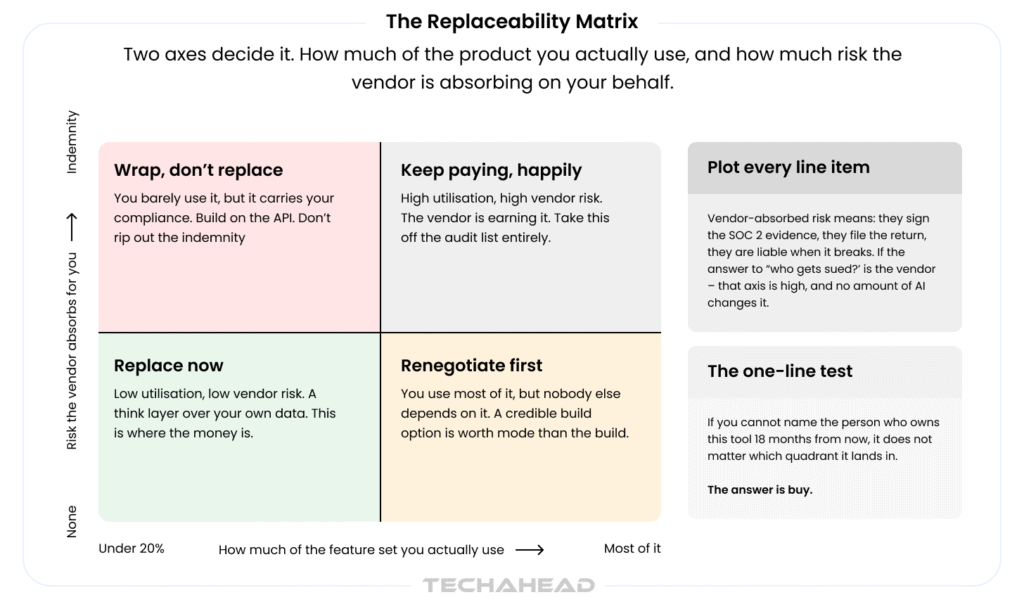
Plot the survivors on two axes: how much of the product you actually use, and how much risk the vendor absorbs on your behalf. Four outcomes, and only one of them is “build.”
The green zone is bigger than most CTOs expect. The red zone is smaller than most vendors claim, and completely non-negotiable.
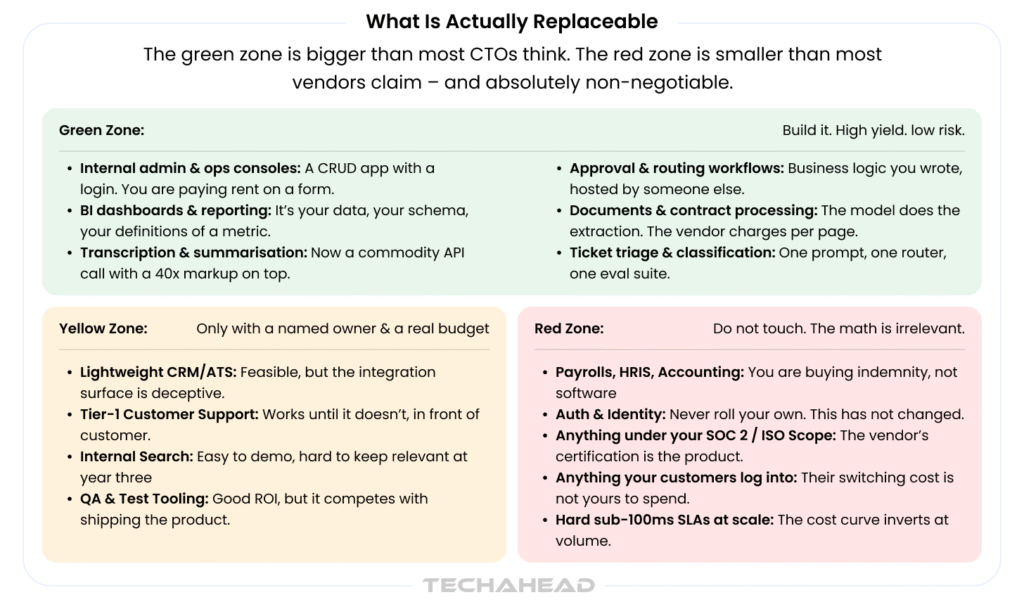
Green. Internal admin and ops consoles. Approval and routing workflows. BI dashboards where you’re arguing with a vendor about your own metric definitions. Document and contract processing. Transcription and summarisation, now a commodity API call with a 40x markup layered on top. Ticket triage and classification.
Yellow. Lightweight CRM, ATS, internal search, tier-1 support, QA tooling. All feasible. All punish you for starting without a named owner and a real budget.
Red. Payroll, HRIS, and accounting. Auth and identity, the answer here has not changed and will not change. Anything inside your SOC 2 or ISO scope. Anything your customers log into. Anything carrying a hard sub-100ms SLA at volume, where the cost curve inverts against you.
There’s a fourth answer people miss, and it’s often the best one: wrap, don’t replace. If a tool carries your compliance but you only touch a fraction of it, build the AI layer on top of its API rather than tearing out the indemnity underneath. You get the workflow you wanted, and the vendor keeps holding the risk. That’s not a compromise; for most regulated workloads, it’s the correct engineering answer.
If you only take one thing: thin layers over your own data are where the money is. Everything else is a distraction dressed up as savings.
This is where most of these conversations fall apart.
The naive comparison: “$90,000 of SaaS versus three weeks of engineering”, isn’t optimistic. It’s just wrong. It omits every cost that arises after the demo.
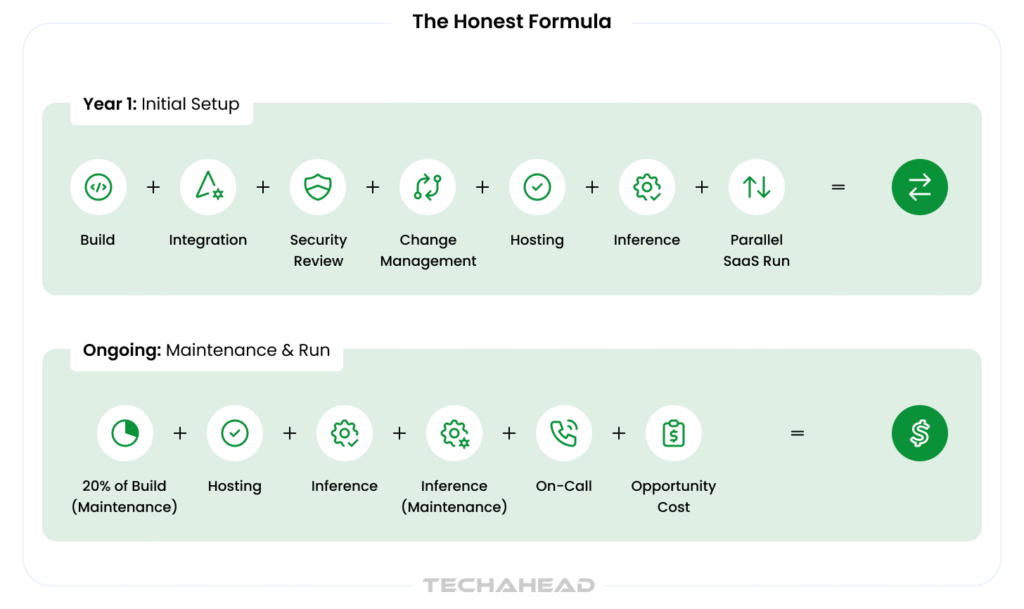
Two line items deserve special attention, because they’re the ones that turn a good decision into a bad one.
Inference is variable and grows with success. A seat licence is capped; your token spend is not. Model it as a unit cost per transaction, not a flat monthly. Then engineer it down: route cheap classification to small models, cache aggressively, and never call an LLM for something a WHERE clause already answers.
Opportunity cost is the one nobody puts on the sheet. Those 600 engineer-hours had somewhere else to be.
If your team is capacity-constrained on revenue work, the true cost of the build is the roadmap item that slipped, not the $45,000 in the ledger, and that number is frequently larger. If your team has Slack, the calculation flips entirely, and the build gets cheap.
Same tool, same vendor, opposite decision, depending entirely on a variable that has nothing to do with AI.
The parallel run is real money. You will pay the vendor and your own infrastructure for six to nine months. Every model that ignores this produces a payback number that’s off by a year.
Here’s the whole sheet on that $90,000 ops tool.
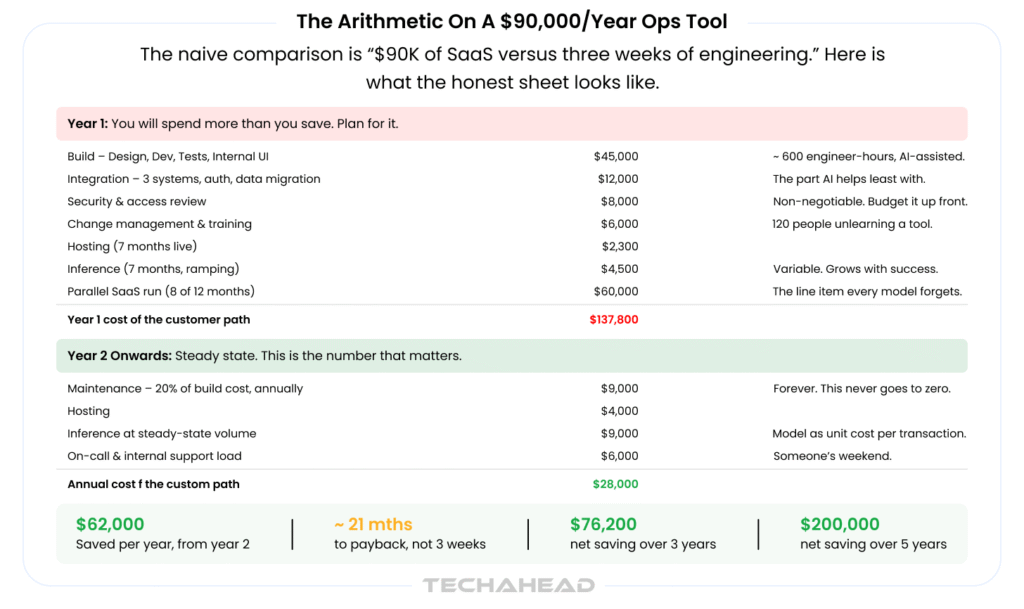
Year one costs you $137,800, against a $90,000 do-nothing baseline. You are $47,800 underwater at the twelve-month mark, which is exactly when someone asks how the project is going.
From year two, the steady state is $28,000 a year. That’s a $62,000 annual saving, a payback at month 21, and $76,200 net across three years. Over five, it’s roughly $200,000.
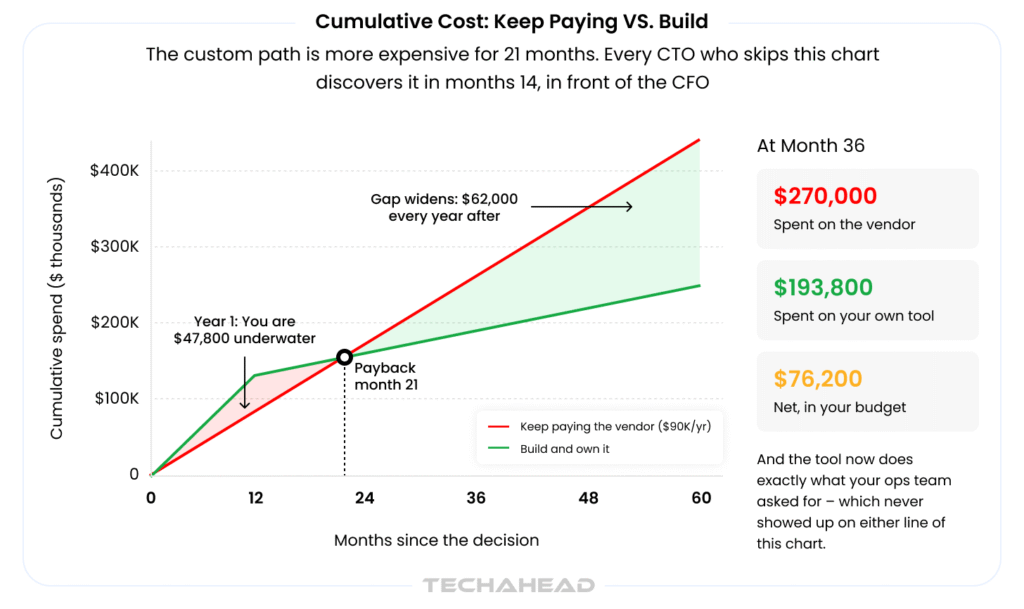
Now the uncomfortable part. Run the same arithmetic on a $40,000 tool, and it never breaks even inside the tool’s realistic lifespan.
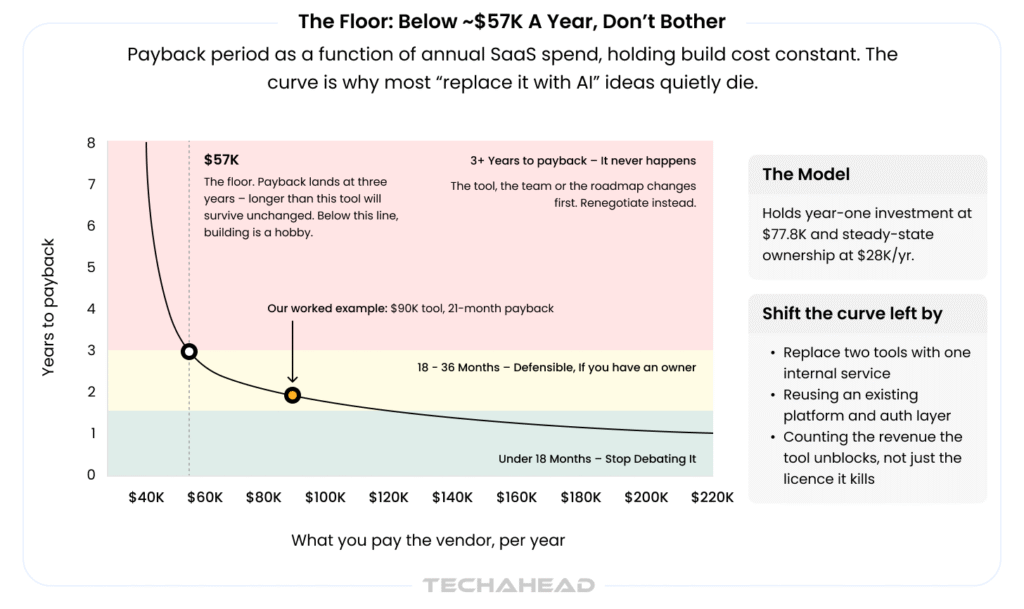
Curve showing payback period as a function of annual SaaS spend, with a floor marked at $57,000 where payback reaches three years (Source: TechAhead Research Team)
Holding build cost roughly constant, payback hits three years at about $57,000 of annual spend, longer than the tool, the team, or the roadmap will survive unchanged. Below that line, building is a hobby. Above $90,000, you’re mostly arguing about who does it.
You can shift the curve left: replace two tools with one internal service, reuse an existing platform and auth layer, or count the revenue the tool unblocks rather than just the licence it kills. What you cannot do is pretend the floor isn’t there.
Assume you’ve got a green-zone tool above the floor with a named owner. You still do not rip anything out.
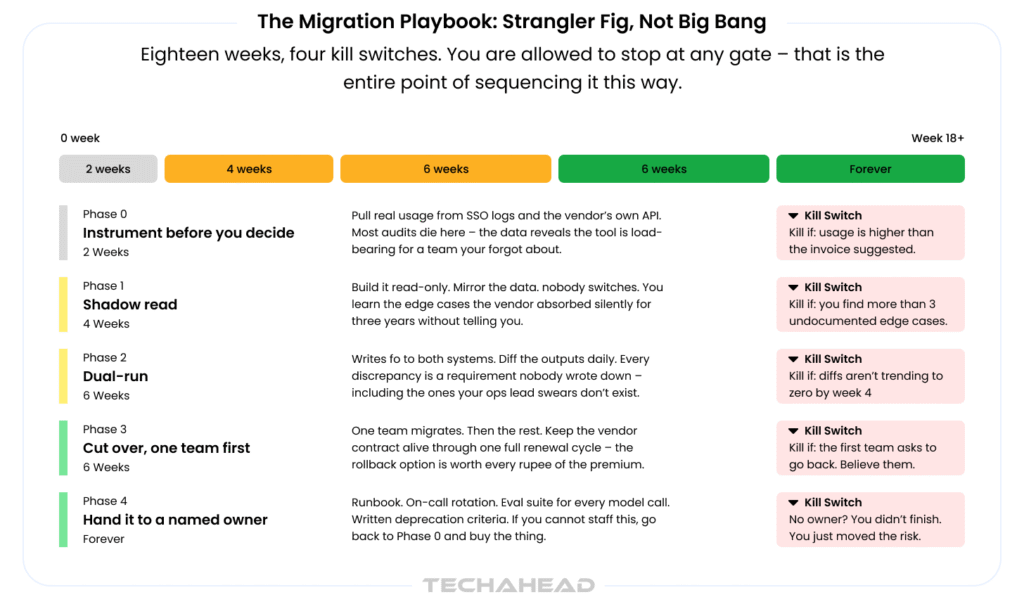
Phase 0: Instrument (2 weeks). Pull real usage from SSO logs and the vendor’s API before you decide anything. Most audits die here, and that’s a success: the data reveals the tool is load-bearing for a team you forgot existed.
Phase 1: Shadow read (4 weeks). Build it read-only. Mirror the data. Nobody switches. You learn the edge cases the vendor has been absorbing silently for three years.
Phase 2: Dual-run (6 weeks). Writes go to both systems. Diff the outputs daily. Every discrepancy is a requirement nobody wrote down, including the ones your ops lead swears don’t exist.
Phase 3: Cut over, one team first (6 weeks). One team, then the rest. Keep the vendor contract alive through a full renewal cycle. The rollback option is worth the premium; that’s what the parallel-run line item in Figure 05 was buying.
Phase 4: Hand it to an owner. Runbook. On-call rotation. Eval suite for every model call. Written deprecation criteria. If you can’t staff this, go back to Phase 0 and buy the thing.
Eighteen weeks feel slow when the prototype worked in four days. It isn’t. The prototype proved the tool can be built; these eighteen weeks prove it can be relied on, which is a different claim and the only one your ops team cares about.
Four gates, four kill switches. You’re allowed to stop at any of them; that’s the entire point of sequencing it this way.
None of these is a technology problem.
All five are why internal tools get quietly re-replaced by SaaS two years later.
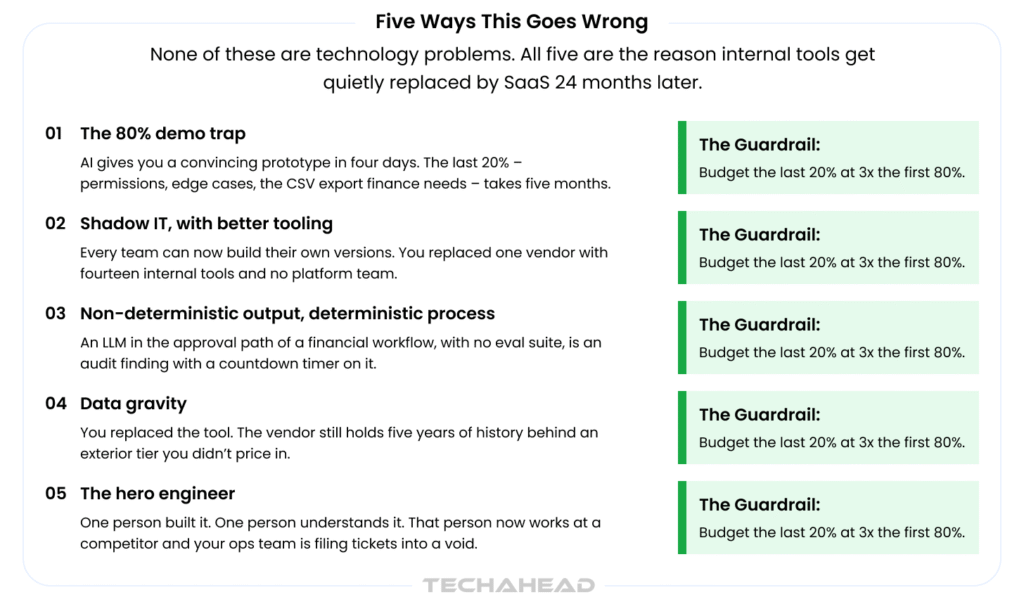
The 80% demo trap. AI gives you a convincing prototype in four days. Permissions, edge cases, and the CSV export finance needs take five months. Budget the last 20% at 3x the first 80%.
Shadow IT with better tooling. Every team can now build its own version. You replaced one vendor with fourteen internal tools and no platform team.
Non-deterministic output in a deterministic process. An LLM in a financial approval path with no eval suite is an audit finding with a countdown timer on it.
Data gravity. You replaced the tool. The vendor still holds five years of history behind an export tier you didn’t price in. Read the exit clause before the kickoff, not during the cutover.
The hero engineer. One person built it, one person understands it, and that person now works at a competitor. Two names on the runbook, or it isn’t done.
Don’t boil the ocean. Do this instead.
Weeks 1-2. Spend audit plus usage instrumentation. Rank every tool by annual cost ÷ weekly active users. The ranking will surprise you; the invoice never told you this.
Weeks 3-4. Run the five-question filter on the top ten. Expect two or three to survive. That’s a good outcome, not a disappointing one.
Weeks 5-12. Build exactly one. The smallest green-zone tool with the clearest owner, not the most expensive one, not the one that annoys you most. The smallest.
The point of the first build is not the savings.
It’s calibrating your organisation’s real build-and-own cost, so the next ten decisions get made with your numbers instead of a vendor’s pricing page or a blog post’s.
Because the CTOs winning here aren’t the ones replacing the most SaaS.
They’re the ones who now have a defensible answer to “why are we paying for this?”, and the credibility to say it in both directions.
Work through your own numbers with TechAhead
We’ve run this audit-to-build cycle with enterprise engineering teams across SaaS, fintech, healthcare, and retail, and the fastest path is almost never a six-month platform bet. It’s a two-week feasibility sprint on your single highest-ranked tool: real usage data, a real TCO model with your build costs, and a build/renegotiate/keep recommendation you can take to the board.
Around $57,000 a year is where payback hits three years, using a $77.8K year-one investment and $28K annual ownership cost. Below that, the tool changes before you break even. Adjust the floor down if the build is strategically differentiating or replaces multiple tools at once.
Take your highest-volume workflow, price a single transaction against the model you’d actually use, and multiply by real monthly volume, then triple it for retries, evals, and the prompt bloat that arrives in month four. Route cheap tasks to small models and cache aggressively; this line item is engineerable, unlike a seat licence.
Yes, if you skip Phase 4. Internal tools don’t die from bad code; they die from unowned code. Budget 20% of the build cost annually, put two names on the runbook, and write the deprecation criteria on day one.
Yes, the certification is about controls, not who wrote the code. But you inherit the evidence collection that the vendor used to handle. Budget the security review up front and keep an eval suite for any non-deterministic step in a controlled process.
Often, the threat is worth more than the build. A vendor facing a credible, costed internal alternative discounts differently than one facing a bluff. Do the Phase 0 work regardless: the worst possible outcome is a 30% discount and a tool you finally understand, and the best is a costed plan you can execute the moment the vendor stops listening.
We use cookies to ensure our website functions properly, improve performance, and provide a personalized experience. You can choose which types of cookies to allow below.
Required for core functionality such as security, network management, and accessibility. These cannot be disabled.
Help us understand site traffic and user interactions so we can improve performance and usability.
Enable enhanced functionality and personalization such as language or region preferences.
Used to deliver relevant ads, track campaign performance, and measure advertising effectiveness.