


 Copy Link
 Share on X
 Share on Facebook
 Share on LinkedIn

Always Active
Required for core functionality such as security, network management, and accessibility. These cannot be disabled.

Uncover the transformative potential of digital and mobile solutions for your industry.





 Last Updated: Sep 25, 2026
May 18, 2026
Last Updated: Sep 25, 2026
May 18, 2026  569
569  19 min. Read


Key Takeaways
Enterprise app modernization has moved from a technology conversation to a financial one. CFOs and CTOs are no longer debating whether legacy systems need replacing. That debate ended somewhere between the third unplanned outage and the second consecutive year of rising maintenance costs. Outdated systems and legacy applications have become significant obstacles to business efficiency and competitiveness, making modernization essential. The question is what does moving from legacy infrastructure to cloud actually cost? And is the number the vendor gave you built on discovery or just optimistic enough to get you to sign?
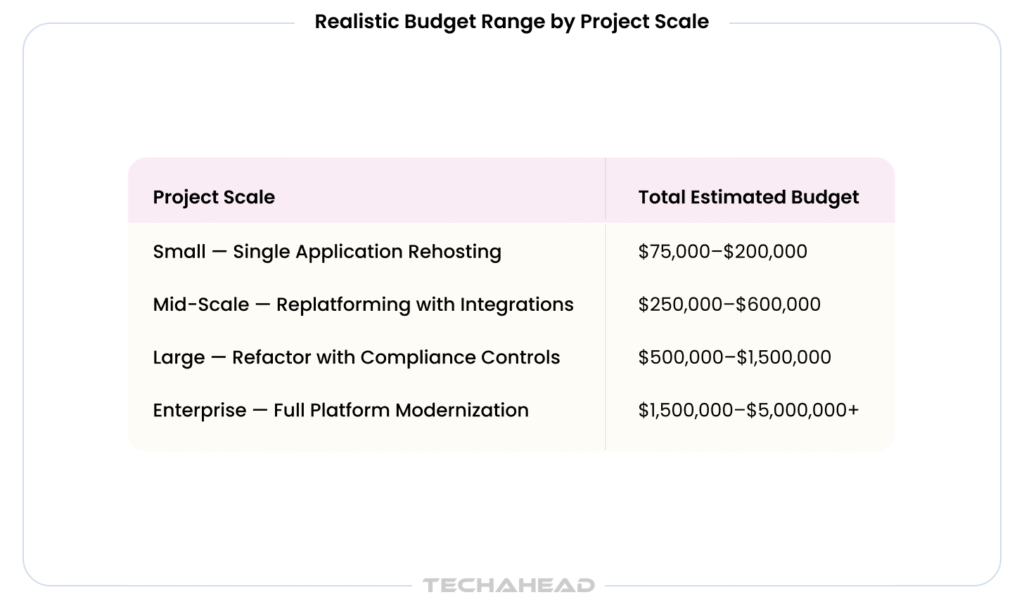
The range is wide. A focused rehosting engagement for a single application starts around $50,000. A full enterprise platform modernization with compliance controls, data migration, microservices decomposition, DevSecOps implementation, and multi-system integration across global operations, routinely exceeds $4,500,000. It reflects genuine differences in legacy system complexity, migration strategy, regulatory environment, and the operational debt that accumulates when modernization is delayed one year too many. Careful budget allocation and planning are critical to optimize modernization costs and ensure resources are used efficiently.
Legacy infrastructure also introduces cost drivers that never appear on a modernization proposal. Undocumented codebases that take weeks to reverse engineer. Data schemas that have never been cleaned or consolidated. Compliance requirements that reshape cloud architecture mid-build. Integration dependencies that only surface once engineers are inside the actual system. Most vendors do not quote for any of this upfront, and most enterprises don’t find out until the change orders start arriving. Addressing these issues early helps maximize business value and enables organizations to remain competitive in their markets.
At TechAhead, we have been modernizing enterprise applications since 2009 before most of today’s cloud platforms existed. We have migrated legacy systems for American Express, AXA, JLL, and Disney. We hold SOC 2 Type II and ISO 42001 certifications, which matters when regulated industries need a modernization partner their compliance teams can actually verify. This guide breaks down enterprise app modernization costs with specificity by migration strategy, by hidden cost drivers that quietly double budgets after contracts are signed.
Legacy systems don’t fail dramatically. They drain you slowly; higher maintenance costs every quarter, integrations that break when vendors update APIs, compliance requirements your decade-old architecture simply wasn’t built to meet.
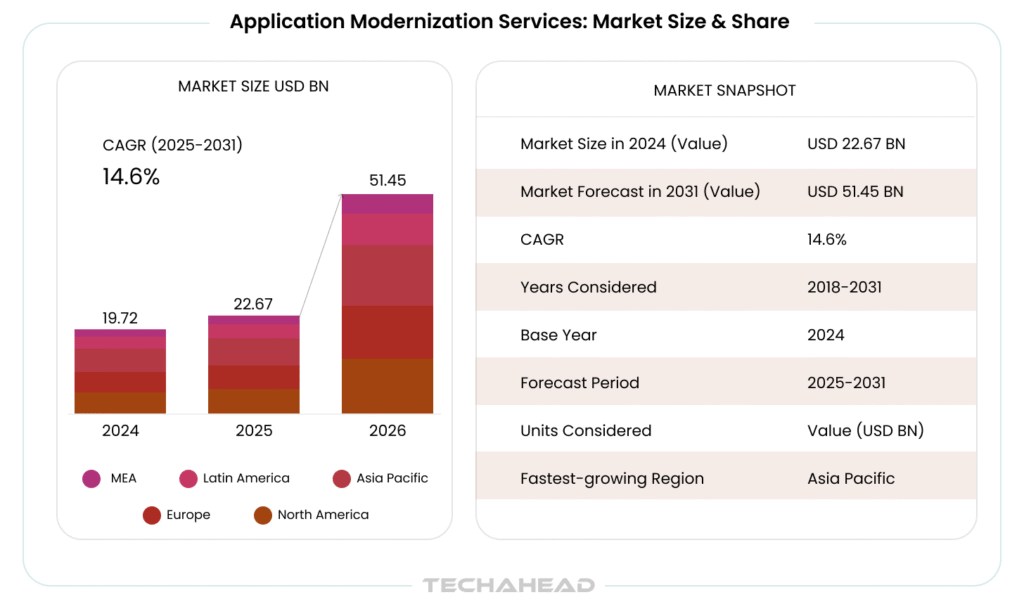
Source: MarketsandMarkets
We’ve seen what staying on legacy infrastructure actually costs. And we’ve seen what moving off it delivers.
When TechAhead modernized American Express’s mobile and CRM infrastructure, the goal wasn’t just technical migration; it was unlocking revenue channels their legacy stack couldn’t support. The result was a direct, measurable increase in sales and customer engagement that their previous infrastructure had been quietly suppressing for years. This demonstrates the business impact and business value of modernization when aligned with business objectives and focused on features that directly affect business operations.
For AXA, cloud modernization meant something different. Their regional operations needed a platform that could scale across markets, meet evolving insurance compliance requirements, and keep pace with a team that moves fast. Legacy infrastructure couldn’t do any of those three things simultaneously.
And for JLL; managing 5.4 billion square feet of global real estate, moving to Azure cloud infrastructure wasn’t a technology decision. It was the only way to make real-time IoT monitoring across thousands of properties even architecturally possible. The outcome was $10M saved annually in operational costs alone. This highlights the expected benefits of modernization, such as improved operational efficiency and significant cost reduction.
Three industries. Three completely different business cases. One consistent finding — the cost of staying on legacy infrastructure was higher than the cost of moving off it.
That’s the real business case for modernization. Not the technology. The numbers. Studies show that up to 50% of features in many products are rarely used, so value-based prioritization in modernization—focusing on high-impact features that align with business objectives—can lead to faster results and better cost control.
Enterprise app modernization costs vary more than most internal budgets anticipate. The range reflects real differences in legacy system complexity, migration strategy, data volume, regulatory environment, and integration depth.
At TechAhead, organizations that invest in proper discovery before budgeting consistently spend 30-40% less than those who do not. Effective budget allocation and cost optimization are critical for controlling project costs and reducing the total cost of modernization, ensuring that resources are focused on high-value features and maximizing return on investment.
| Modernization Type | Description | Typical Cost Range | Timeline |
| Rehosting (Lift & Shift) | Move application to cloud with minimal code changes | $50,000–$150,000 | 4–8 weeks |
| Replatforming | Minor optimizations to leverage cloud capabilities without full rebuild | $100,000–$300,000 | 2–4 months |
| Refactoring / Re-architecting | Restructure codebase to cloud-native architecture | $200,000–$600,000 | 4–8 months |
| Rebuilding | Full redevelopment from scratch on modern cloud-native stack | $400,000–$1,500,000+ | 6–14 months |
| Replacing (SaaS Migration) | Retire legacy system and migrate to commercial SaaS platform | $150,000–$500,000 | 3–8 months |
| Full Enterprise Platform Modernization | Multi-system migration with compliance, data, and integration overhaul | $1,000,000–$5,000,000+ | 12–24 months |
| Legacy API Modernization | Expose legacy systems via modern REST or GraphQL APIs | $50,000–$200,000 | 6–16 weeks |
| Database Migration & Modernization | Migrate on-premise databases to cloud-native managed services | $75,000–$250,000 | 8–20 weeks |
| Microservices Decomposition | Break monolithic application into cloud-native microservices | $300,000–$900,000 | 6–12 months |
| DevSecOps Implementation | Integrate security, CI/CD pipelines, and automated testing into modernized stack | $80,000–$250,000 | 8–16 weeks |
Companies that modernize their legacy app portfolio can realize immediate savings that amount, on average, to 32% of their IT budget by reducing their technical debt load.
Most modernization budgets look clean on paper. Then the build starts and line items nobody quoted begin appearing in change orders. Proper budget allocation and a structured modernization process are critical for successful modernization projects, helping to minimize budget surprises and ensure alignment with business objectives.
A well-executed audit can reveal hidden dependencies and infrastructure issues that, if left unaddressed, may lead to increased costs and project delays during modernization efforts. This can result in significant cost reductions and smoother project execution.
During the discovery and assessment phase, technical audits should focus on areas that generate recurring expenses, allowing organizations to identify and address the most significant cost drivers in their legacy systems. Optimizing the application modernization process and streamlining workflows before modernization can reduce complexity, lower costs, and ensure the process aligns with current business objectives.
This is the line item most enterprises skip, and the one that saves the most money. Discovery covers technical architecture assessment, legacy code analysis and integration inventory. As part of the modernization process, a well-executed technical audit during discovery can reveal hidden dependencies and infrastructure issues that, if left unaddressed, may lead to increased costs and project delays.
Technical audits should focus on areas that generate recurring expenses, helping organizations identify and address the most significant cost drivers in their legacy systems. A thorough audit can lead to significant cost reductions in application modernization efforts. Every hour spent in discovery prevents three hours of rework during migration. At TechAhead, we believe discovery is mandatory before any modernization budget is locked.
Standing up your cloud environment correctly from day one—VPC configuration, IAM policies, networking architecture, security controls, and environment separation—is foundational work that determines how everything else performs. Leveraging cloud native services and implementing cloud optimization strategies at this stage can significantly improve cost efficiency by ensuring resources are used effectively and unnecessary expenses are minimized. Technological upgrades during this phase enhance scalability and automation, setting the stage for a more agile and cost-effective enterprise app modernization process.
The core engineering cost. Actual code migration, refactoring for cloud-native patterns, dependency updates, API modernization, and service decomposition are central to modernization efforts.
Modernizing legacy applications to a microservices architecture can lead to immediate savings of approximately 32% of an organization’s IT budget by reducing technical debt. Microservices architecture also allows for independent scaling of application components, significantly reducing costs associated with testing and deployment stages of the software development lifecycle.
Moreover, refactoring monolithic applications into microservices enhances modifiability, decreases time-to-market, and improves resource utilization. This range reflects genuine differences in codebase size, language age, documentation quality, and whether your application is being rehosted, replatformed, or fully rebuilt.
Moving data is never just copying files. Schema transformation, data cleansing, deduplication, validation pipelines, and cutover planning all carry real engineering costs. For enterprises with years of accumulated data across siloed systems, fintech, healthcare, insurance; this line item consistently surprises. During data migration, optimizing cloud resources and improving resource utilization can lead to significant cost savings by reducing manual processes and ensuring efficient use of infrastructure. Budget 20–30% more than your first estimate.
SOC 2 Type II, HIPAA, PCI-DSS, GDPR, and ISO 27001 compliance requirements do not transfer automatically to your new cloud environment; they get rebuilt into it. Encryption at rest and in transit, audit logging, identity and access management, penetration testing, and compliance documentation all have engineering costs attached. By modernizing security and compliance processes, organizations can also reduce ongoing support costs associated with maintaining outdated or fragmented legacy components. At TechAhead, security architecture is built from day one, not added after the migration is live.
Your modernized application doesn’t exist in isolation. CRM connections, ERP integrations, third-party APIs, and internal service dependencies all need to be re-established in the new environment — often rebuilt from scratch when legacy integration points no longer function in a cloud-native context. Addressing inefficient workflows during integration is crucial, as streamlining and standardizing processes at this stage can reduce costs, minimize delays, and improve overall modernization outcomes.
Performance testing, regression testing, security testing, user acceptance testing, and load testing under real production conditions. For enterprise-scale migrations, this phase takes longer than most estimates allow.
Implementing continuous integration and an efficient development process using DevOps practices and automated workflows helps reduce downtime, improve reliability, and collaboration. Automating testing and deployment processes can significantly reduce costs associated with manual testing, as it minimizes regression testing time and lowers the risk of post-deployment bugs.
Automated deployment pipelines, infrastructure as code, monitoring and alerting configuration, and log management. Implementing CI/CD and DevOps practices is a cost-effective way to achieve significant cost savings in modernization, as automation and continuous integration streamline processes, reduce manual errors, and optimize resource usage. This is the infrastructure that keeps your modernized application maintainable after launch.
Your internal team needs to operate what gets built. Cloud platform training, runbook documentation, incident response procedures, and architecture handover sessions are essential especially when the team that manages the modernized system wasn’t involved in building it.
The 90 days after go-live are where hidden issues surface. Performance tuning, unexpected integration behavior, user-reported bugs, and infrastructure optimization all require dedicated engineering attention. Build post-migration support into your budget as a fixed line item; not an afterthought. Effective support and stabilization during this period significantly reduce long term maintenance costs by addressing issues early and minimizing future technical debt.
Not every application migrates the same way. The 6 Rs framework, originally developed by AWS, gives enterprise teams a structured way to categorize each application before migration begins. The strategy you choose for each system directly determines your budget, timeline, and risk profile. Here is what each one actually costs.
Rehosting moves your application to the cloud with minimal code changes. It is the fastest and cheapest migration path ($50,000–$150,000) and works well for applications that need to move quickly off aging on-premise infrastructure. The tradeoff is clear though. You are not taking advantage of cloud-native capabilities. You are just changing where the application runs, not how it performs.
Replatforming makes targeted improvements during migration; swapping a self-managed database for a cloud-managed service, for example without touching the core architecture. Cost runs $100,000–$300,000. It is the middle ground that many enterprises underestimate. Small optimizations compound into real performance and cost gains over time, without the risk and expense of a full rebuild.
Refactoring means rethinking how your application is structured, breaking monoliths into microservices, modernizing APIs, and rebuilding core components for cloud-native deployment patterns.
Strategic modernization such as thorough technical audits and process optimization, are essential during refactoring to achieve cost optimization by managing infrastructure costs and improving resource efficiency.
It is the most technically complex migration path short of a full rebuild (running $200,000–$600,000). At TechAhead, this is where we see the most significant long-term ROI.
Repurchasing means retiring your legacy system entirely and migrating to a commercial SaaS platform. Cost runs $150,000–$500,000, which covers data migration, configuration, integration, and user training. The engineering cost is lower than a rebuild. However, the change management cost, getting your organization to work differently inside a new platform is consistently underestimated.
Not every legacy system deserves to be migrated. Retiring identifies applications that can simply be switched off; reducing infrastructure costs, security surface area, and maintenance overhead immediately.
Decommissioning legacy systems can deliver immediate savings and cost savings for the organization by eliminating technical debt and freeing up the IT budget for other priorities.
This is not a migration cost, it is a cost saving; usually $10,000–$30,000 in decommissioning work that frees up significantly more in ongoing operational spend.
Some applications are not ready to migrate — dependencies aren’t resolved, compliance requirements need more time, or the business case isn’t strong enough yet. The cost here is planning and documentation $5,000–$20,000 — to ensure retained systems are properly accounted for in your overall modernization roadmap.
| Strategy | Approach | Typical Cost | Best For |
| Rehost | Lift & shift to cloud | $50,000–$150,000 | Speed, aging infrastructure |
| Replatform | Targeted cloud optimizations | $100,000–$300,000 | Performance gains, low risk |
| Refactor | Re-architect for cloud-native | $200,000–$600,000 | Long-term ROI, scalability |
| Repurchase | Replace with SaaS | $150,000–$500,000 | Legacy replacement, lower engineering cost |
| Retire | Decommission unused systems | $10,000–$30,000 | Cost reduction, security |
| Retain | Keep on-premise temporarily | $5,000–$20,000 | Not-yet-ready applications |
Every modernization proposal looks clean at the proposal stage. The hidden costs don’t appear until you’re three months into a build — and by then, you’re negotiating change orders under pressure rather than planning for them in advance. Here’s what consistently gets left out.
Legacy codebases rarely come with clean documentation. What looks like a simple migration in a scoping conversation turns into weeks of reverse engineering once engineers get inside the actual system.
Effectively managing your legacy app portfolio and proactively reducing the technical debt load are crucial steps to control enterprise app modernization costs and avoid unexpected budget surprises. At TechAhead, our discovery phase exists specifically to surface this before a budget is locked and not after.
For JLL’s Intellicommand platform, our engineers found building management system APIs that varied across property types, regions, and equipment vendors. None of that was visible during initial scoping. All of it affected the timeline and budget. Discovering it early meant we could plan for it. Discovering it mid-build would have meant absorbing it in a change order.
Moving data is not just copying files. Enterprise data accumulated over years such as inconsistent schemas, duplicate records, missing values, siloed sources, which requires significant remediation before it can function correctly in a modern cloud environment. For American Express, cloud migration meant consolidating customer data across systems that had never been designed to talk to each other. Data normalization, deduplication, and validation pipelines added material cost to the project — cost that was not visible until our engineers opened the actual datasets.
Compliance requirements that were not fully scoped upfront are one of the most common sources of unplanned modernization cost. For AXA’s insurance platform, regional compliance requirements across markets surfaced mid-build. They require additional security controls, audit logging, and data residency architecture that the original scope had not accounted for.
At TechAhead, we now run compliance mapping as a dedicated workstream during discovery because finding a regulatory gap in week twelve is dramatically more expensive than finding it in week two.
Modernizing one application rarely happens in isolation. Dependent systems: CRMs, ERPs, internal APIs, third-party data feeds; all need to keep functioning during and after migration. At TechAhead, integration testing across dependent systems is a fixed line item in every modernization proposal. Because the most common source of post-launch incidents is not the migrated application itself; it is the systems that connect to it.
This is one of the most consequential architectural decisions in any modernization program — and one of the most misunderstood from a cost perspective. Monolithic architectures aren’t inherently bad. Microservices aren’t inherently better. The right choice depends entirely on your scale, team structure, and long-term product roadmap. Here’s how the cost difference actually breaks down.
At TechAhead, we recommend monolithic architecture for early-stage products and focused internal tools where speed matters more than scalability.
At TechAhead, we have decomposed monolithic enterprise platforms for clients including JLL and American Express where independent scaling across global operations made microservices the only architecture that could support the business requirements.
The question we ask every enterprise client isn’t “monolith or microservices?” It’s “what does your application need to do in three years that it can’t do today?” That answer determines the architecture, not the trend. We have built both. We have migrated from one to the other. And we have watched organizations spend significantly more on decomposing a monolith they should never have built than they would have spent building microservices correctly the first time.
Architecture decisions are budget decisions. Treat them that way from day one.
TechAhead has been building and modernizing enterprise applications since 2009; 16+ years of knowing exactly what breaks during migration before it breaks on your timeline. Our 250+ engineers have delivered successful modernization projects for enterprise clients, including Disney, American Express, Audi, AXA, JLL, and ESPN F1. TechAhead holds SOC 2 Type II and ISO 42001 certifications. We do not claim strong security practices. We hand you the independently audited reports that prove it.
Clutch Top App Developer 2026. Google Best App Award 2024. Webby Award 2024. Three independent recognitions that enterprise buyers can verify without taking our word for it.
Legacy infrastructure has a cost that never appears on a modernization proposal; the daily drain of maintenance overhead, integration failures, and compliance gaps that compound quietly until they do not. We have helped Fortune 500 clients stop paying that hidden cost. Let’s do the same for you.
Application modernization updates specific legacy systems, moving them to cloud, refactoring architecture, or replacing outdated infrastructure. The application modernization process is a structured subset of the broader modernization process involved in digital transformation, focusing on optimizing and updating targeted applications to align with current business objectives.
Digital transformation is broader; rethinking how technology drives business outcomes across the entire organization. The distinction matters because confusing the two leads to underscoped projects and overinflated expectations. At TechAhead, we scope both clearly before a single line of code is written.
Multi-cloud and hybrid strategies add 25-40% to modernization complexity, introducing cross-platform networking, inconsistent security controls, and data synchronization challenges that single-cloud migrations avoid. At TechAhead, we architect for the strategy that matches your risk tolerance and operational requirements, not the one that’s easiest to build or cheapest to propose.
Phased modernization almost always outperforms big-bang programs for enterprise environments. Smaller releases reduce risk, deliver early ROI, and allow architecture decisions to evolve as the program progresses. By structuring application modernization efforts in incremental phases, organizations can incorporate user feedback during each release, further reducing risk and improving outcomes. At TechAhead, we recommend phased delivery with clearly defined value milestones, so finance committees see tangible returns before the full modernization budget is committed.
Most enterprise modernization programs reach positive ROI within 18-24 months of go-live; driven by reduced infrastructure costs, lower maintenance overhead, and productivity gains from modern tooling. At TechAhead, clients in asset-intensive industries like real estate and manufacturing, including JLL, have reported $10M+ in annual operational savings within 12 months. ROI timeline depends heavily on legacy system complexity and modernization strategy chosen.
Zero-trust means no user, device, or service is trusted by default. Every access request is verified regardless of network location. For modernized enterprise cloud applications, it means identity-based access controls, micro-segmentation, continuous authentication, and least-privilege policies across every service boundary. At TechAhead, zero-trust principles are built into cloud architecture from day one.
We use cookies to ensure our website functions properly, improve performance, and provide a personalized experience. You can choose which types of cookies to allow below.
Required for core functionality such as security, network management, and accessibility. These cannot be disabled.
Help us understand site traffic and user interactions so we can improve performance and usability.
Enable enhanced functionality and personalization such as language or region preferences.
Used to deliver relevant ads, track campaign performance, and measure advertising effectiveness.