


 Copy Link
 Share on X
 Share on Facebook
 Share on LinkedIn

Always Active
Required for core functionality such as security, network management, and accessibility. These cannot be disabled.

Uncover the transformative potential of digital and mobile solutions for your industry.





 Last Updated: Sep 18, 2026
Aug 10, 2026
Last Updated: Sep 18, 2026
Aug 10, 2026  444
444  16 min. Read


Key Takeaways
Cloud migration in 2026 is no longer just about moving virtual machines out of a data center; most organizations are simultaneously preparing for generative AI, RAG, vector search, and AI agents, which changes the entire budgeting equation.
The numbers show why. Gartner forecasts worldwide public cloud spending at $723.4 billion in 2025, growing 21.3% in 2026, inside a broader $6.31 trillion IT spending market, where data center systems spend is up 55.8% on AI-optimized infrastructure demand.
Flexera’s 2026 State of the Cloud Report adds the operational reality: 58% of organizations now run generative AI in the cloud, yet wasted cloud spend has climbed to 29%, its first rise in five years.
The core principle: migration cost (one-time) and infrastructure cost (recurring) are not the same number, and an AI-ready budget has to plan for both separately.
The most important principle to internalize before building a number is this:
Cloud migration cost is not the same as cloud infrastructure cost.
Migration cost is the one-time investment required to assess, redesign, move, test, and stabilize workloads. Infrastructure cost is the recurring monthly operating expense that begins after migration and continues for the life of the platform. Conflating the two is how migration projects get approved on numbers that never resembled the real bill.
The data backs up how fast the ground is shifting.
According to Flexera’s 2026 State of the Cloud Report, 64% of organizations now use business value delivered as their leading measure of cloud success: Up 12 points year over year, while 49% track unit economics such as cost per service, up from 40% the prior year.
Source: TechAhead AI Team
At the same time, generative AI adoption reached 58% of surveyed organizations (up from 50%), and wasted cloud spend climbed to 29%, the first increase in five years, as AI workloads outpaced teams’ ability to forecast and govern them.
In other words, cloud is being judged on value more than ever, and AI is simultaneously making that value harder to predict. An AI-ready migration budget has to be a combination of technical planning, financial modeling, and governance, not just a spreadsheet of instance prices.
The most common budgeting mistake is quoting only compute and storage prices. A defensible budget separates costs into two buckets from day one.
One-time migration costs typically include:
Recurring cloud costs, once the platform is live, typically include:
This distinction matters for a strategic reason, not just an accounting one. A lift-and-shift migration can reduce implementation time, but it often preserves the same architectural inefficiencies that made the on-premises environment expensive; it simply moves them onto a cloud invoice.
A modernization program requires a larger initial investment but tends to improve scalability, resilience, deployment speed, and, critically, AI readiness.
AWS positions its own Migration Evaluator around exactly this gap: a no-cost assessment built to produce a data-driven business case before an organization commits to either path.
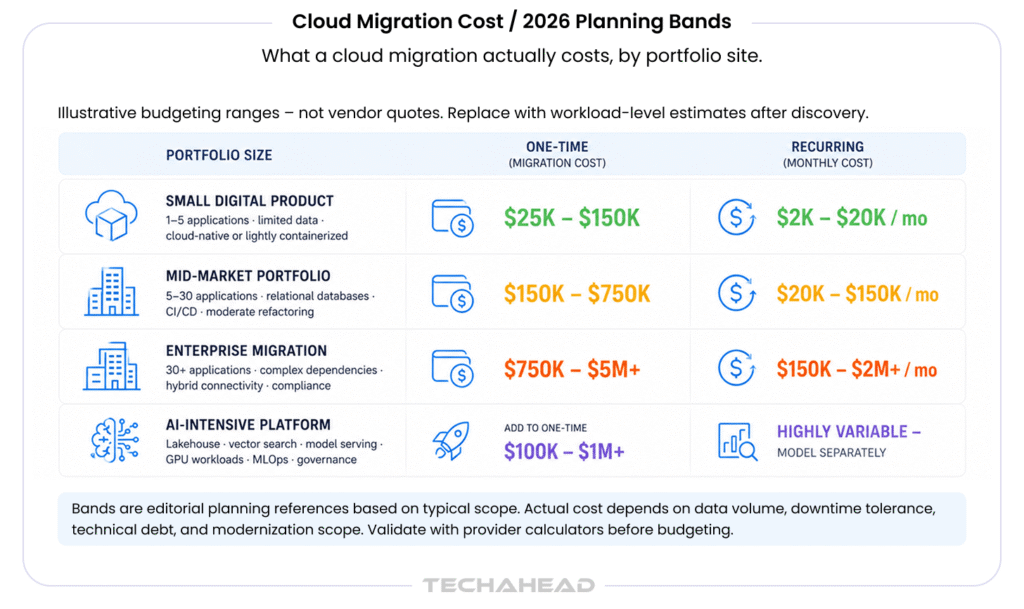
No credible source can claim that every migration falls into one universal price range: The cost depends on application count, data volume, regulatory obligations, downtime tolerance, technical debt, and modernization scope. What’s useful instead is a set of illustrative planning bands to anchor an early conversation with finance, clearly labeled as editorial estimates rather than vendor quotes.
Migration Budget Bands:
| Migration profile | Typical scope | One-time planning range | Likely recurring cloud budget after stabilization |
| Small digital product | 1–5 applications, limited data, cloud-native or lightly containerized | $25,000–$150,000 | $2,000–$20,000/month |
| Mid-market portfolio | 5–30 applications, relational databases, CI/CD, security controls, moderate refactoring | $150,000–$750,000 | $20,000–$150,000/month |
| Enterprise migration | 30+ applications, complex dependencies, hybrid connectivity, compliance, multiple environments | $750,000–$5 million+ | $150,000–$2 million+/month |
| AI-intensive platform | Data lakehouse, vector search, model serving, GPU workloads, MLOps, governance | Add $100,000–$1 million+ to implementation | Highly variable: GPU, data, inference, and observability must be modeled separately |
Treat these as budgeting bands, not market averages, and replace them with workload-level estimates as soon as discovery data is available (Section 6 covers that method). A more durable model for the first-year number looks like this:
Total first-year cost = migration services + temporary dual running + data transfer + cloud operating cost + security and compliance + AI platform cost + contingency
Source: TechAhead AI Team
Every term in that formula should be modeled separately; bundling them into one lump “cloud cost” line is exactly what causes budget overruns later.
Discovery is consistently underestimated.
A migration team needs to identify application owners and business criticality, runtime and OS dependencies, database engines and integration points, hard-coded IPs and credentials, batch jobs and scheduled tasks, latency-sensitive services, data residency requirements, and licensing restrictions tied to specific hardware.
AWS’s Migration Evaluator is built specifically to automate this discovery layer, because an application that looks like a simple monolith often depends on undocumented databases, file shares, or authentication services that only surface once someone starts pulling the thread.
Rehosting is faster but often doesn’t deliver the expected cost or performance benefit. Refactoring produces better long-term economics but requires materially more engineering and testing effort.
Data movement cost is driven by total volume, number of migration waves, source/target locations, network bandwidth, transformation needs, replication windows, validation and reconciliation effort, encryption/compliance controls, and downtime tolerance.
Cloud providers separately meter multiple components of storage: AWS S3 pricing, for instance, itemizes storage capacity, requests, retrieval, replication, data transfer, and management features as distinct line items, not one flat “storage” charge.
Costs rise when teams need to break a monolith into services, containerize workloads, adopt managed Kubernetes, replace proprietary middleware, introduce event-driven architecture, redesign state management, add API contracts, or build automated CI/CD pipelines.
The business case should weigh this cost against faster release cycles, lower operational effort, better resilience, and the ability to plug in AI services later without another rebuild.
AI-ready infrastructure needs more than a firewall and encryption at rest.
Expect to budget for centralized identity and least-privilege access, secrets management, private networking, key management, workload vulnerability management, SIEM, data loss prevention, model and prompt security, audit logging, data classification, and regulatory controls for personal, financial, health, or confidential data.
Security belongs in the initial budget; treating it as a post-migration add-on is one of the most expensive sequencing mistakes a team can make.
Recurring costs here include infrastructure monitoring, APM, centralized logging, distributed tracing, log ingestion and retention, backup and disaster recovery, incident response, managed support, and platform engineering.
Logging in particular becomes unexpectedly expensive once high-volume application, audit, network, and AI-inference logs are retained indefinitely rather than tiered.
Almost every migration requires a period where legacy and cloud systems run in parallel. Budget explicitly for duplicate compute and storage, database replication, extra network connectivity and monitoring, parallel test environments, extended licenses, and staff overtime during cutover.
This should be its own line item in the financial model, not something absorbed silently into the infrastructure estimate.
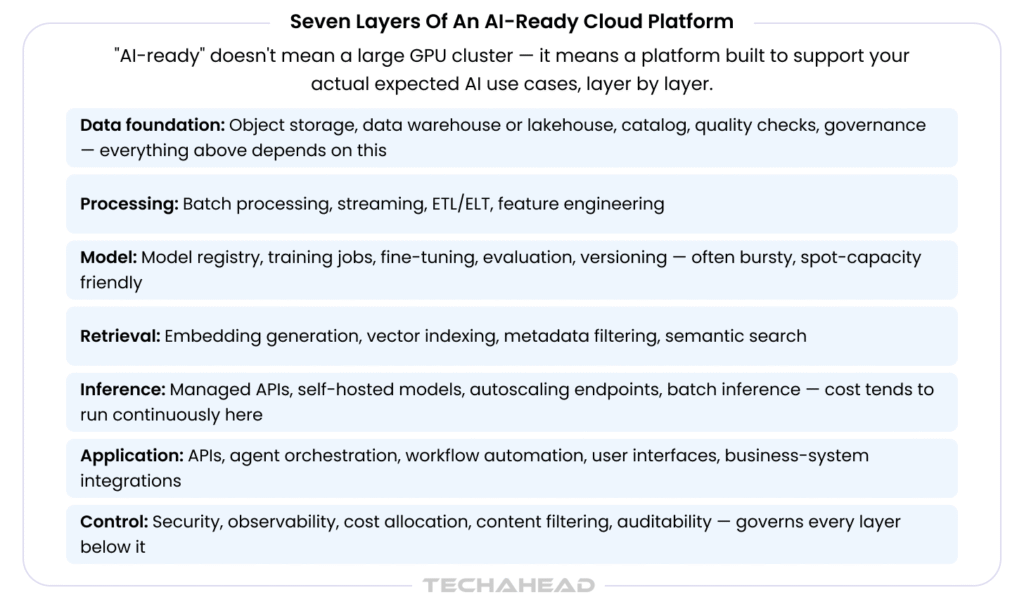
“AI-ready” does not automatically mean buying a large GPU cluster. It means building a platform capable of supporting the organization’s actual expected AI use cases, no more, no less. A practical architecture typically has seven layers:
Training and inference have fundamentally different cost profiles. Training workloads are often bursty and can use temporary capacity, reservations, or interruptible (spot) capacity when the job supports checkpointing.
Source: TechAhead AI Team
Inference cost tends to be more persistent because production endpoints often run continuously; a low-volume application may be cheaper on a managed model API, while a high-volume or latency-sensitive one may justify a dedicated endpoint or self-hosted model.
Budget separately for: model training, fine-tuning, embedding generation, batch inference, real-time inference, vector storage and querying, prompt/response logging, evaluation, guardrails and moderation, and data pipeline processing.
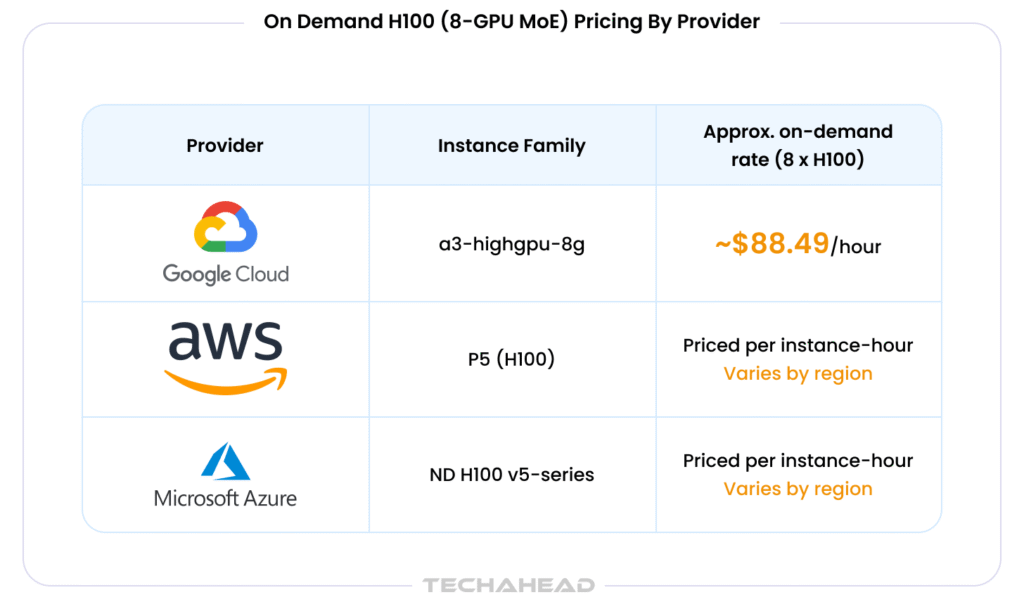
A worked GPU example. Say a team runs an eight-GPU H100 training configuration for 100 hours. On Google Cloud’s A3 High machine family: Eight NVIDIA H100 80GB GPUs on a single a3-highgpu-8g instance, the published on-demand rate is approximately $88.49/hour for the full 8-GPU node. That produces an illustrative compute estimate of:
100 hours × $88.49/hour = $8,849
This figure excludes attached storage, data processing, networking, orchestration overhead, failed runs, experiment iteration, and tax, and GPU pricing shifts by region, generation, and commitment level, so it must be re-validated in the provider’s pricing calculator before it goes into a real budget.
The purchasing model matters as much as the sticker price. AWS offers On-Demand, Savings Plans, and Spot Instances side by side: EC2 Instance Savings Plans can discount usage by up to 72% versus On-Demand in exchange for a committed spend, while Spot Instances, built on spare, reclaimable capacity, can discount by up to 90% for fault-tolerant, interruption-tolerant workloads. Neither discount is a guaranteed project saving; both depend on workload stability, commitment utilization, region, instance family, and the organization’s tolerance for interruption.
Source: TechAhead AI Team
| Notes: |
| 1-yr committed use can lower this materially; validate in the calculator |
| Savings Plans up to 72% off, Spot up to 90% off, see EC2 pricing |
| See the Azure pricing calculator and the ND H100 v5 spec sheet |
Treat every number in this table as a planning reference, not a quote: GPU pricing is one of the fastest-moving line items in any cloud bill.
Comparing providers on virtual-machine hourly price alone is a common and expensive mistake. Evaluate the full architecture instead.
Table 3: AI-ready cost categories to model
| Cost category | What to measure | Why it matters |
| Compute | vCPU, memory, autoscaling, operating hours, utilization | Idle and overprovisioned resources dominate most bills |
| Accelerators | GPU/TPU model, memory, interconnect, reservation, utilization | AI training and inference are highly sensitive to accelerator choice |
| Storage | Hot, cool, archive, block, file, object, vector storage | Retention and access patterns drive the effective cost |
| Data movement | Ingress, egress, cross-region transfer, replication | Moving data between services or regions creates recurring charges |
| Databases | Provisioned capacity, IOPS, storage, backups, replicas | Managed databases are operationally efficient but costly at scale |
| AI services | Model API tokens, embeddings, fine-tuning, endpoint hours | Token volume and traffic patterns are notoriously hard to forecast |
| Observability | Logs, traces, metrics, retention, security analytics | High-volume AI and microservice logs can grow faster than expected |
| Resilience | Multi-zone, multi-region, backup, DR | High availability improves resilience but doubles some resources |
| People & tooling | FinOps, platform engineering, security, support, licenses | Operational ownership is part of the total cost of ownership, not separate from it |
For storage and data movement specifically, use provider calculators with architecture-specific assumptions, AWS, for example, meters S3 storage, requests, retrieval, replication, data transfer, and management features as separate cost components.
A single “cost per server” number is not a budget. A bottom-up method holds up far better under scrutiny.
Step 1: Build the inventory: application count, CPU/memory utilization, storage capacity and growth, database size and transaction volume, network traffic, peak and average requests, availability requirements, backup/retention needs, security and compliance requirements, and AI data/inference requirements.
Step 2: Classify each workload using the seven Rs from Section 3.2.
Step 3: Estimate baseline usage using at least 30–90 days of monitoring data where available, separating average utilization, peak utilization, seasonal peaks, dev/test usage, DR capacity, and temporary migration capacity.
Step 4: Model the target architecture, mapping each workload to VMs/containers, managed Kubernetes, serverless, managed relational databases, object storage, streaming/messaging, a data warehouse or lakehouse, and the AI platform/model-serving layer.
Step 5: Add non-compute costs: data transfer, backups, observability, security tooling, support, licenses, connectivity, and staff/managed services.
Step 6: Model three scenarios: a low case (conservative usage, successful optimization), an expected case (realistic growth, normal overhead), and a high case (traffic growth, underutilized resources, additional replicas, or GPU demand).
Step 7: Validate with a pilot. Run a representative workload in a proof-of-concept environment and measure actual performance, data transfer, storage growth, logging volume, and AI inference behavior before committing the full budget.
Financial-services and technology companies that have run large-scale AWS migrations: Capital One’s move of customer-facing applications, being a widely cited example, consistently point back to this kind of phased, measured approach rather than a single big-bang cutover.
Flexera’s 2026 research found that 63% of organizations now have a dedicated FinOps team and 73% operate hybrid-cloud environments, both figures that keep climbing as AI adds unpredictable, hard-to-forecast usage patterns to the bill.
The FinOps Foundation’s framework organizes this discipline into three iterative phases: Inform (visibility into spend), Optimize (acting on savings opportunities), and Operate (embedding continuous, cross-functional governance), and that structure applies directly to AI workloads, not just traditional compute.
Practical controls worth building into the budget from day one:
Example: AI and Cloud Unit Economics
| Metric | Calculation | Example interpretation |
| Cost per inference | Total inference spend ÷ completed inferences | Useful for comparing model or endpoint choices |
| Cost per customer | AI + platform spend ÷ active customers | Helps product teams assess pricing and margins |
| Cost per document processed | (Embedding + retrieval + generation cost) ÷ documents processed | Useful for RAG and document-intelligence products |
| Cost per successful workflow | Total AI spend ÷ workflows completed without human correction | A better signal than token cost alone |
| GPU utilization | GPU compute time used ÷ GPU capacity purchased | Low utilization justifies autoscaling or shared capacity |
| Migration cost per application | Migration program cost ÷ applications migrated | Useful for comparing simple vs. complex migration waves |
| Cloud cost as % of revenue | Cloud operating cost ÷ revenue | A core SaaS margin-planning metric |
The cheapest architecture is rarely the best one. The real target is an acceptable balance of cost, availability, latency, security, developer productivity, and business value, which is exactly the “value over pure cost efficiency” shift Flexera’s data shows organizations already making.
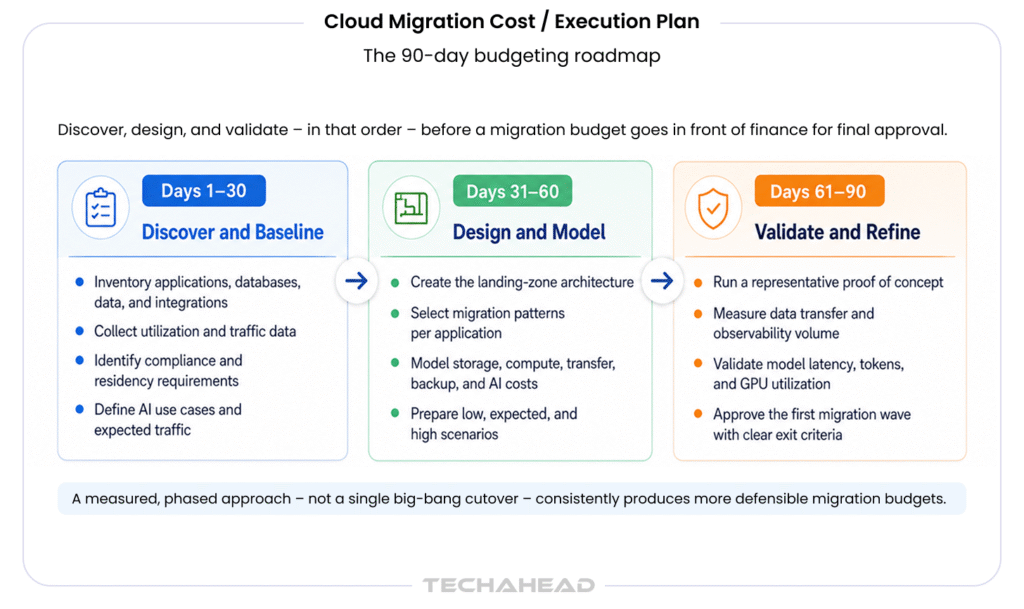
Days 1-30: Discover and baseline: inventory applications, databases, data, and integrations; collect utilization and traffic data; identify compliance and residency requirements; separate production, non-production, and DR workloads; define AI use cases and expected traffic.
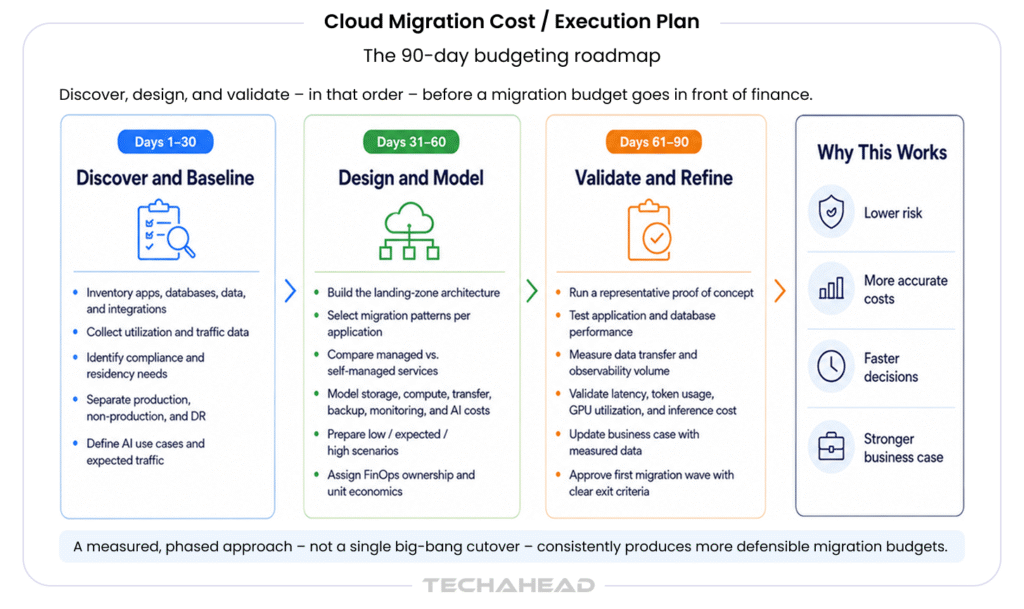
Image Source: TechAhead AI Team
Days 31–60: Design and model: build the landing-zone architecture; select migration patterns per application; compare managed vs. self-managed services; model storage, compute, transfer, backup, monitoring, and AI costs; prepare low/expected/high scenarios; assign FinOps ownership and unit economics.
Days 61–90: Validate and refine: run a representative proof of concept; test application and database performance; measure data transfer and observability volume; validate model latency, token usage, GPU utilization, and inference cost; update the business case with measured data; approve the first migration wave with clear exit criteria.
Cloud migration cost in 2026 should be treated as a business-capability investment, not a simple infrastructure invoice. Organizations need to budget for migration engineering, temporary dual running, security, governance, data platforms, observability, AI services, and ongoing optimization, together, as one financial model, not as separate afterthoughts bolted on when the bill arrives.
An AI-ready cloud architecture should be designed around measurable workload economics: cost per request, per customer, per document, per workflow, or per transaction, not just the price of a virtual machine.
Planning a cloud migration or AI modernization project? Talk to TechAhead’s cloud engineering team for a workload-level assessment, architecture roadmap, and realistic migration budget tailored to your applications, data, compliance requirements, and growth plans.
It ranges from $25,000 for a small digital product to $5 million+ for enterprise portfolios, plus $100,000–$1 million+ extra for AI-intensive platforms.
No. Migration cost is the one-time spend to assess, redesign, and move workloads; infrastructure cost is the recurring monthly bill after go-live.
AI adds GPU capacity, vector databases, model serving, and inference costs — layers that don’t exist in a traditional lift-and-shift migration budget.
AWS Savings Plans cut costs up to 72% and Spot Instances up to 90%, but savings depend on workload stability and tolerance for interruption.
Measuring only infrastructure cost. A realistic budget also includes security, data egress, dual running, and AI-specific unit economics.
We use cookies to ensure our website functions properly, improve performance, and provide a personalized experience. You can choose which types of cookies to allow below.
Required for core functionality such as security, network management, and accessibility. These cannot be disabled.
Help us understand site traffic and user interactions so we can improve performance and usability.
Enable enhanced functionality and personalization such as language or region preferences.
Used to deliver relevant ads, track campaign performance, and measure advertising effectiveness.