


 Copy Link
 Share on X
 Share on Facebook
 Share on LinkedIn
Always Active
Required for core functionality such as security, network management, and accessibility. These cannot be disabled.

Uncover the transformative potential of digital and mobile solutions for your industry.





 Last Updated: Sep 18, 2026
May 14, 2026
Last Updated: Sep 18, 2026
May 14, 2026  721
721  25 min. Read


Key Takeaways
Building an iOS app in 2026 is not a line-item exercise; it is a series of interdependent engineering decisions that compound into a final number. Enterprises are often blindsided by ‘Ecosystem Debt’: the 30–40% gap between a basic development quote and the reality of Apple’s mandatory compliance, AI governance, and annual platform modernization requirements.
We saw this firsthand building for American Express, where Apple’s financial services data handling requirements and App Store compliance standards added significant discovery and architecture work before a single feature was scoped.
Similarly, for Heatmiser’s smart home iOS platform, Apple’s HomeKit compliance framework reshaped the entire device communication architecture in ways the original brief had not anticipated, adding weeks of engineering work that no initial estimate had accounted for.
Custom iOS app development offers enterprises tailored, scalable, and secure solutions that address unique business needs and industry requirements. Understanding the iOS ecosystem—including its frameworks, compliance standards, and integration points—is crucial, as it directly influences development decisions and overall costs.
This guide breaks down every major cost driver so your internal teams and finance committees understand exactly where the budget goes, and why. Selecting the right iOS development partner is essential to ensure project success, long-term support, and measurable ROI.
Mobile app development is the process of designing, building, and deploying software applications specifically for mobile devices such as smartphones and tablets. In today’s digital-first landscape, mobile apps have become essential tools for enterprises seeking to engage customers, streamline operations, and unlock new revenue streams. Whether targeting internal users or a global customer base, the right mobile app can transform business processes and drive competitive advantage.
The journey of developing apps involves several stages: ideation, market research, design, development, testing, deployment, and ongoing maintenance. Each stage introduces its own set of considerations and costs. The type of app—be it a simple utility, a data-driven enterprise platform, or a feature-rich customer-facing solution—directly impacts the resources required.
App complexity, integration with backend systems, security requirements, and the choice of development platform (iOS, Android, or cross-platform) all play significant roles in determining the final budget. When comparing iOS and Android apps, developing apps for Android often involves additional costs due to greater ecosystem fragmentation and more extensive testing challenges, whereas iOS development typically benefits from a more uniform hardware and software environment.
For enterprises, understanding these cost drivers is crucial. A basic mobile app may require a modest investment, while a scalable enterprise solution can command a much higher budget due to advanced features, compliance needs, and integration with existing IT infrastructure.
App development companies frequently provide industry benchmarks and online calculators to help estimate mobile app development costs, offering valuable guidance for organizations planning their projects. By grasping the fundamentals of mobile app development and the factors that influence cost, organizations can make informed decisions and set realistic expectations for their app development projects.
Consumer apps and enterprise iOS apps share a platform, not a cost structure. For example, basic apps or iOS app based solutions with minimal features, such as simple utilities or standalone tools, have lower development and infrastructure costs, as they may operate entirely on the device or with limited backend requirements.
In contrast, a consumer fitness app may require a backend, a payment flow, and push notifications. Enterprise iOS deployments, compared to iOS app based consumer apps, require all of that plus MAM (Mobile Application Management), Declarative Device Management (DDM), Apple Business Manager enrollment, enterprise distribution certificates, role-based access control, SSO via SAML or OAuth, and in regulated industries audit-logging and data-loss prevention layers.
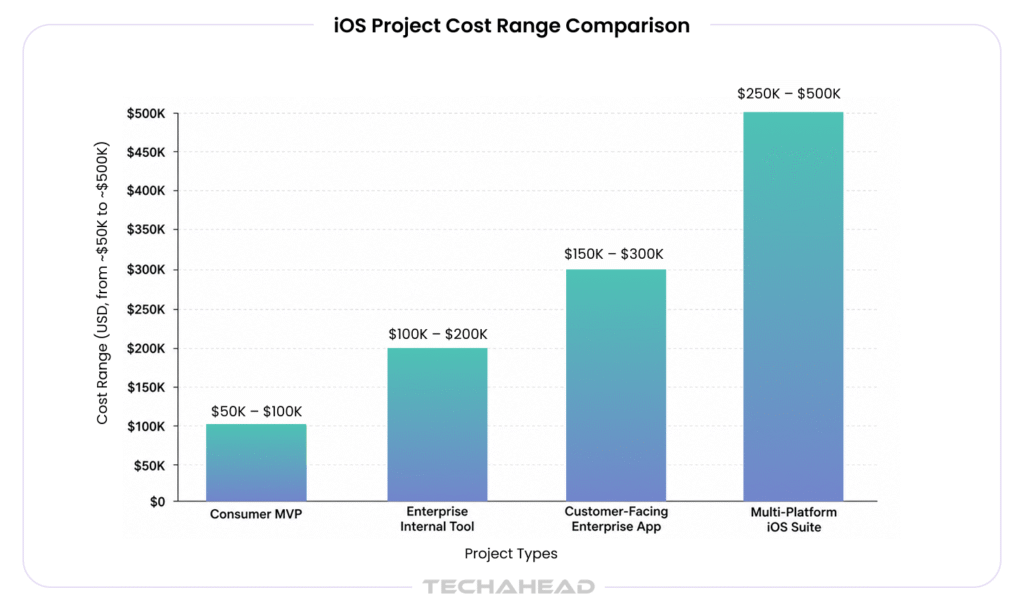
The table below anchors the conversation before getting into line-item specifics.
Below is a detailed app development cost breakdown and cost breakdown by project type, design complexity, and feature set. This table helps clarify the components contributing to overall iOS app development costs, enabling you to better estimate budgets and prioritize features. Complex apps—those with advanced features such as AI, AR, or custom design elements—require more intricate planning and execution, leading to higher costs and longer timelines.
| Project Type | Typical Scope | Timeline | TechAhead Price Range |
| Consumer MVP | Core feature set, 1 iOS platform, basic backend | 3–5 months | $50,000 – $100,000 |
| Enterprise Internal Tool | MDM integration, SSO, offline sync, admin dashboard | 5–8 months | $100,000 – $200,000 |
| Customer-Facing Enterprise App | Brand design system, API integrations, analytics, accessibility compliance, App Store release | 6–10 months | $150,000 – $300,000 |
| Multi-Platform iOS Suite | iPhone + iPad + watchOS or CarPlay extensions, enterprise MDM, multi-environment CI/CD | 9–14 months | $250,000 – $500,000 |
These ranges reflect TechAhead’s iOS app development services team billing at blended US-nearshore rates. Pure US onshore delivery adds 25-35% to these figures.
Simple apps can cost between $5,000 and $50,000, while complex applications with AI or specialized integrations can exceed $200,000.
The choice between Swift (UIKit) and SwiftUI is the first architectural decision that affects both schedule and cost. Both UIKit and SwiftUI are used to build native iOS apps, enabling the creation of secure, scalable, and custom solutions for various industries.
SwiftUI: Faster Delivery, Narrower Device Support
SwiftUI produces 30–50% fewer lines of code than equivalent UIKit implementations. For a project targeting iOS 26 (utilizing the new Liquid Glass design system), SwiftUI is the standard. At a professional rate of $150/hour, a 200-screen enterprise app that would take 3,200 UIKit hours could be delivered in ~1,900 SwiftUI hours, a strategic saving of nearly $200,000.
UIKit remains the choice for apps requiring extreme low-level control, such as custom physics engines or high-performance video editors. However, the “Maintenance Tax” is steep. Budget an additional $12,000-$20,000 per major iOS release for a complex UIKit app, as adaptation to new system behaviors (like iOS 26’s translucent UI layers) is manually intensive.
Migrating a UIKit codebase to SwiftUI after the fact costs 40-60% of the original development investment. For a $200,000 UIKit project, a full migration budget is $80,000-$120,000. Make the framework call at the start.
The design of an iOS app is more than just aesthetics; it’s a critical factor that shapes user engagement, adoption rates, and ultimately, the total cost of iOS app development. The user interface plays a central role in this process, as it directly impacts how users interact with the app and perceive its value. For enterprises, investing in thoughtful UI/UX design is not optional; it’s a strategic decision that can reduce long-term development costs and minimize the risk of costly redesigns after launch.
The cost of iOS app design is influenced by several variables: the number of screens, the complexity of user flows, the need for custom animations, and the level of branding required. A simple app with basic features and standard navigation might require an investment of $5,000 to $10,000 for design.
In contrast, a complex app—featuring advanced interactions, accessibility compliance, and a fully customized interface—can see design costs soar to $50,000 or more. The design phase of app development typically accounts for roughly 10% to 20% of the total budget, ensuring compliance with Apple’s Human Interface Guidelines.
Enterprises should view iOS app design as an investment in user engagement and operational efficiency. A well-designed app reduces friction, increases productivity, and encourages adoption across the organization. Moreover, clear and intuitive design reduces the likelihood of user errors and support requests, saving money over the app’s lifecycle. By prioritizing high-quality iOS app design from the outset, enterprises can ensure their app delivers a seamless experience and stands out in a crowded marketplace.
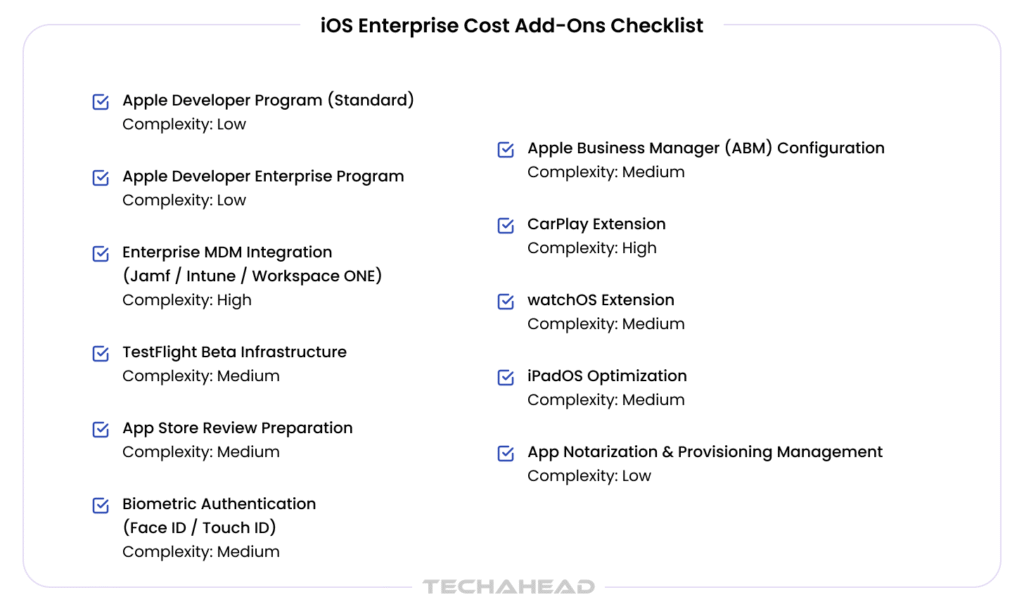
Beyond core development, iOS enterprise deployments carry a set of mandatory or near-mandatory cost layers that generic app development guides omit. App store fees are a recurring cost for distributing apps on the Apple App Store, and these fees, along with app launch procedures such as compliance with Apple’s submission guidelines and review process, directly impact the overall budget. Successfully launching your app on the Apple App Store requires careful attention to these requirements to avoid delays or additional expenses.
| Add-On | What It Covers | Typical Cost Range | Notes |
| Apple Developer Program (Standard) | App Store distribution, TestFlight, code signing | $99/year | Required for any App Store release |
| Apple Developer Enterprise Program | In-house distribution without App Store | $299/year | For proprietary internal apps only |
| Enterprise MDM Integration — Jamf Pro | API integration, enrollment workflow, policy enforcement | $25,000–$60,000 dev cost | $5–15/device/month licensing |
| Enterprise MDM Integration — Microsoft Intune | Integration with M365 tenants, conditional access | $15,000–$40,000 dev cost | Included in M365 E3/E5 at extra licensing cost |
| Enterprise MDM Integration — VMware Workspace ONE | Full UEM integration, app tunneling, DLP | $30,000–$70,000 dev cost | Most complex integration |
| TestFlight Beta Infrastructure | Automated build delivery, tester group management | $3,000–$8,000 setup | Ongoing CI/CD cost after setup |
| App Store Review Preparation | Guideline audit, metadata, screenshots, privacy manifest | $5,000–$12,000 | Fintech/health apps require additional compliance documentation |
| Face ID / Touch ID (Biometric Auth) | Local authentication framework, fallback logic | $8,000–$18,000 | Required for most enterprise and fintech apps |
| Apple Business Manager Configuration | Custom app distribution, VPP, zero-touch enrollment | $5,000–$15,000 | ABM itself is free; integration labor is the cost |
| CarPlay Extension | Navigation or audio entertainment features | $25,000–$80,000 | Apple entitlement required; adds 2–6 weeks |
| watchOS Extension | Companion app, health/fitness data, complications | $20,000–$45,000 | Independent watchOS apps add backend complexity |
| iPadOS Optimization | Split View, Stage Manager, Apple Pencil, keyboard shortcuts | $15,000–$35,000 | Often underscoped in initial estimates |
| App Notarization & Provisioning Management | Annual certificate renewal, distribution profile handling | $3,000–$6,000/year | Operational cost, not one-time |
At TechAhead, we have built iOS products across nearly every add-on category in this table. Biometric attestation and passkeys for fintech clients where Face ID was not optional. Apple Business Manager configuration for enterprise teams rolling out internally distributed apps to hundreds of devices.
MDM integration with Microsoft Intune for organizations already running M365 environments. watchOS companion apps for health and fitness platforms where wrist-based data access was a core user requirement, not a nice-to-have.
For fintech and healthcare apps specifically, App Store review preparation is not just screenshots and metadata. It is privacy manifest documentation, data use declarations, and compliance artifacts that Apple’s review team scrutinizes far more carefully than a standard consumer app submission.
Apple reviewed approximately 200,000 app submissions per week in early 2026, with 90% of reviews completing within 24-48 hours for standard apps. For enterprise iOS teams, the review process is a cost center, not just a formality. App testing across different OS versions is a critical phase to ensure compatibility and performance, helping to identify issues early and control iOS app development costs.
Review Timeline Realities
• Standard new app review: 24-48 hours (business days)
• Update review: 12-24 hours
• Expedited review: 4-12 hours if Apple accepts the request – not guaranteed
• Finance, health, or regulated apps: 3-7 days, sometimes longer
Apple significantly expanded its use of AI-assisted reviews. According to official April 2026 data, Apple is processing 200,000+ submissions per week, with 90% completed in under 48 hours and an average human-in-the-loop review taking only 1.5 days.
Each rejection resets the clock. A single rejection in a release cycle that has a hard go-live date can cost an enterprise client $20,000-$50,000 in delayed revenue or operational disruption. The Apple Developer Program also requires a mandatory $99 per year fee to enable app distribution on the App Store.
Proper guideline pre-screening – reviewing App Store Review Guidelines 2 through 5 before submission, writing compliant privacy manifests, and running Xcode’s automated validation – is non-optional preparation work that TechAhead builds into every release milestone. App testing is generally less expensive for iOS apps compared to Android, due to the smaller number of devices and OS versions that need to be supported.
Mobile Device Management integration is the most commonly underestimated cost line in enterprise iOS budgets. The MDM platform itself is a licensing cost; the integration work is a development cost. Features like user authentication and database management are often integrated with MDM solutions, contributing to ongoing maintenance and security costs.
Jamf Pro remains the dominant Apple-native solution, but its cost structure has evolved to reflect its shift toward “Apple-First” security. Developers must build enrollment workflows using Jamf Setup, handle configurations via AppConfig, and implement Jamf API calls for compliance enforcement.
Intune is the strategic choice for organizations already anchored in the Microsoft 365 stack. While Plan 1 is included in M365 E3/E5, most 2026 enterprises now opt for the Intune Suite to access advanced features like Cloud PKI and Remote Help.
Formerly a VMware product, Omnissa Workspace ONE is the choice for highly regulated sectors (Healthcare, Fintech) requiring deep per-app VPN and complex Conditional Access logic. It is the most complex integration path due to its proprietary orchestration engines.
These three extension platforms are frequently listed in requirements documents but rarely scoped accurately. Supporting additional platforms and features increases the overall iOS app size, which directly raises both development and ongoing maintenance costs.
CarPlay apps require Apple’s explicit entitlement approval before submission, which adds 2-6 weeks to the planning phase and has no guaranteed approval timeline. The frameworks available are limited by category: navigation, audio, communication, Voice-based Conversational Apps, EV charging, and a handful of others. If your use case does not fit a sanctioned CarPlay category, Apple will not grant the entitlement. Development for an approved CarPlay extension runs $25,000-$60,000 depending on template complexity and backend integration requirements.
watchOS companion apps break into two types: dependent apps (requiring the iPhone app to be installed) and independent apps (standalone on-device logic). Independent watchOS apps that sync enterprise data — field service status, health metrics, workflow approvals — require their own networking stack and local storage layer, pushing cost to the $35,000-$45,000 range. Simpler notification-forwarding companions start around $15,000.
Many enterprise apps are approved on iPhone and then stretched to iPad without proper optimization. This is a UX and compliance risk. True iPadOS optimization includes Split View, Slide Over, Stage Manager layout handling, Apple Pencil input (where relevant), external keyboard shortcut support, and pointer interactions. Properly scoped iPadOS work on a medium-complexity enterprise app runs $15,000-$35,000 on top of the iPhone build.
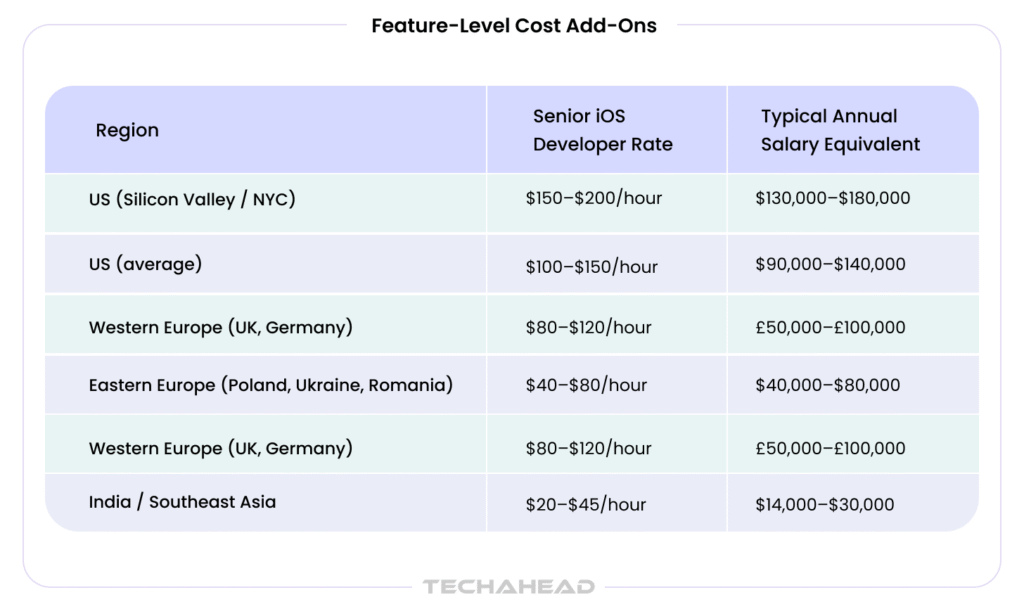
Labor arbitrage is real but not unlimited. The 2026 market for senior iOS developers shows a clear geographic spread. The cost to hire a mobile app developer—including both iOS app developers and android developers—varies widely by region and expertise, making location a key factor in determining ios app development costs.
The salary range for an iOS app developer can differ substantially depending on geography, with higher compensation in North America and Western Europe compared to Eastern Europe or South Asia, reflecting both demand and the benefits of hiring in-house specialists for iOS app development.
Developer hourly rates vary significantly by region, with North America ranging from $100–$250 per hour, Eastern Europe from $30–$100, and South Asia from $20–$40. Specifically, the location of the development team can have a major impact: for example, hourly rates for iOS app development in India typically range from $20–$40, while in the US, rates are generally $80–$170 per hour.
When comparing iOS app development costs to android app development, it’s important to note that android development often requires more effort due to device fragmentation and the complexity of testing across a wide range of Android devices and OS versions. This can increase the overall cost and timeline compared to iOS, where the device ecosystem is more controlled.
On average, the development cost of iOS apps is usually 10% to 15% greater than that of Android, due to stricter Apple guidelines and the need for specialized skills in Swift or Objective-C. Moreover, salary benchmarks for both iOS app developers and android developers can vary significantly by city, with high-paying markets like Silicon Valley and NYC leading the US.
TechAhead’s blended delivery model – US-based architects and project leads combined with nearshore senior developers –prices at $85-$125/hour blended, delivering enterprise-grade quality at 20-35% below pure US onshore cost. The architecture and client-facing roles remain in Los Angeles; the execution depth sits in skilled nearshore teams that TechAhead has built over 16+ years.
The practical limit of offshore arbitrage is iOS expertise depth. Swift concurrency, SwiftUI state management, and Apple’s private framework behaviors require years of hands-on experience. Junior offshore developers billing at $20-$30/hour frequently produce code that requires expensive rewrites at the architecture phase. For enterprise projects above $150,000, TechAhead does not recommend pure offshore execution. The rework risk exceeds the savings.
Development time is one of the most significant factors influencing the cost of an enterprise iOS app development project. The longer it takes to develop an app, the higher the associated costs—both in terms of direct development expenses and opportunity costs for delayed deployment.
For a simple app with basic features, the development time typically ranges from 2 to 3 months. These projects often involve straightforward user interfaces, limited integrations, and minimal backend complexity.
On the other hand, a complex app, incorporating advanced features, multiple integrations, and security can require 6 to 12 months or more to complete. The experience and efficiency of the development team also play a crucial role in determining how quickly an iOS app can be brought to market.
Enterprises should approach iOS app development with a clear project plan and realistic timelines. Rushed development can lead to technical debt, quality issues, and increased maintenance costs down the line.
Conversely, a well-structured timeline allows for thorough testing, stakeholder feedback, and iterative improvements, ensuring the final product meets business objectives. By aligning development time with project goals and resource availability, organizations can optimize both cost and quality in their iOS app development initiatives.
Most iOS development proposals look complete on paper. However, ongoing costs and app maintenance costs—such as licenses, subscriptions, and third-party API integrations—often go unaccounted for in initial budgets. These are the costs that quietly appear after you have already signed.
Six Hidden iOS Cost Categories:
Most enterprises have moved away from legacy in-house certificates to Mandatory Modern Standard. While this reduces “certificate expiration” crashes, it requires a structured App Store Connect release pipeline. Budget $4,000–$7,000 annually for release management and environment-specific provisioning.
With the release of iOS 26, Apple introduced the Liquid Glass UI, requiring a total overhaul of translucent layers and glass-morphism effects. Simply “testing” is no longer enough; you must refactor for the Visual Intelligence and Battery Intelligence layers. Budget 80–190 developer hours annually to ensure your app doesn’t look or feel “legacy” overnight.
Since the 2024 mandate, privacy is “code.” Every SDK update requires a re-audit of your Privacy Manifests. In 2026, a mismatch between your code and your declared “Privacy Nutrition Label” can lead to an immediate App Store rejection or legal liability.
Retrofitting a manual build process into an automated CI/CD pipeline (using Bitrise, GitHub Actions, or Xcode Cloud) costs $7,000–$15,000. Doing this upfront is a “one-time” cost that saves hundreds of manual hours over the app’s lifecycle.
For regulated industries, WCAG 2.2 AA is the minimum standard. Retrofitting a medium-complexity app for VoiceOver and Dynamic Type support costs 2–3x more than building it natively. Budget $20,000–$40,000 for a full, compliant implementation.
Protecting enterprise data requires deep Keychain integration and Certificate Pinning to prevent “man-in-the-middle” attacks. Improper secrets management is the #1 cause of failed security audits. Proper implementation adds $6,000–$12,000 to the initial build but is a fraction of the cost of a data breach.
This is exactly what TechAhead’s SOC 2 Type II certified delivery framework prevents. Certificate lifecycle management, provisioning profile tracking, and renewal triggers are documented operational requirements in our audited controls, not calendar reminders. For clients running AI-powered iOS features, our ISO 42001 certification and Claude & OpenAI partnership extend that same governance discipline to API key management, model access controls, and AI audit trails. Nothing left to chance.
These five questions do not have textbook answers. They have operational ones and how a vendor responds tells you everything about whether they have actually built enterprise iOS in production or just pitched it. These questions are essential for any enterprise app project or iOS app project, and are critical to consider before you develop an iOS app.
A company who hesitates here has not managed a multi-environment enterprise iOS deployment. At TechAhead, we automate provisioning profile rotation through Fastlane Match integrated into our CI/CD pipelines — certificates and profiles stored in encrypted repositories, rotated on schedule, and validated against each environment automatically. Developer intervention is an exception, not the process.
This question separates vendors who have read the documentation from those who have shipped it. At TechAhead, AppConfig implementation means defining managed app configuration keys in the app’s Info.plist, reading values through NSUserDefaults at runtime, and validating MDM-pushed configurations against expected schemas before the app initializes. We have done this across Jamf Pro, Microsoft Intune, and VMware Workspace ONE deployments, each with slightly different payload behaviors that only surface in real device testing.
Most vendors will say “we migrate incrementally.” That’s not an answer. At TechAhead, we run a structured concurrency audit first — mapping every completion handler chain, identifying Notification Center dependencies, and flagging data race risks before migration begins. We then introduce async/await at the boundary layer first, preserving legacy patterns internally until each module is validated. Migrating blind creates concurrency bugs that only surface under production load.
This is the question that reveals whether a vendor has actually been through an App Store rejection under pressure — or just promises smooth submissions. At TechAhead, we maintain a pre-submission compliance checklist that addresses 4.3 and 5.1.1 rejection triggers before the first submission. When rejections happen anyway — and sometimes they do — we have a dedicated App Store response process: root cause within four hours, remediation build within 24, resubmission with a documented response to Apple’s reviewer within 48. Hard launch dates do not move. Our process is built around that reality.
Quoting iPadOS as a simple ‘stretch-to-fill’ checkbox is a major red flag. At TechAhead, iPadOS scoping starts with a layout audit, identifying every fixed-width constraint, non-adaptive UI component, and portrait-locked screen in the existing iPhone codebase. Minimum viable compatibility means implementing UITraitCollection-based adaptive layouts, supporting arbitrary window sizes, and validating keyboard and pointer input handling. We scope it as a separate workstream, generally $15,000-$35,000, because treating it as a minor add-on is how it becomes a major production incident.
Controlling app development costs is a top priority for enterprises, especially when balancing innovation with budget constraints. Fortunately, there are proven strategies that can help organizations reduce development time and expenses without sacrificing quality or functionality.
One effective approach is to start with a minimum viable product (MVP). By focusing on core features and launching quickly, enterprises can validate their app idea, gather user feedback, and iterate based on real-world usage—all while minimizing upfront investment. Another cost-saving strategy is to leverage cross-platform development tools like React Native or Flutter. These frameworks enable teams to build apps for both iOS and Android from a single codebase, reducing development time and resource requirements.
Outsourcing app development to a reputable partner can also yield significant savings, particularly when working with experienced teams that understand enterprise needs and compliance requirements. Additionally, utilizing existing libraries, APIs, and cloud services (such as Firebase or AWS) can accelerate development and reduce the need for custom backend infrastructure.
By adopting these strategies, enterprises can streamline the app development process, reduce unnecessary expenditures, and deliver high-quality mobile apps that align with business goals and user expectations.
TechAhead has been building iOS applications since 2009 – before the iPhone had a front-facing camera. With deep expertise in iPhone app development and custom iOS app development for a wide range of industries, TechAhead makes iOS apps that are tailored, scalable, and secure, enabling clients to capitalize on the Apple ecosystem’s seamless integration and high revenue potential.
The team of 240+ includes Swift engineers who have shipped apps for Disney, American Express, Audi, AXA, JLL, and ESPN F1. The delivery practice is SOC 2 Type II and ISO 27001 certified, which matters when enterprise procurement requires vendor security attestation. TechAhead is a Clutch Top App Developer 2026, Google Best App Award recipient 2024, and Webby Award winner 2024.
The honest pitch is not credentials, it is process. TechAhead’s iOS discovery sprint (typically 2-3 weeks) produces a scoped architecture document with line-item cost breakdowns at the feature level, not the project level. Enterprise buyers get a number they can defend to a CFO, not a range they have to explain to one.
For enterprises evaluating iOS development partners, TechAhead also offers mobile application development across platforms and React Native development for organizations that need a single codebase across iOS and Android without sacrificing native performance.
TechAhead’s iOS app development services team provides fixed-price discovery sprints that produce a defensible project budget before any development contract is signed. If you are planning an enterprise iOS investment in 2026, the right first step is to request an iOS Development Estimate.
Adding iPad to an iPhone app adds 20–35% to your development budget, not because iPad is a separate platform, but because it demands genuinely different UI architecture. Split View, Stage Manager, Apple Pencil support, and adaptive layouts across arbitrary window sizes are not easy. For any iphone app development project, expanding to iPad increases both the project scope and the overall iphone app development cost due to these additional UI and feature requirements. At TechAhead, we scope iPadOS as a dedicated workstream because treating it as a minor add-on is how it becomes a major production problem.
The true mobile app development cost depends on key factors such as platform selection, feature complexity, and compliance requirements. Understanding how much does it cost to build and maintain an app is essential for accurate budgeting and informed decision-making. Apple Developer Program fees, provisioning management, MDM integration, App Store review preparation, certificate lifecycle, and annual platform modernization costs are routinely excluded from opening proposals. At TechAhead, we call this Ecosystem Debt, the 30–40% gap between a basic development quote and the real cost of shipping and maintaining a production-grade enterprise iOS app.
SOC 2 Type II means a vendor’s security controls, including certificate lifecycle management have been independently audited over time, not just assessed on a single day. At TechAhead, our SOC 2 Type II certified framework treats provisioning certificate rotation, expiration tracking, and profile management as documented operational controls. Enterprise clients do not discover expired certificates in production. Our audited processes catch them weeks before they become an $18,000 remediation incident.
ISO 42001 is the AI management system standard, covering AI risk governance, transparency, and human oversight requirements. For enterprise iOS apps with AI-powered features, it means every model integrated into your app operates within an audited governance framework. At TechAhead, our ISO 42001 certification makes sure AI audit trails, API key governance, and model access controls are maintained across every iOS deployment.
We use cookies to ensure our website functions properly, improve performance, and provide a personalized experience. You can choose which types of cookies to allow below.
Required for core functionality such as security, network management, and accessibility. These cannot be disabled.
Help us understand site traffic and user interactions so we can improve performance and usability.
Enable enhanced functionality and personalization such as language or region preferences.
Used to deliver relevant ads, track campaign performance, and measure advertising effectiveness.